
NPC Admin Windows
Since Core 2.9.0 NPCs can be edited in game instead of only in JSON. There are four admin windows: NPC management, the skin editor, the NPC viewer and the dialog editor. All of them use the KS Premium look and need ks.citizen.admin or ks.admin (see Permissions).
Opening the windows
Section titled “Opening the windows”| Window | How to open |
|---|---|
| NPC management | /kscitizen edit (opens the NPC you look at, up to 24 blocks away), /kscitizen edit <id>, or the NPCs tile in /ksadmin |
| Skin editor | From NPC management, on the Look tab |
| NPC viewer | /kscitizen viewer, or its tile in /ksadmin |
| Dialog editor | From NPC management, on the Talk tab. Other mods (for example Quests) can open it too. |
NPC Management
Section titled “NPC Management”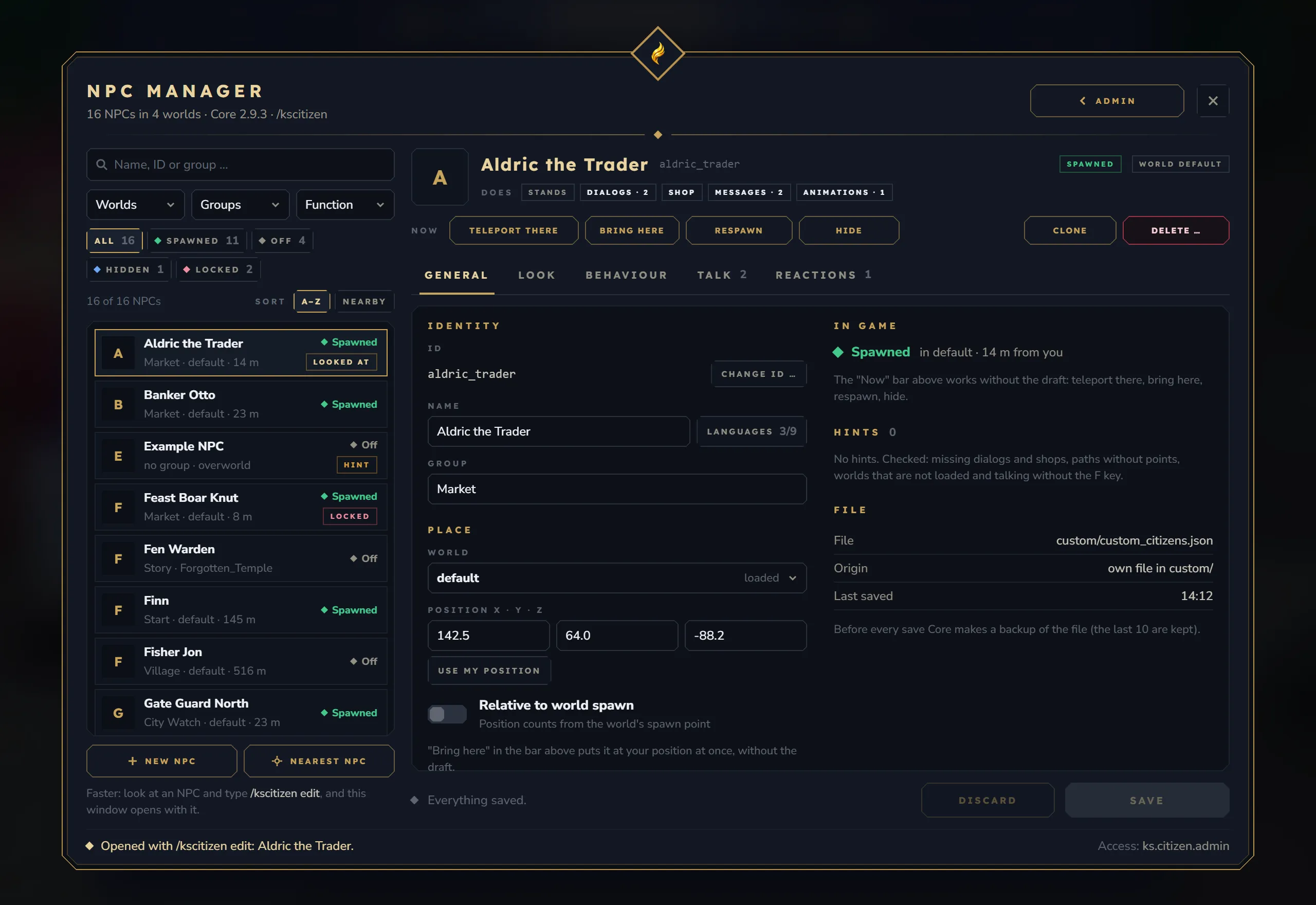
The main window has a list on the left and the selected NPC on the right.
- List with search, groups, status and distance.
- Header with status and world chips and quick actions: teleport, bring here, respawn, hide/show, clone and delete. Hide/show is saved and survives restarts. Teleports also work into other worlds.
- Tabs General, Look, Behaviour, Talk and Reactions, each with a counter and a change mark.
- Footer with Save/Discard and the list of changes. Undo works while the window is open.
- New NPC from 7 templates; ID, name and group are suggested.
- Per-language NPC names. Name tags and NPC chat lines show the name in each viewer’s language; the plain name is the fallback.
- Item picker for the 6 equipment slots, with search, groups and single or multiple choice. It opens as a framed window over a dimmed backdrop. The shop editor and the dialog editor use the same picker.
- Changing an NPC’s ID first lists everything that points at it: Quests, map markers, other mods’ windows, commands and dialogs.
- Delete and Close also handle unsaved drafts.
Safety rules
Section titled “Safety rules”- Drafts survive Esc: unsaved changes are kept for 30 minutes and offered again when you reopen the window.
- Errors block saving and jump to the first problem; warnings only ask.
- Files changed outside the game win: if an NPC file was changed on disk, the window shows when it changed and only offers “Reload files”.
- Console commands are locked without
ks.core.admin.dialog.console: NPC commands that run as the console (interact commands run as console, death commands, proximity commands) and the NPC’s permission while it has such interact commands are read-only, and the server refuses changes to them on save. Everything else stays editable. - Unsafe IDs are refused, including Windows-reserved names such as
con,nulorcom1.
Settings that moved out of the window
Section titled “Settings that moved out of the window”Attitude, gradient set/ID, name tag colour, live skin and “invulnerable” are no longer shown in the window. Their values stay in the NPC files. Death commands always run as the console.
NPC settings that work since 2.9.0
Section titled “NPC settings that work since 2.9.0”- Proximity reaction “Sound”: a 3D sound for the player who triggered it.
- Animation trigger “On attack”: plays when the NPC is hit, at most once per second.
- Animation trigger “Default”: an idle animation for players within 48 blocks.
See Animations for the JSON fields.
Skin Editor
Section titled “Skin Editor”The skin editor changes the look of NPCs that use the player model.
- Tabs Templates, Body, Hair, Clothes and Accessories. Each tab holds its areas as buttons below the tabs:
- Body: Body type, Face, Eyes, Eyebrows, Ears, Mouth, Skin feature
- Hair: Haircut, Beard
- Clothes: Underwear, Undershirt, Top, Trousers, Over-trousers, Shoes, Gloves, Cape
- Accessories: Headwear, Face accessory, Earring
- Templates: copy a whole look (see below)
- The editor opens on the Hair tab. Tabs with only a few areas (Hair, Accessories) show a hint next to their buttons that names the other tabs (“More areas in the tabs above: …”).
- Every part has search and pages, all colours are offered, and a “Form” choice picks part variants.
- Randomise per area, “My skin”, Random, Base body, and up to 30 undo steps.
- Live 3D stage that only you see. It frames the head by itself for hair, face parts and head, face and ear jewellery, and shows the whole figure for body, skin features, clothes and templates. “Full | Head” overrides the automatic choice until you move to an area of the other kind.
- Templates: players in your world, any player name, other NPCs and your last 3 applied skins.
- The NPC in the world only changes when you press “Apply”.
The game client resets zoom and rotation of the 3D preview whenever the preview changes; this cannot be changed from the server.
NPC Viewer
Section titled “NPC Viewer”The NPC viewer lists everything NPC-like in a loaded world (by default your own world): NPCs, NPCs of other mods, orphans (NPC entities without a config entry), mounts and world creatures. For each entry it shows facts and a live 3D portrait.
Actions:
- Teleport, also to other worlds.
- Bring here, then “Save here”, which saves the spot without a respawn.
- Remove, with a confirmation.
- “Clean up orphans” with the exact list of what will be removed.
- “Adopt as NPC”, also for world creatures, with a warning that they lose their own behaviour.
Dialog Editor
Section titled “Dialog Editor”The dialog editor creates and changes dialog files in game. The file format is described on the Dialog System page.
- Node list and node types. Texts for all languages are written directly in the node.
- Answers with target, condition, tag, actions, repeat rule and commands.
- “Check” for this dialog or all dialogs, with a jump to the problem. The same check runs when dialogs load and logs errors.
- Templates: 6 node templates and 3 dialog templates (Empty, Merchant, Quest giver).
- Settings: speaker, start node, NPC assignments with a condition, duplicate and delete.
- “Test as player” opens the real player window and runs nothing.
- Old key-based texts stay read-only until you press “Convert”.
- Players keep the saved version of a dialog until you save it.
- Drafts survive Esc for 30 minutes, as in NPC management.
- Console commands in dialogs can only be added, changed, removed, copied or deleted with
ks.core.admin.dialog.console.
Shop Editor
Section titled “Shop Editor”The NPC shop editor is opened from the NPC shops tile in /ksadmin and needs ks.admin. See Shop Editor.