
UI Pages
Version: 1.0.0
Players use the events window (/ksevent), the rating bar (/ksevent vote), the event card at the left edge and the cards at the top of the screen. Admins use the admin window (/kseventadmin). All windows use the KyuubiSoft “Goldfiligran” look and come in 9 languages.
Overview
Section titled “Overview”| Window | How to open it | Notes |
|---|---|---|
| Events window | /ksevent (also /events) | Needs ks.events.user.open (allowed by default) |
| Rating bar | /ksevent vote, or Rate on the Now tab | Only during the voting of a build contest |
| Event card | Appears by itself | From 10 minutes before a start until the end |
| Cards at the top | Appear by themselves | Reminders, start, phase changes, cancellations, ceremony |
| Admin window | /kseventadmin, or the Events tile in the /ksadmin hub | Needs ks.events.admin |
Events window
Section titled “Events window”The header shows Events and a line like “Tue 11/10 · 20:00 (server time) · /ksevent”; while an event runs, ”… · Build contest is on”. × closes the window. A green marker on the Now tab shows that something is running or about to start for you.
Three tabs: Calendar, Now and Results. A line at the bottom of the window reports what a click did (green) or why it did not work (red).
Calendar
Section titled “Calendar”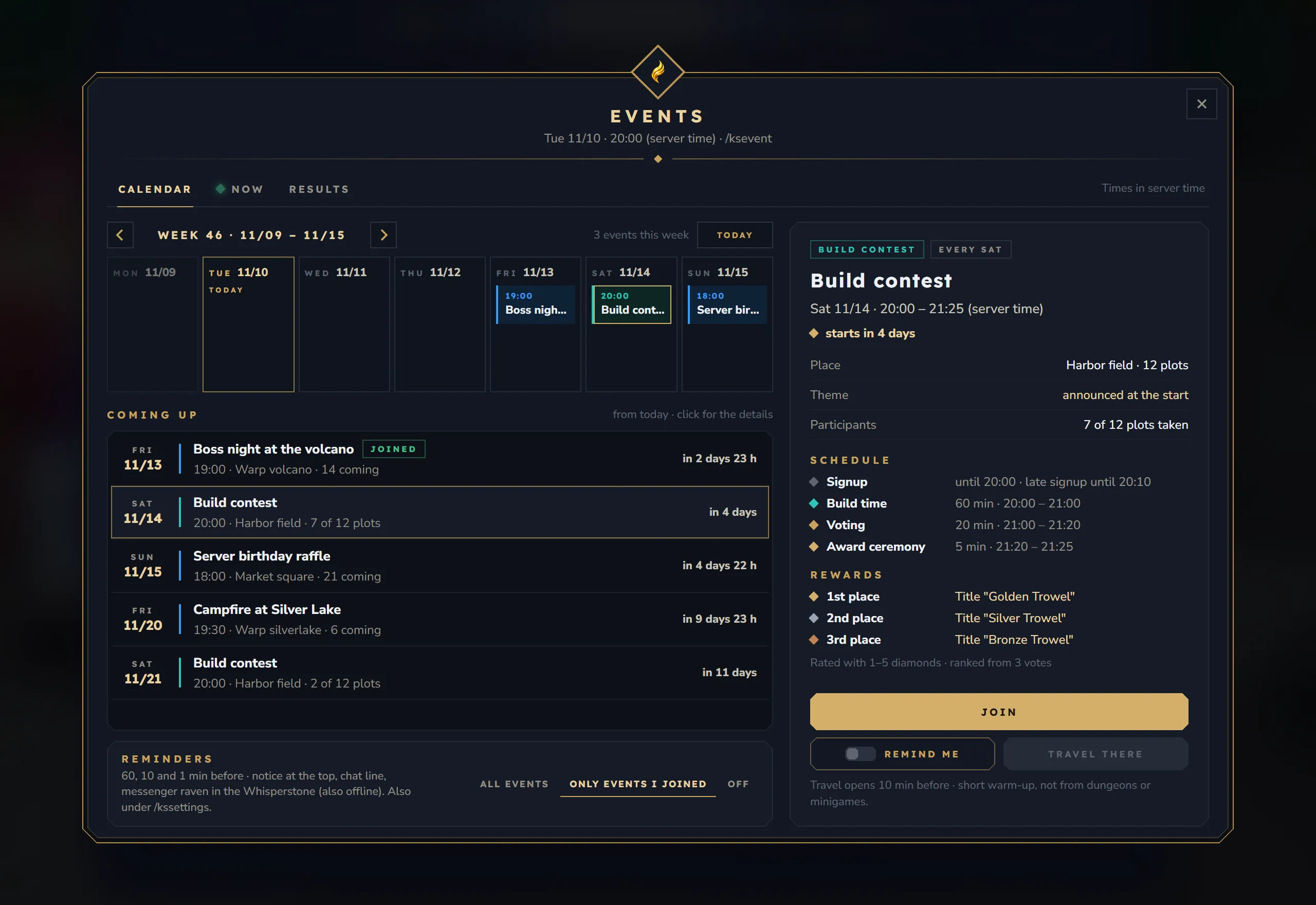
Week strip
- “Week 46 · 11/09 – 11/15” with ‹, › and Today, and how many events the week has.
- One box per day with up to two dates (time and name) and “+1 more”. Today is framed in gold, past days are dimmed. Past dates say past, cancelled ones cancelled, running ones on now.
- Clicking a date shows its details. Clicking a past date opens its result on Results.
Coming up
- The dates of the next 14 days (at most 10): weekday and date, name, a joined chip, time, place and how many plots are taken (“7 of 12 plots”) or how many are coming (“14 coming”), and the time until the start (“in 4 days”).
Reminders
- Your reminder times and channels, for example “60, 10 and 1 min before · notice at the top, chat line, messenger raven in the Whisperstone (also offline). Also under /kssettings.”
- All events, Only events I joined and Off switch your setting at once.
Detail of a date (right)
- Chips: the kind (Build contest or Meeting point), once or “every Sat”, paused or cancelled, and Season Pass XP ×2 when the event doubles Season Pass XP.
- Name, time (“Sat 11/14 · 20:00 – 21:25 (server time)”) and “starts in 4 days”, “on now · ends in 25 min” or “over”.
- Build contest: Place (build field and plots), Theme (“announced at the start”), Participants (“7 of 12 plots taken”), the Schedule with sign-up, build time, voting and ceremony, and the Rewards per place. “Rated with 1–5 diamonds · ranked from 3 votes.”
- Meeting point: Place, Attendance (“32 blocks around, start and end”), Coming, the description under What it is about, the meeting time, the raffle and the XP boost, and the rewards for everyone present and the raffle.
- Join or Leave. When joining is not possible the button says why: “All plots taken”, “Signup closed”, “Leaving is closed now”, “Paused”, “Cancelled”, “Over” or “Joining not allowed”.
- Remind me with a switch: marks the date for reminders. It is on by itself when you joined.
- Travel there, from 10 minutes before the start until the end.
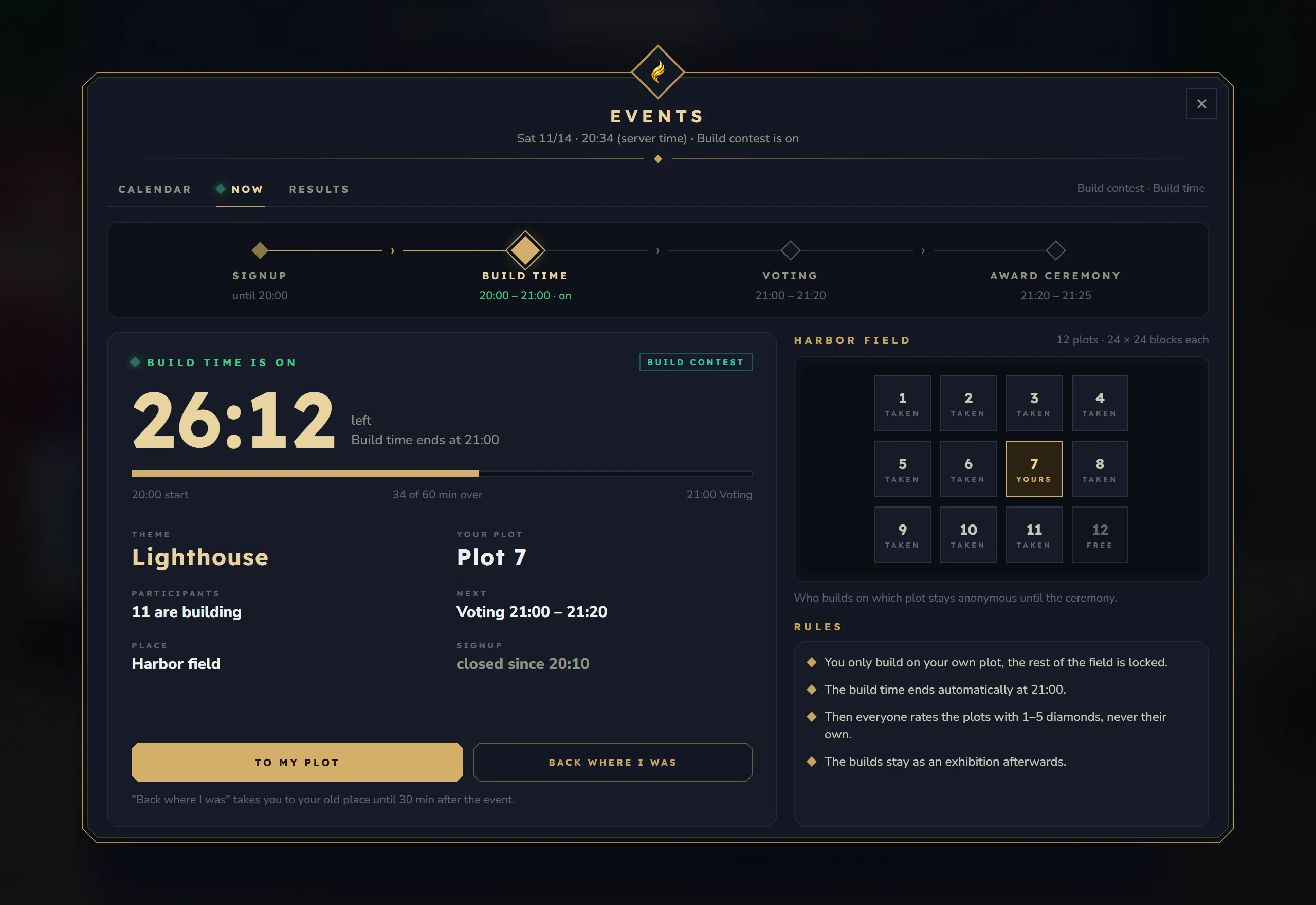
Shows your own event when you take part, otherwise the first one that runs.
- Phase strip: Signup, Build time, Voting and Award ceremony (for a meeting: Promises, Meeting, End), each with its time. The current phase has a large gold diamond and ”· on”.
- Time left: “26:12 · left · Build time ends at 21:00”, a bar, “20:00 start · 34 of 60 min over · 21:00 Voting”. Before the start: the countdown “until the start”.
- Facts of a contest: Theme, Your plot (or “at the start”, “none”), Participants (“11 are building”), Next (“Voting 21:00 – 21:20”), Place and Signup (“open until 20:00”, “late signup until 20:10”, “closed since 20:10”).
- Facts of a meeting: Place, Coming, Attendance, Raffle, Next and Your promise.
- Buttons: To my plot (or Travel there), Join while you can still join, Rate during the voting, and Back where I was. During the warm-up the line below counts down: “Travelling in 3 seconds … please do not move.”
- The field (contest): every plot as a box, scaled to the field: yours, taken, free, and during the voting rated. “Who builds on which plot stays anonymous until the ceremony.”
- Rules of the event in four short lines.
When nothing runs, the tab says “Nothing on right now”, names the next date and offers To the calendar.
Results
Section titled “Results”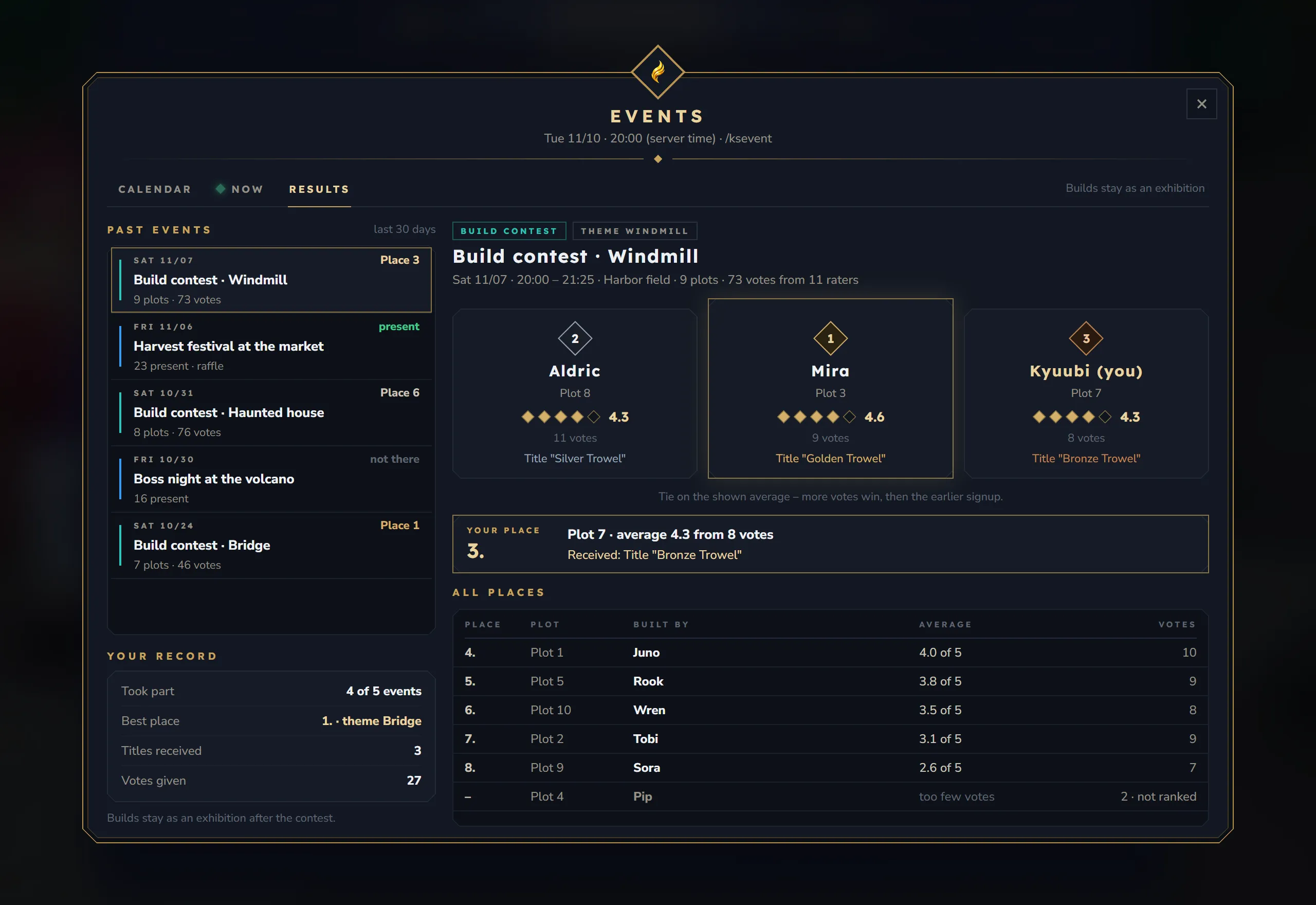
Left
- Past events of the last 30 days, newest first: date, name with theme, plots and votes (contest) or how many were present (meeting), and your outcome: “Place 3”, “took part”, “present”, “partly there”, “not there”, “cancelled” or “not ranked”.
- Rewards waiting: when rewards are waiting for you, a box like “1 reward waiting” that names them, with Collect for items, or “arrives at your next login” for titles, coins and commands.
- Your record: Took part (“4 of 5 events”), Best place (“1. · theme Bridge”), Titles received, Votes given.
Right, for a build contest
- Chips, title (“Build contest · Windmill”) and “Sat 11/07 · 20:00 – 21:25 · Harbor field · 9 plots · 73 votes from 11 raters”.
- The podium of places 1 to 3: name, plot, diamonds and average, votes and the reward of the place. “Tie on the shown average – more votes win, then the earlier signup.” appears when a tie was decided.
- Your place: “3.” with “Plot 7 · average 4.3 from 8 votes” and what you received, or how many plots you rated if you did not build.
- All places from place 4: place, plot, built by, average (“4.0 of 5”) and votes. Plots with too few votes say “too few votes · not ranked”.
Right, for a meeting
- Present, Coming, Duration and the raffle (or the XP boost, or the rewards handed out).
- Raffle: up to three winners with their prize, and “3 prizes among 23 present · drawn at 19:00”.
- Present (23): the names of those present, you first, and “+12 more”.
- Handed out: each reward with how many got it.
- Your attendance: present, partly there or not there, and what you received.
A cancelled date shows Cancelled with the reason. A contest whose result waits for an admin shows Being checked: “Some votes looked unusual. The result shows up as soon as the team has released it.”
Rating bar
Section titled “Rating bar”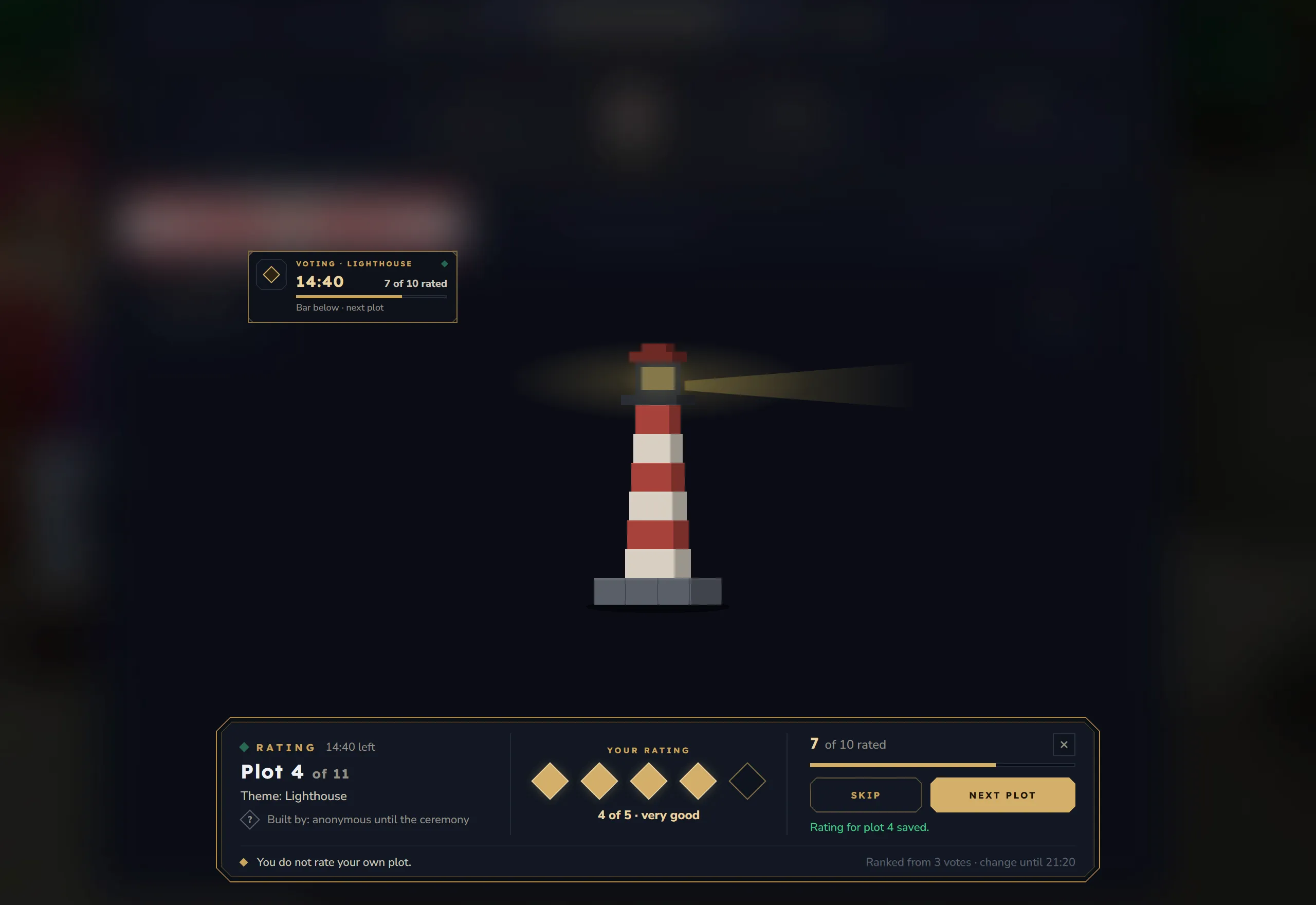
A bar at the bottom of the screen, like the dialog of an NPC. Nothing is darkened, so the build stays visible.
- Left: “Rating · 14:40 left”, the plot you stand on (“Plot 4 of 11”), “Theme: Lighthouse” and “Built by: anonymous until the ceremony” (admins see the name; with Builders anonymous until the ceremony off, everyone does).
- Middle: Your rating with five diamonds. A click saves at once: “4 of 5 · very good”. The words are weak, okay, good, very good and outstanding. On your own plot: “You do not rate your own plot.”; on an empty plot: “Nobody builds on this plot.”; next to the plots: “Walk onto a plot or use “Next plot”.”
- Right: “7 of 10 rated” with a bar, × to close, Skip and Next plot. Next plot takes you straight to the next plot you have not rated (never your own), without a warm-up.
- Bottom: “Ranked from 3 votes · change until 21:20”, or “All rated · you can change ratings until 21:20”.
When the voting ends, the bar says “The rating is over. The bar closes in a moment.”
Event card
Section titled “Event card”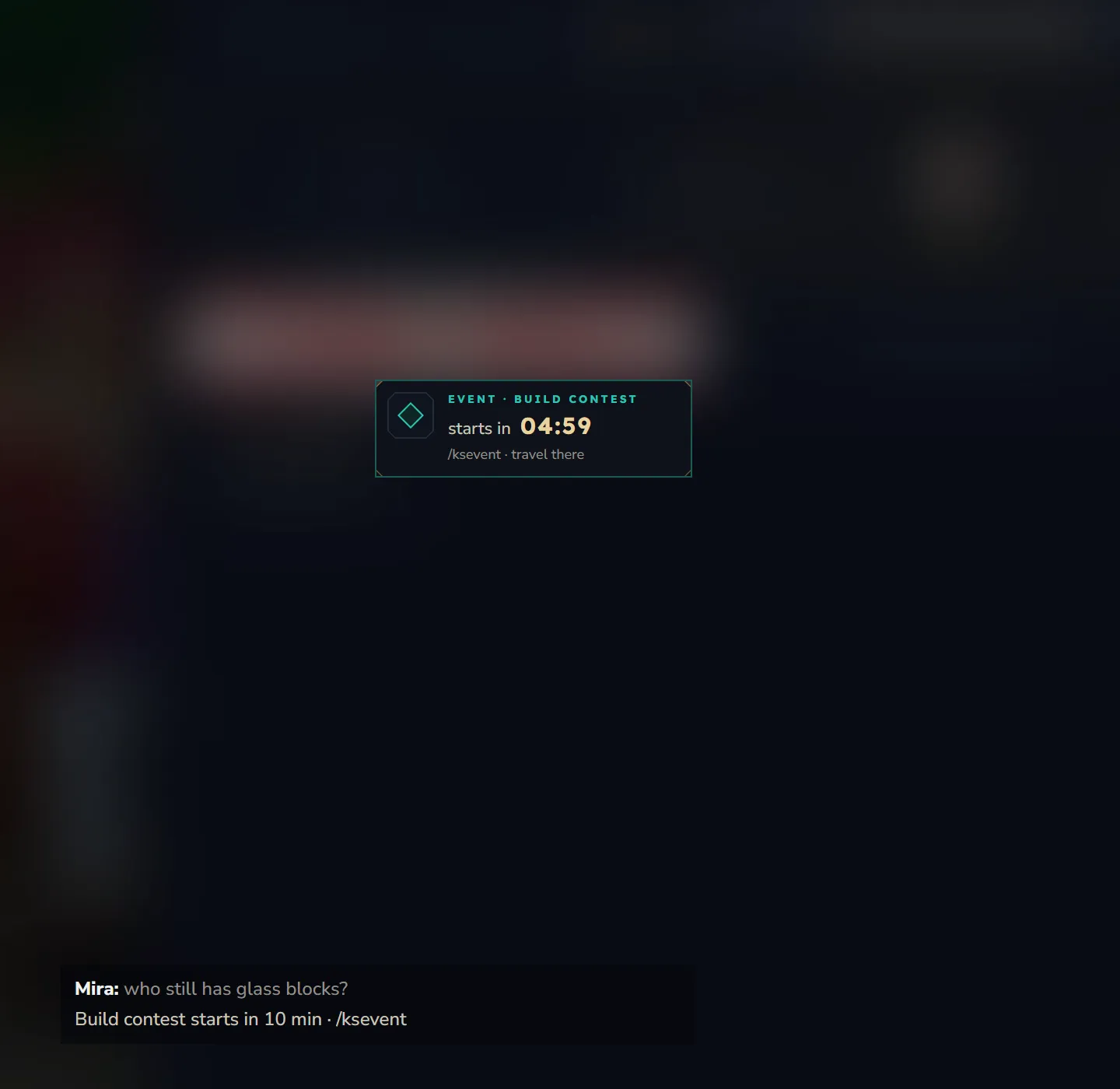
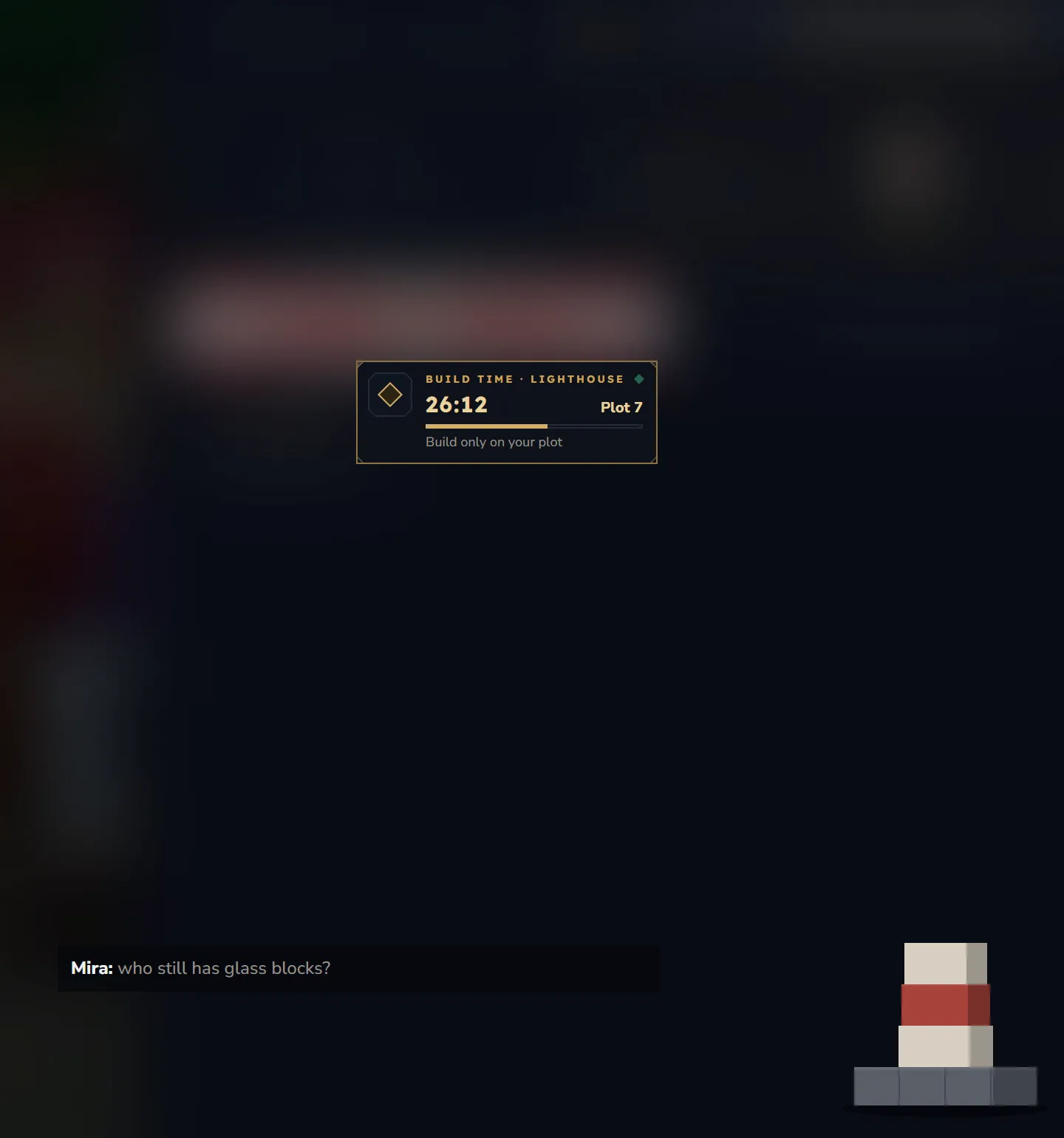
A small card at the left edge of the screen, for dates you joined or marked with Remind me:
| When | The card shows |
|---|---|
| From 10 minutes before the start | ”Event · Build contest”, “starts in 04:59”, “/ksevent · travel there” |
| Build time | ”Build time · Lighthouse”, the time left, “Plot 7”, “Build only on your plot” (without a plot: “Watching · no plot”) |
| Voting | ”Voting · Lighthouse”, the time left, “7 of 10 rated”, “/ksevent vote · rate now” or, with the bar open, “Bar below · next plot” |
| Ceremony | ”Award ceremony”, the time left, your place (“Place 3”), “Fireworks over the winning plots” |
| Meeting | ”Meeting · <name>”, the time left, “you are in”, “Start and end count for attendance” |
The card updates every second. It hides while the world map is open and comes back when you close it. Players switch it off on the Events page of /kssettings (with KyuubiSoft Core).
Cards at the top of the screen
Section titled “Cards at the top of the screen”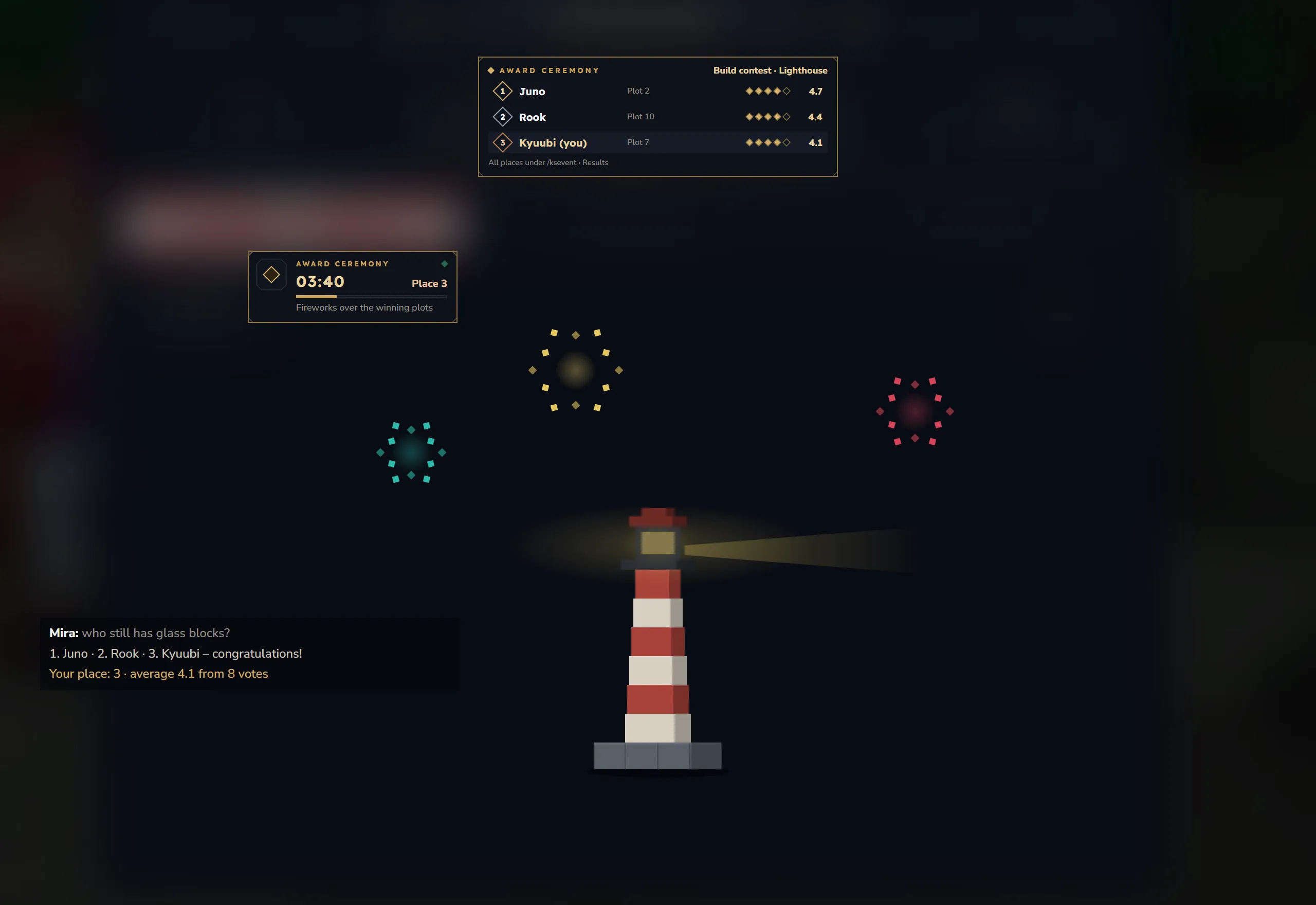
Short cards appear at the top centre, in the shared row of KyuubiSoft Core when it is installed:
- Reminder: “Build contest starts in 10 min · /ksevent”.
- Start: “Event starts · 20:00” and “Build contest has started. Theme: Lighthouse.” Everyone online gets it when Start announcement to all is on.
- Phase changes: for example the start of the voting.
- Cancelled: “Cancelled · Build contest” with the reason or the admin’s message.
- Ceremony: a podium card with places 1 to 3 (name, plot, diamonds, average) and “All places under /ksevent › Results”.
The same notices come as chat lines. When no card can be shown, the notice comes as one chat line “title · text”.
In the world during the ceremony, everyone on the field sees places 1 to 3 as a big title, and fireworks rise over the winning plots. Each builder gets a chat line with their place: “Your place: 3 · average 4.1 from 8 votes.”
Before a field reset, players on the field are taken just outside and get a card and a chat line: “Harbor field is put back to its empty state for the next contest. You were taken just outside the field – please wait there until the reset is done.”
With KyuubiSoft Whisperstone, reminders and cancellations also arrive as a note on the whisper stone, and its Events tile opens the events window.
Admin window
Section titled “Admin window”Opened with /kseventadmin or the Events tile in the /ksadmin hub. Needs ks.events.admin.
The header shows Event Administration and “For admins · /kseventadmin”. The navigation on the left has Overview, Plan, Build field and Rules. Below it, Server time shows the time and zone of the server (“server clock · UTC”) and a note on the permissions.
Overview
Section titled “Overview”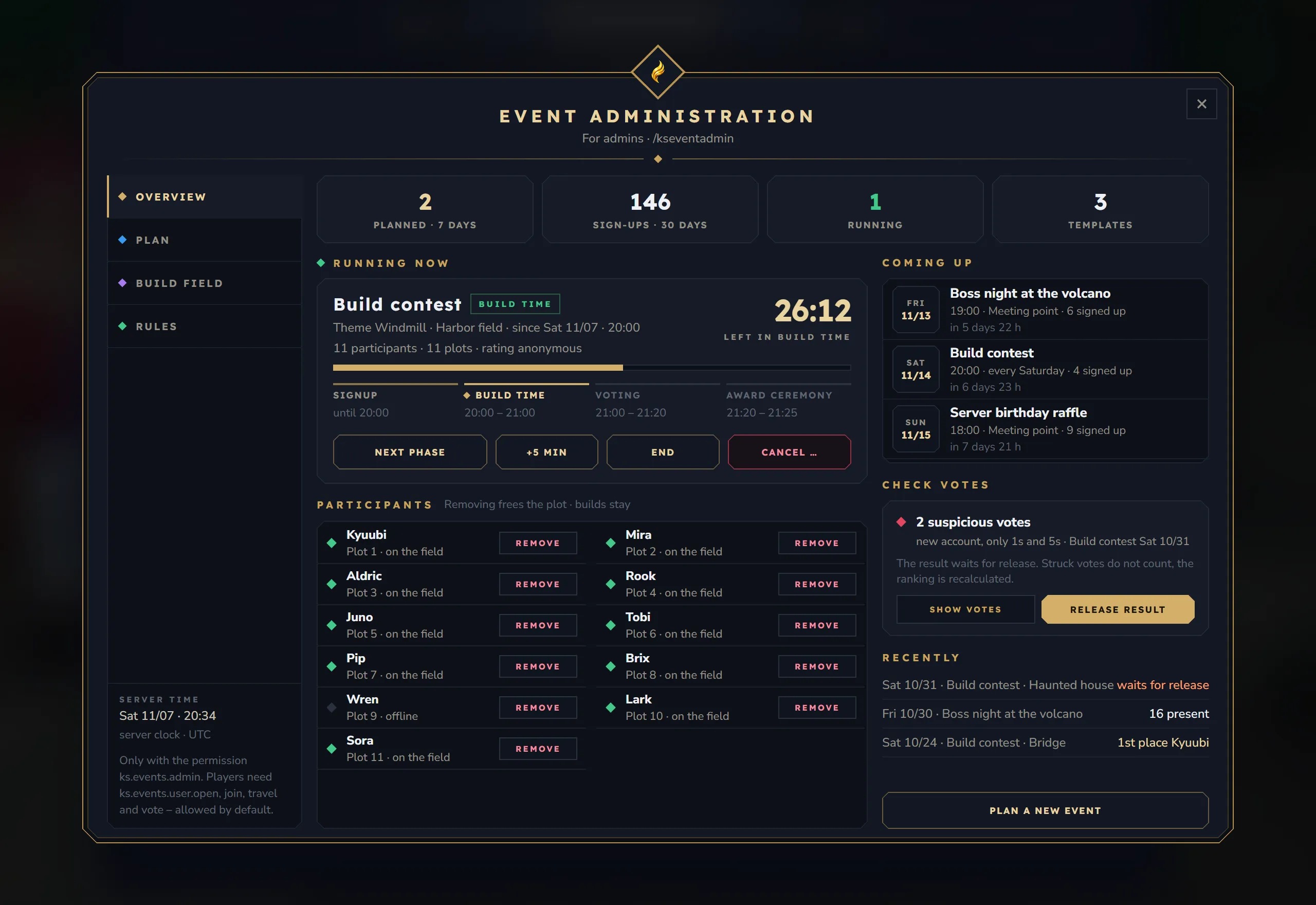
- Tiles: Planned · 7 days, Sign-ups · 30 days, Running, Templates.
- Running now (or Up next): name, phase, theme, field, participants and plots, the time left in big numbers and the phase strip.
- Next phase, +5 min, End and Cancel … for a running event; Start now for the next one.
- End asks first: “Result and rewards come from what is there, without ceremony effects.”
- Cancel … asks for an optional message to everyone signed up, up to 200 characters.
- Participants: name, plot and whether they are on the field, online or offline, with remove. “Removing frees the plot · builds stay.” For a meeting it shows who was present at the start.
- Coming up: the next dates with kind and sign-ups.
- Check votes: how many votes look suspicious, why (new account, only 1s and 5s), Show votes to strike or restore single votes, and Release result when a result waits.
- Recently: the latest dates with their outcome: “1st place Kyuubi”, “16 present”, “waits for release”, “cancelled”.
- Plan a new event opens an empty form.
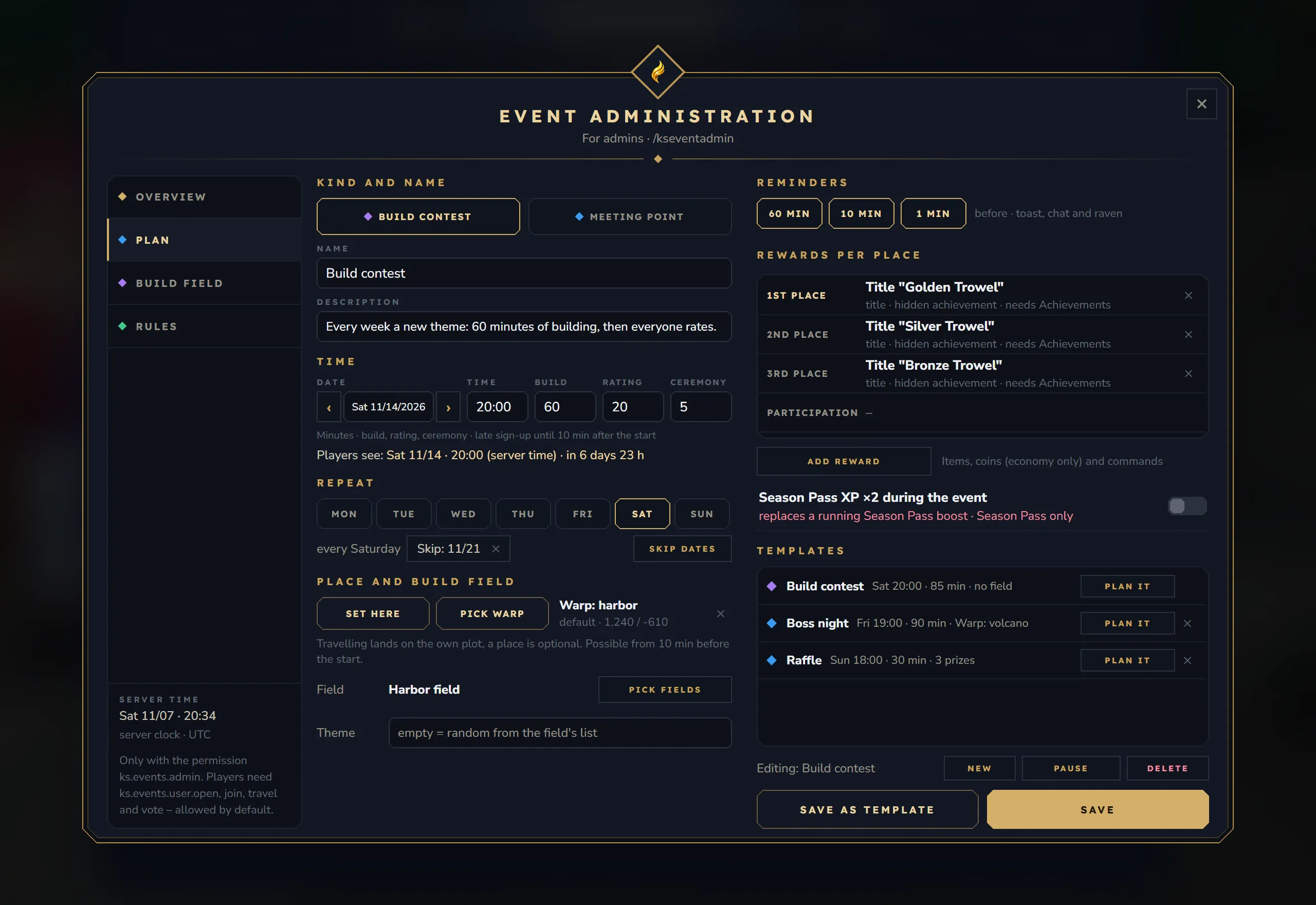
- Kind and name: Build contest (only with KyuubiSoft Claims 2.0) or Meeting point, name and description.
- Time: date with ‹ and ›, time, and the lengths of build, rating and ceremony (contest) or the duration (meeting). The line “Players see: Sat 11/14 · 20:00 (server time) · in 6 days 23 h” checks your input.
- Repeat: the weekdays of a weekly event, “every Saturday”, skipped dates (“Skip: 11/21”) and Skip dates to pick more.
- Place and build field: Set here (your position) or Pick warp. For a contest also Pick fields (in order: when a field cannot be reset, the next one is used) and the Theme (empty = random from the field’s list). For a meeting also Raffle prizes (0 = no raffle).
- Reminders: the minutes before the start, and which channels are on.
- Rewards per place (contest) or Rewards (meeting): Add reward opens a form with kind (Item, Coins, Command, Title), slot, target, amount and an optional label. Up to 5 rewards per slot; × removes one.
- Season Pass XP ×2 during the event, only with Season Pass: “replaces a running Season Pass boost”.
- Templates: the built-in Build contest and your own templates with Plan it. Save as template turns the form into a template (without date and skipped dates).
- Editing: which event the form edits, with New, Pause / Resume and Delete. Save plans the event.
Build field
Section titled “Build field”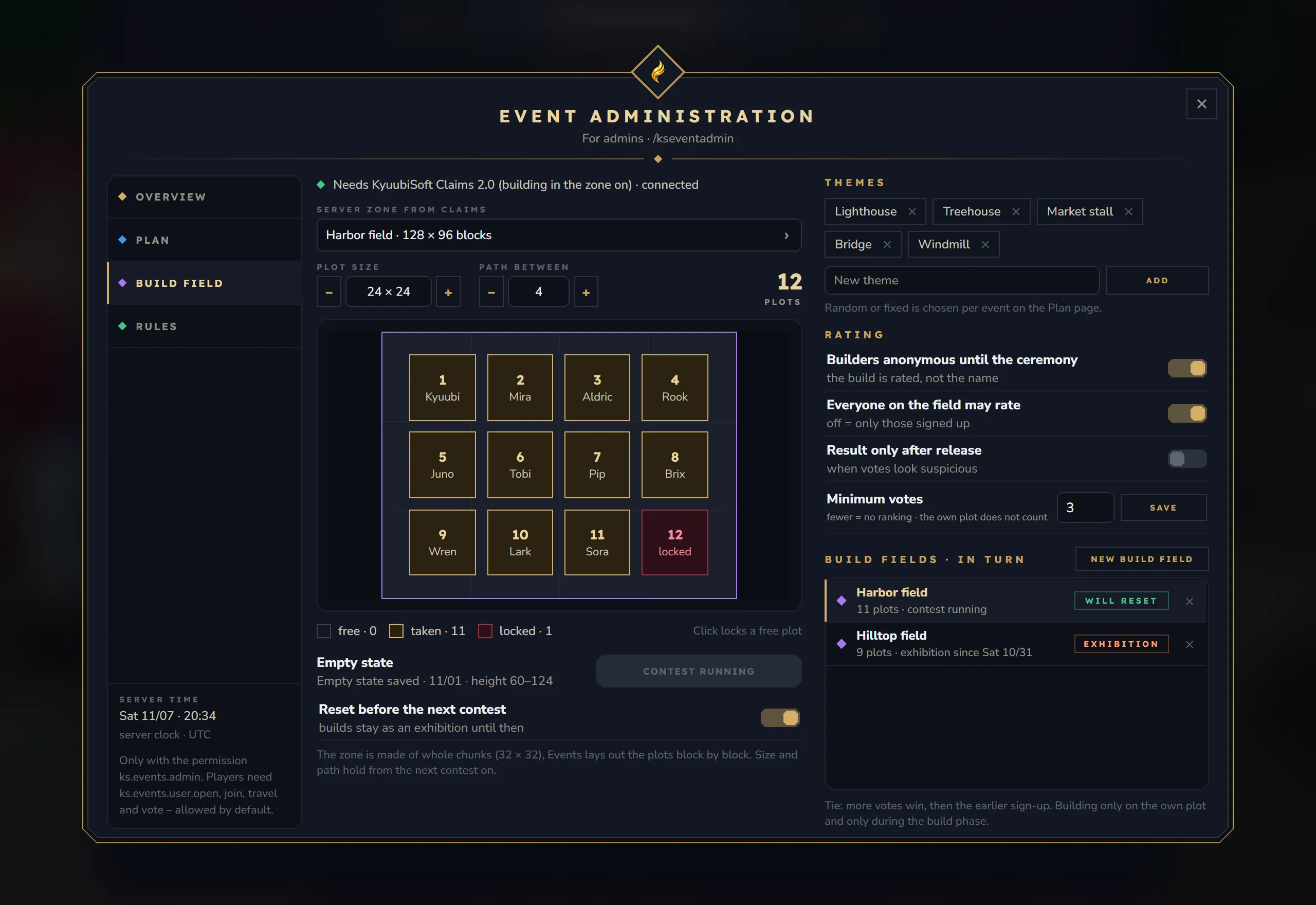
- Claims: “Needs KyuubiSoft Claims 2.0 (building in the zone on) · connected”, or “not connected – build contests are off”.
- Server zone from Claims: the zone and its size; click to pick another zone.
- Plot size and Path between with − and +, the number of plots, and Apply when you changed them. A new size applies from the next contest on.
- Preview: every plot with its number, during a contest with the builder’s name. Click a free plot to lock or unlock it. Legend: free, taken, locked.
- Empty state: whether it is saved, when, and its height range, with Save empty state (not during a contest on the field).
- Reset before the next contest (only with a saved empty state): “builds stay as an exhibition until then”. After a failed reset the field says why (“Reset off: failed on 11/14. Details in the server log.”) and offers Retry reset.
- Themes: the theme list of the field. Type a theme and click Add; × removes one.
- Rating (for all fields): Builders anonymous until the ceremony, Everyone on the field may rate, Result only after release and Minimum votes.
- Build fields · in turn: all fields with their plots and state (will reset, exhibition, save first, last reset failed), New build field and × to delete one. Deleting a field keeps the zone in Claims.
New build field opens the list of server zones. Stand in the zone’s world first: the empty state is taken from your height, 4 blocks down and 60 blocks up.
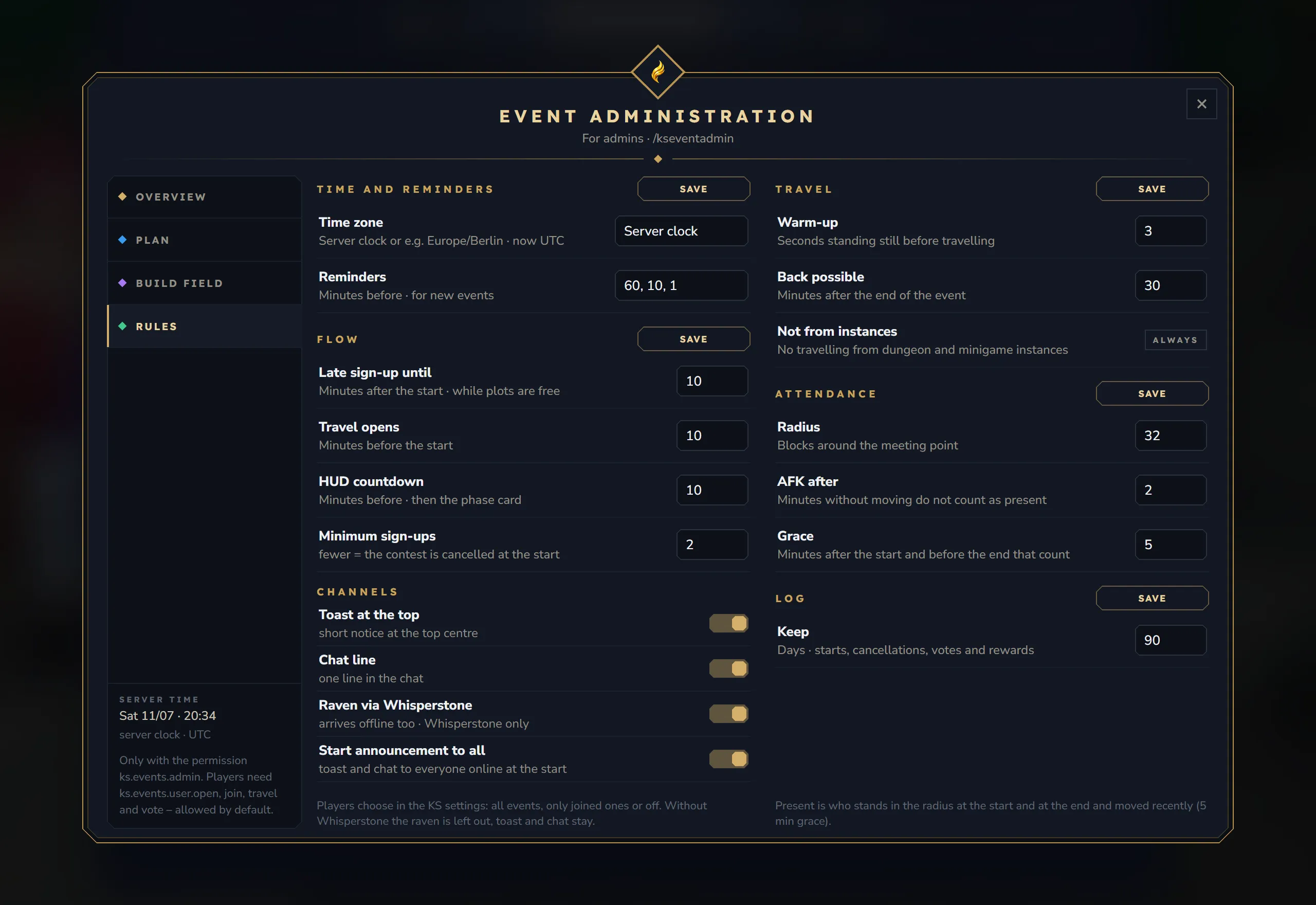
| Section | Settings |
|---|---|
| Time and reminders | Time zone, reminder minutes for new events |
| Flow | Late sign-up until, Travel opens, HUD countdown, Minimum sign-ups |
| Channels | Toast at the top, Chat line, Raven via Whisperstone, Start announcement to all |
| Travel | Warm-up, Back possible, Not from instances (always) |
| Attendance | Radius, AFK after, Grace |
| Log | Keep (days) |
Number sections have their own Save; switches apply at once. Every option is described on the Configuration page.
KS settings page
Section titled “KS settings page”With KyuubiSoft Core, /kssettings has an Events page with:
- Reminders: All events, Only events I joined or Off. “An event you marked with “Remind me” always does.”
- Event card: the card at the left edge on or off.