
UI Pages
Version: 1.0.0
Players meet Heirlooms in four places: the tooltip of an item, the story window (/ksheirloom), small cards at the top centre of the screen and a few chat lines. Admins have their own admin window (/ksheirloom admin). The windows use the KyuubiSoft “Goldfiligran” look. The settings named here are on Configuration.
Overview
Section titled “Overview”| Where | How to open it | Notes |
|---|---|---|
| Tooltip | Hover over an heirloom | Everyone, everywhere: inventory, chests, other players’ items |
| Story window | /ksheirloom | Shows the item in your hand. Needs ks.heirlooms.user.open (allowed unless denied) |
| Boon choice | Choose a boon in the Boons tab | Only with boons switched on |
| Cards and chat lines | Appear by themselves | Cards only for the owner |
| Admin window | /ksheirloom admin | Needs ks.heirlooms.admin |
The tooltip
Section titled “The tooltip”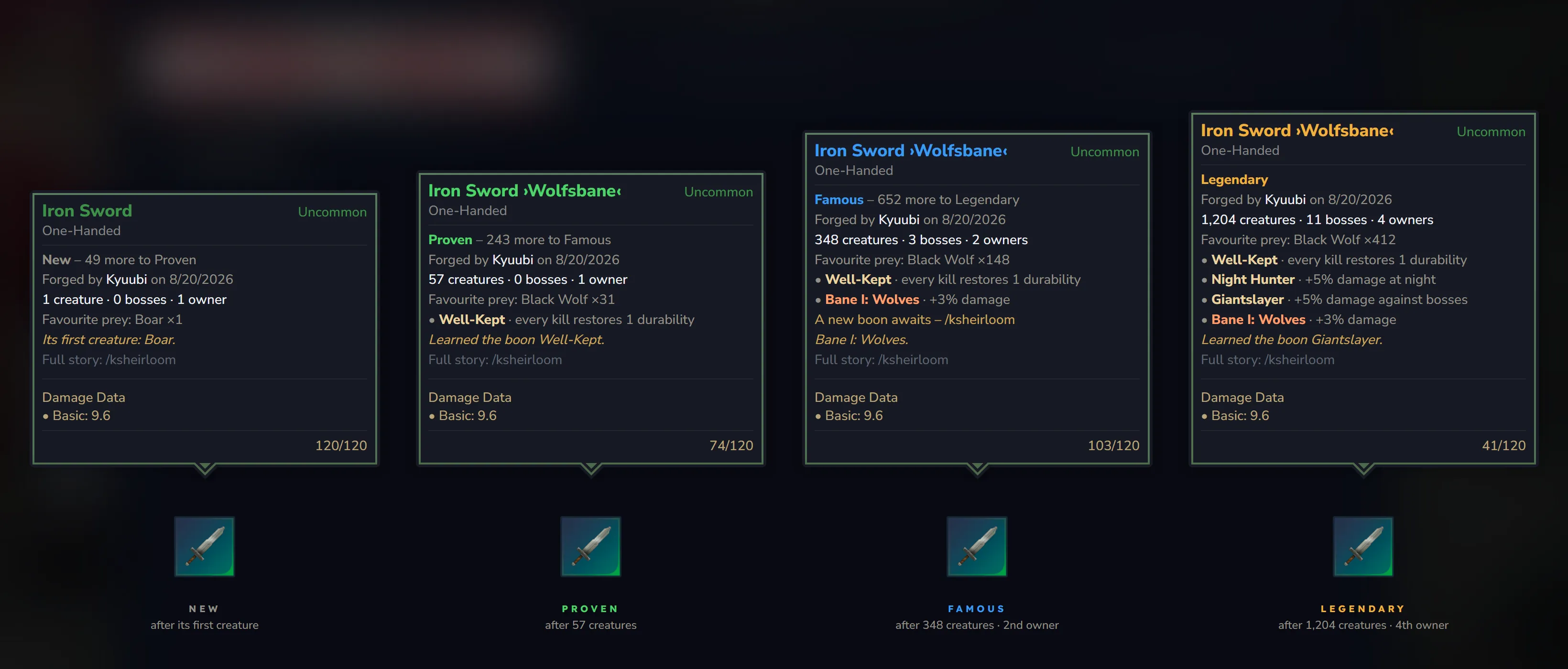
The tooltip of an heirloom keeps the game’s own frame. Rarity, type, damage and durability stay as they are; Heirlooms adds its lines:
| Line | Example |
|---|---|
| Name with the worn title, in the colour of the fame | Iron Sword ›Wolfsbane‹ (green, blue or gold) |
| Fame and the count to the next level | Famous – 652 more to Legendary |
| Origin | Forged by Kyuubi on 8/20/2026, Telling its story since 8/20/2026 or Origin unknown |
| Counts | 348 creatures · 3 bosses · 2 owners, 57 ores · 1 owner, 24 hits blocked · 1 owner |
| Favourite prey (weapons and bows) | Favourite prey: Black Wolf ×148 |
| Boons and banes (only with boons switched on) | • Well-Kept · every kill restores 1 durability, • Bane I: Wolves · +3% damage |
| An open boon choice | A new boon awaits – /ksheirloom |
| The latest moment, in italics | Learned the boon Well-Kept. |
| The hint (can be switched off) | Full story: /ksheirloom |
- While the boons sleep for a new owner, their lines are dimmed and a line says
Boons dormant – 3 of 25 creatures with you. - The tooltip texts follow each player’s game language.
- The tooltip is stored on the item. After an admin changes the rules, it shows the new state the next time the story changes.
The story window
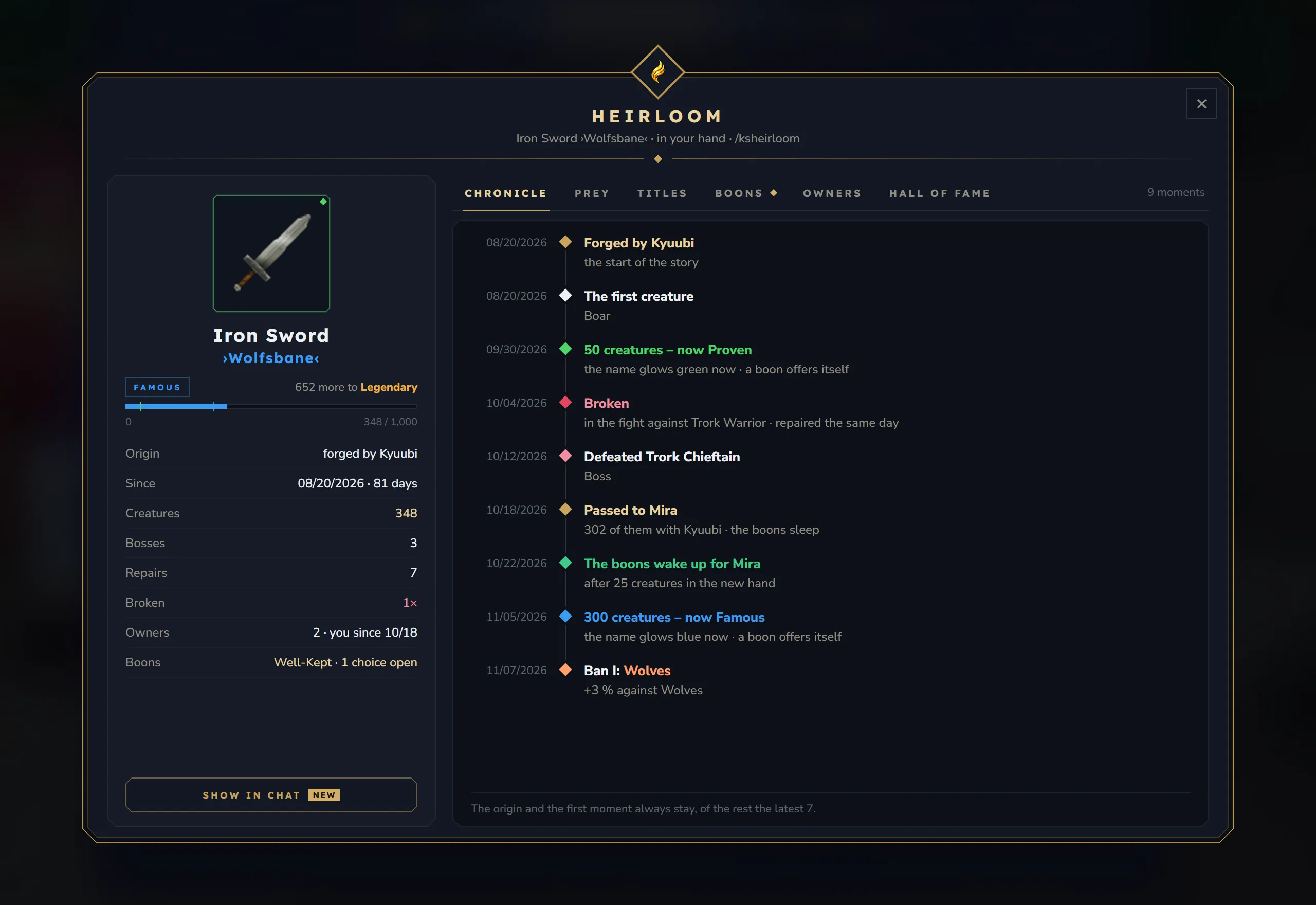
Section titled “The story window”/ksheirloom opens the story of the item in your hand: the active hotbar slot, or the tool from the tool belt while you use it. The window looks at your hand every second, so when you take another item it shows that one. A shield in the off-hand slot is not “in your hand”; hover over it to read its story.
Header
Section titled “Header”- Heirloom and a line about your hand, for example
Iron Sword ›Wolfsbane‹ · in your hand · /ksheirloom,Iron Sword · no story yetorTake an item in your hand. - × closes the window.
Side panel
Section titled “Side panel”- The item with its rarity frame, its name and its worn title (or “no title”).
- The fame: a chip with the level, the count to the next level (
652 more to Legendary, or “highest fame”) and a bar with marks for Proven and Famous. - The facts:
| Fact | Shows |
|---|---|
| Origin | ”forged by Kyuubi”, “found” or “unknown” |
| Since | The day the story began and how many days ago |
| Creatures / Ores / Trees / Hits blocked / Hits taken | The item’s count |
| Bosses | Bosses defeated (weapons and bows) |
| Repairs | How often it was repaired |
| Broken | How often it broke, or “never” |
| Owners | The number of owners, with “you since 10/18” when you own it |
| Boons | Chosen boons, an open choice and banes (weapons and bows, only with boons switched on) |
- Show in chat sends one line about the item to the players near you (see Cards and chat lines). After that a line under the button counts down, for example “Shown in chat · again in 42 s”. Admins can switch the button off.
Without a story, the side panel explains why:
| Heading | Meaning |
|---|---|
| Your hand is empty | Take a weapon, a tool or a shield in your hand and open the window again |
| No story yet | The item can carry a story; it begins with its first count, for example “The story begins with the first creature that falls to it.” |
| Carries no story | The item stacks or never wears down, so it remembers nothing |
Six tabs sit at the top. The note on their right sums up the open tab, for example “9 moments”, “3 kinds” or “1 boon · 1 choice open · 1 ban”. Every tab except Hall of fame needs a story; without one they show the heading of the side panel and “The hall of fame is always open – it holds the most famous heirlooms of the server.” A diamond on Boons means a boon choice is waiting.
Chronicle
Section titled “Chronicle”The story as a timeline, oldest first, with the date of each moment:
- The origin (“Forged by Kyuubi”, “Found” or “The story begins”).
- The first count: “The first creature” with its name, “The first ore”, “The first tree”, “The first hit blocked” or “The first hit taken”.
- Milestones at 10, 50, 100, 250, 500 and 1,000, then every 1,000.
- New fame levels, for example “50 creatures – now Proven” with “the name glows green now”.
- Titles, bosses, breaks (“in the fight against Trork Warrior”) and repairs. A break and a repair on the same day share one line (“repaired the same day”).
- New owners (“Passed to Mira”, with the count of the owner before), awakened boons, learned boons and banes.
The origin and the first moment always stay. Of the other moments the latest seven are kept.
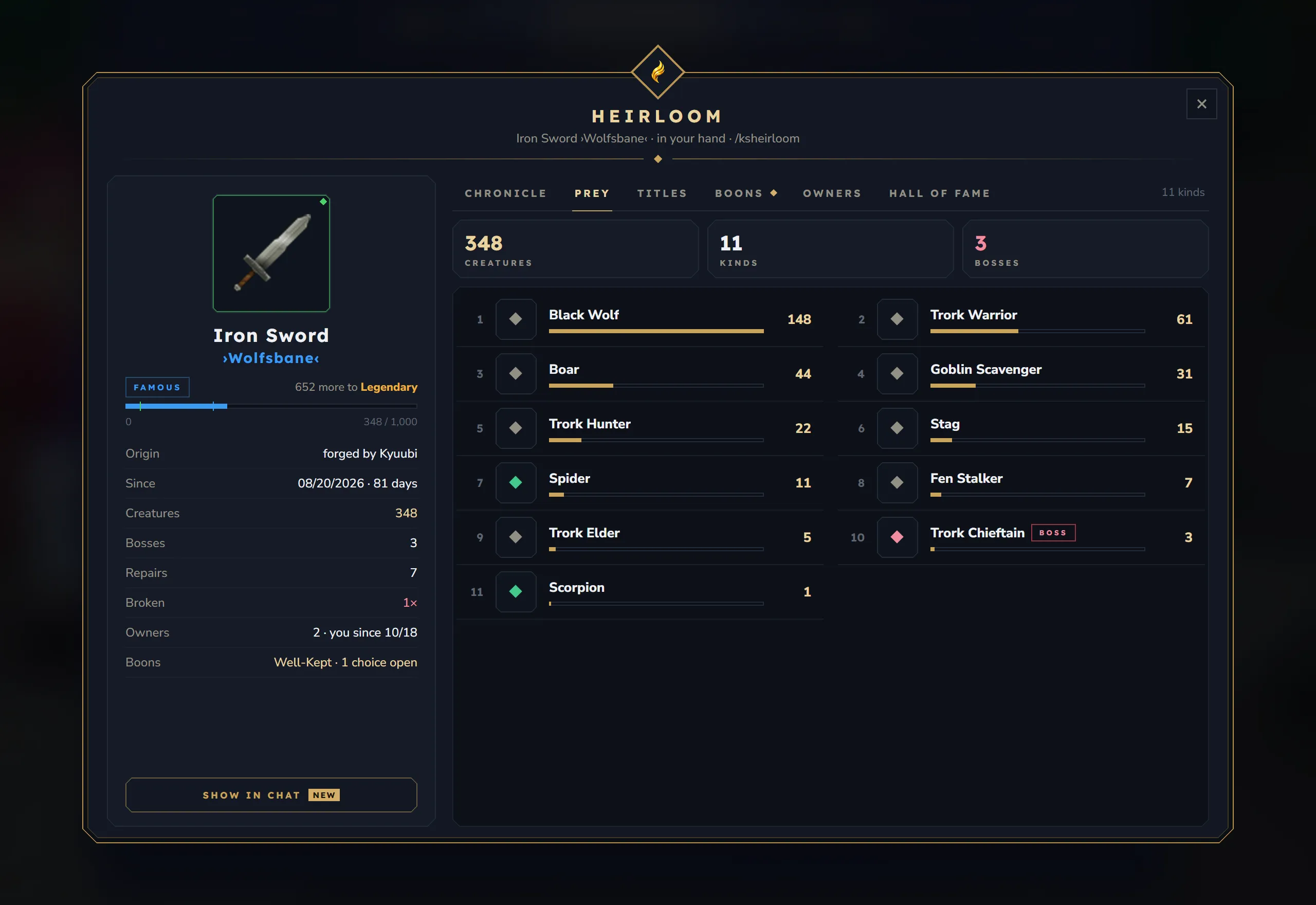
- Three tiles: the count, the number of kinds and the number of bosses.
- Up to twelve kinds of creatures in two columns, the most hunted first, each with a bar and its count. A diamond marks what a creature is: red for a boss, green for poisonous, orange for fire and blue for frost creatures. Bosses also get a Boss chip.
- Tools and shields count no prey: “Tools and shields count no prey – only weapons and bows do.”
Titles
Section titled “Titles”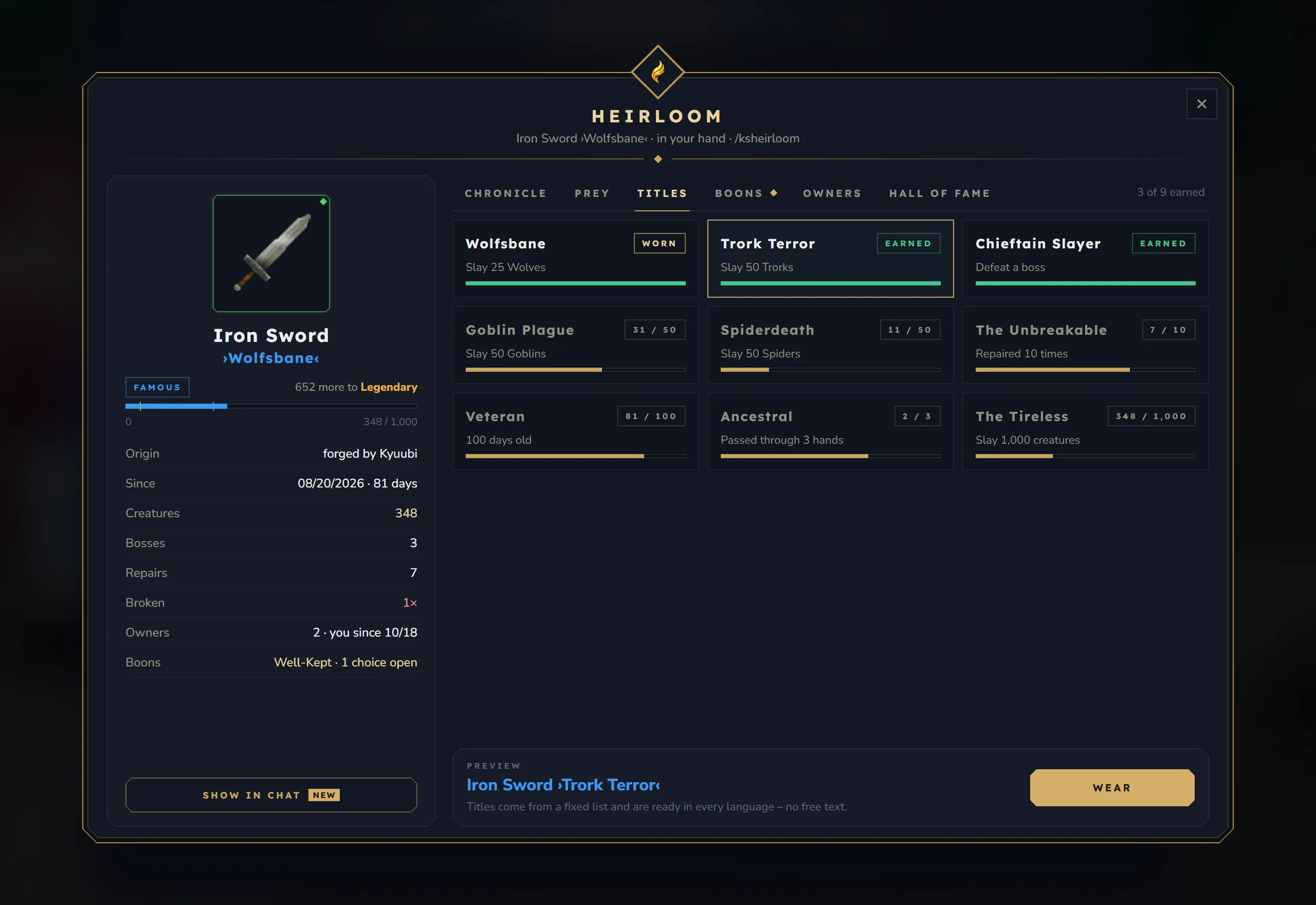
- One card for every title this kind of item can earn, three per row. Each card shows the title, its condition (“Slay 25 Wolves”, “100 days old”, “Repaired 10 times”), a progress bar and a chip: Worn, Earned or the progress, such as
12 / 25. - Click a card to see it in the preview: the item’s name with that title. Wear puts on an earned title, Take off removes the worn one. A title that is not earned yet shows “Not earned yet”.
- “Titles come from a fixed list and are ready in every language – no free text.”
Titles switched off by an admin are not listed. An item that already wears one keeps it.
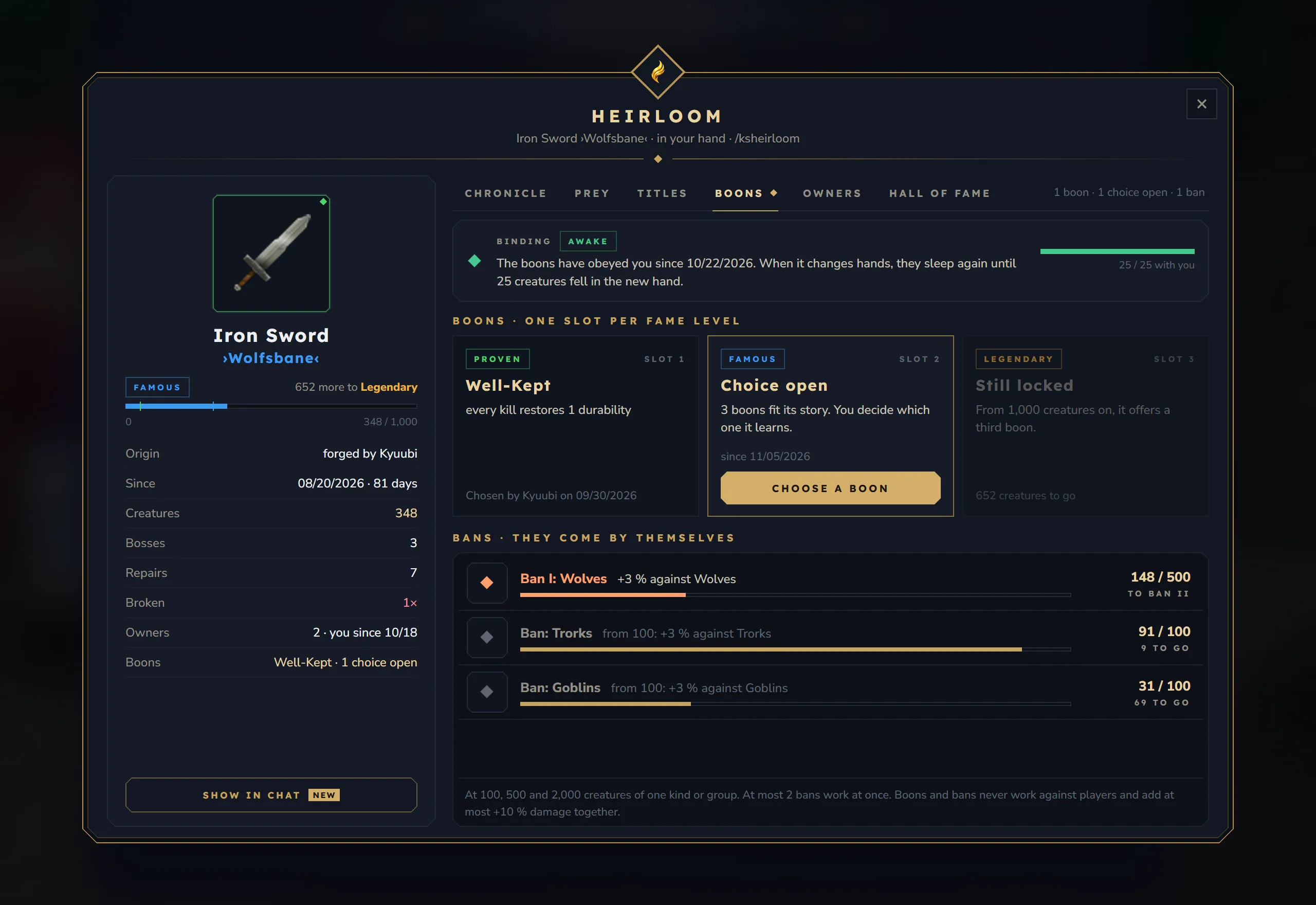
Only weapons and bows learn boons. Other items show “Only weapons learn boons”. While an admin has boons switched off, the tab shows “Boons are off on this server” and “Story, fame and titles keep counting. An admin can switch boons and bans on.”
With boons on, the tab has three parts:
- Binding: Awake or Asleep, a sentence about it (“The boons have obeyed you since 10/22/2026. When it changes hands, they sleep again until 25 creatures fell in the new hand.”) and a bar such as
25 / 25 with you. - Boons · one slot per fame level: one slot each for Proven, Famous and Legendary.
| Slot state | Meaning |
|---|---|
| The boon’s name | Chosen, with its effect and “Chosen by Kyuubi on 9/30/2026” |
| Choice open | The level is reached and boons are on offer. Choose a boon opens the choice |
| Waiting | The level is reached, but the slot before still has an open choice |
| No boon free | Every fitting boon is chosen or switched off |
| Still locked | The level is not reached yet, for example “652 creatures to go” |
- Bans · they come by themselves: up to four creature groups, the most slain first. Each row shows the bane (“Ban I: Wolves +3 % against Wolves”) or the first one to come (“Ban: Trorks from 100: +3 % against Trorks”), a bar and the progress (
148 / 500, “to ban II”, or “highest level”). An earned bane beyond the limit of banes at once says “resting – at most 2 bans work”. - A footer sums up the rules: the bane levels, how many work at once and the damage cap.
Owners
Section titled “Owners”- Every owner whose name is kept, oldest first and numbered. The maker has a Smith chip, you have a You chip.
- For each owner the time they had it (“since 10/18/2026 · 23 days”, or from–until) and how much it counted in their hands.
- Names an admin deleted show as “Name deleted”.
- The footer: “When you pass it on – drop it, trade it, sell it – the story travels with it.” and “The latest 5 owners keep their names, all of them are counted.”
Hall of fame
Section titled “Hall of fame”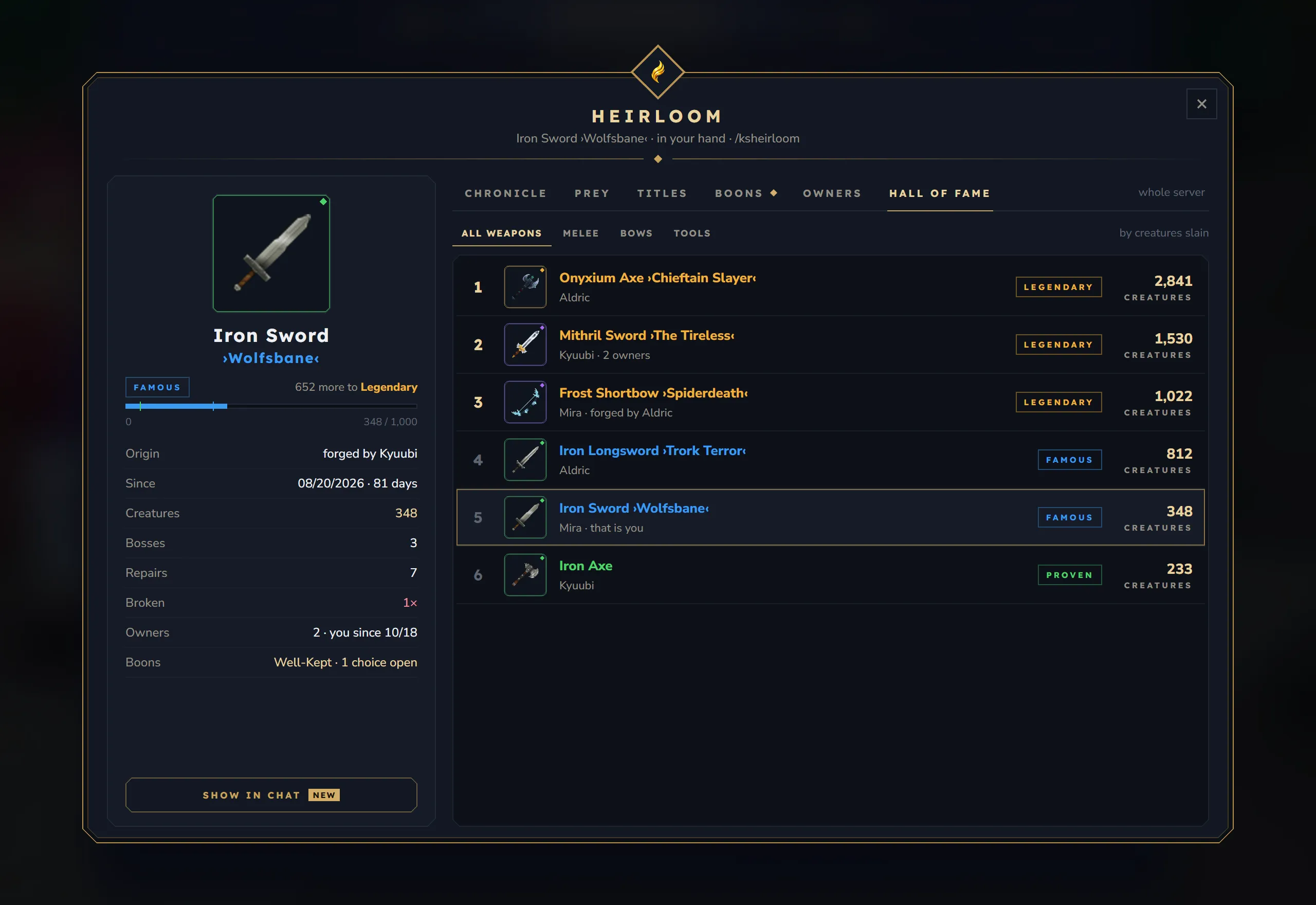
- The most famous heirlooms of the whole server, up to 30 per list, the highest count first. The tab is always open, also without an item in hand.
- Filters: All weapons (melee and bows), Melee, Bows and Tools (pickaxes, hatchets, shields and armor). The note says what is counted: “by creatures slain” or “tools count ores, trees and hits”.
- Each row: the rank, the item with its title in the colour of its fame, the owner (“Mira · that is you”, “Mira · forged by Aldric”, “Kyuubi · 2 owners”), the fame and the count.
- An heirloom joins once it is Proven. Without one: “No heirloom stands in the hall of fame yet. An heirloom joins once it is Proven.”
Choosing a boon
Section titled “Choosing a boon”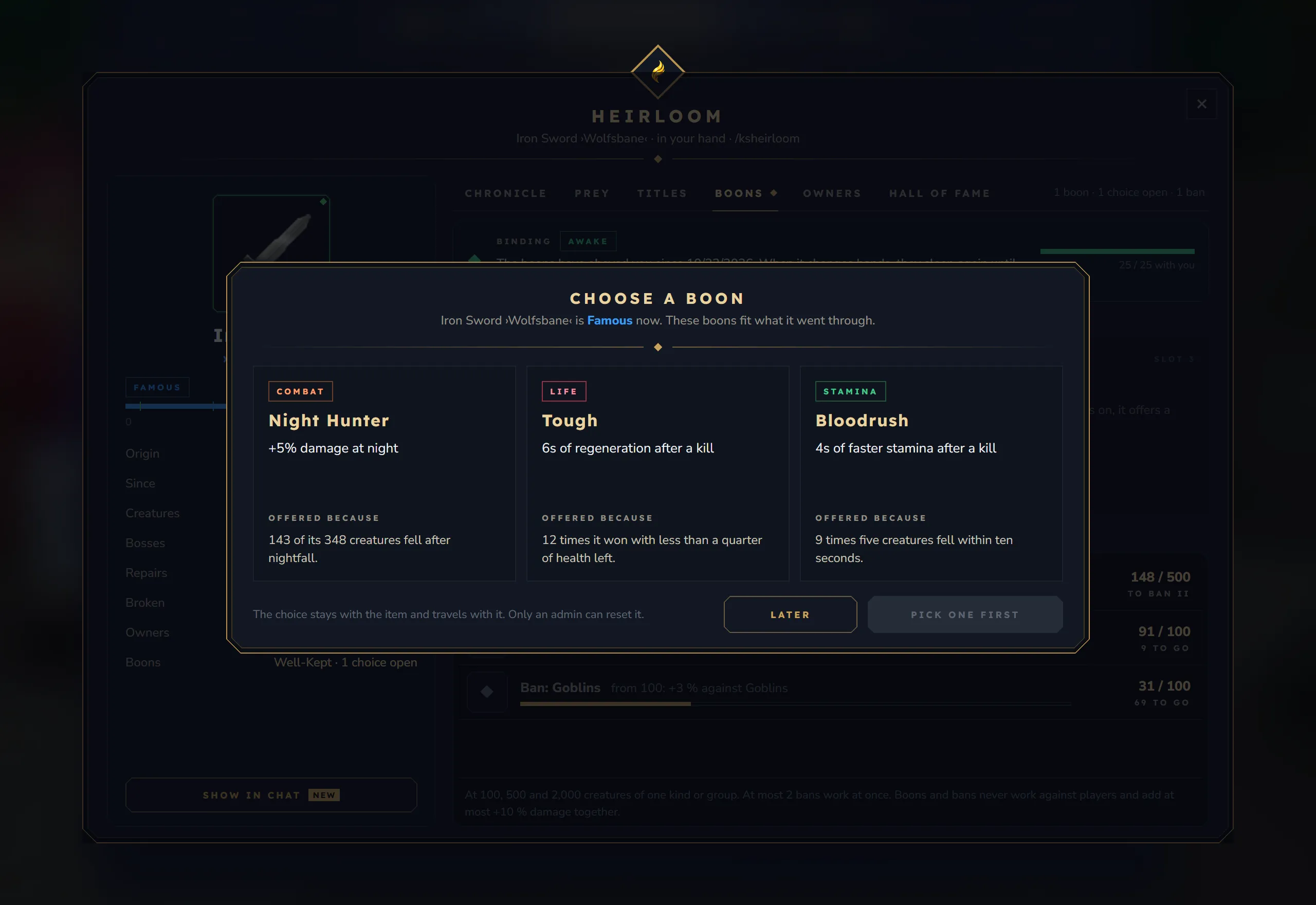
Choose a boon on an open slot opens the choice over the window:
- The subtitle names the item and its new level: “Iron Sword ›Wolfsbane‹ is Famous now. These boons fit what it went through.”
- Up to three offers. Each shows its kind (Combat, Life, Stamina, Durability or Status), its name, its effect and Offered because, for example “143 of its 348 creatures fell after nightfall.”
- Click an offer, then Choose. Later closes the choice; it stays open on the item.
- “The choice stays with the item and travels with it. Only an admin can reset it.”
Cards and chat lines
Section titled “Cards and chat lines”Small cards appear at the top centre of the screen, only for the player whose item changed. Each card shows for 4 seconds; up to three come from one change. With KyuubiSoft Core installed, they take a row of Core’s shared card lane, so they do not cover the cards of other KyuubiSoft mods.
| Card | When | Text |
|---|---|---|
| A story begins | The first story a player ever gets on the server | ”From now on it remembers what it lives through. Hover over it to read it.” |
| Milestone | 10, 50, 100, 250, 500, 1,000 and every 1,000 after | ”Now written in its chronicle” |
| New fame level | Proven, Famous, Legendary | ”348 creatures – the name now shines blue” |
| A boon offers itself | A boon slot opens | ”Three boons fit its story – choose with /ksheirloom, tab Boons” |
| Title earned | A title is earned | ”Wear it with /ksheirloom, tab Titles” |
| Bane I / II / III | A bane level is reached | ”+3% damage against these creatures” |
| Boons awakened | A new owner finished the binding | ”It knows you now – its boons work in your hand too” |
| An heirloom | The item reaches a new owner | ”302 creatures in the hands before yours”, plus “its boons are dormant (0 of 25 with you)” when it has some |
| Broken | The item broke | ”Iron Sword needs a repair” – “The story stays. The break goes into the chronicle.” |
Admins switch the cards off with messages.toasts. A chime plays with milestones, fame levels, titles, banes and awakened boons (cosmetics.milestoneSound).
Chat lines
Section titled “Chat lines”| Line | Who sees it |
|---|---|
Heirlooms · Iron Sword ›Wolfsbane‹ of Mira is now legendary. 1000 creatures. | Every player online, when an item becomes legendary (messages.legendaryChat) |
Mira shows Iron Sword ›Wolfsbane‹ · Famous · 348 creatures · favourite prey Black Wolf | Players within 32 blocks in the same world, after Show in chat (messages.share) |
Each player reads these lines in their own language.
The admin window
Section titled “The admin window”/ksheirloom admin opens the admin window. A column on the left switches between Overview, Rules, Titles, Boons and Item. Switches act at once; numbers apply after Save in their section. A wrong number is refused with a message such as “Famous: please a whole number from 2 to 999,999.” or “Famous must be higher than the level before.” The window closes itself when the admin permission is taken away.
Overview
Section titled “Overview”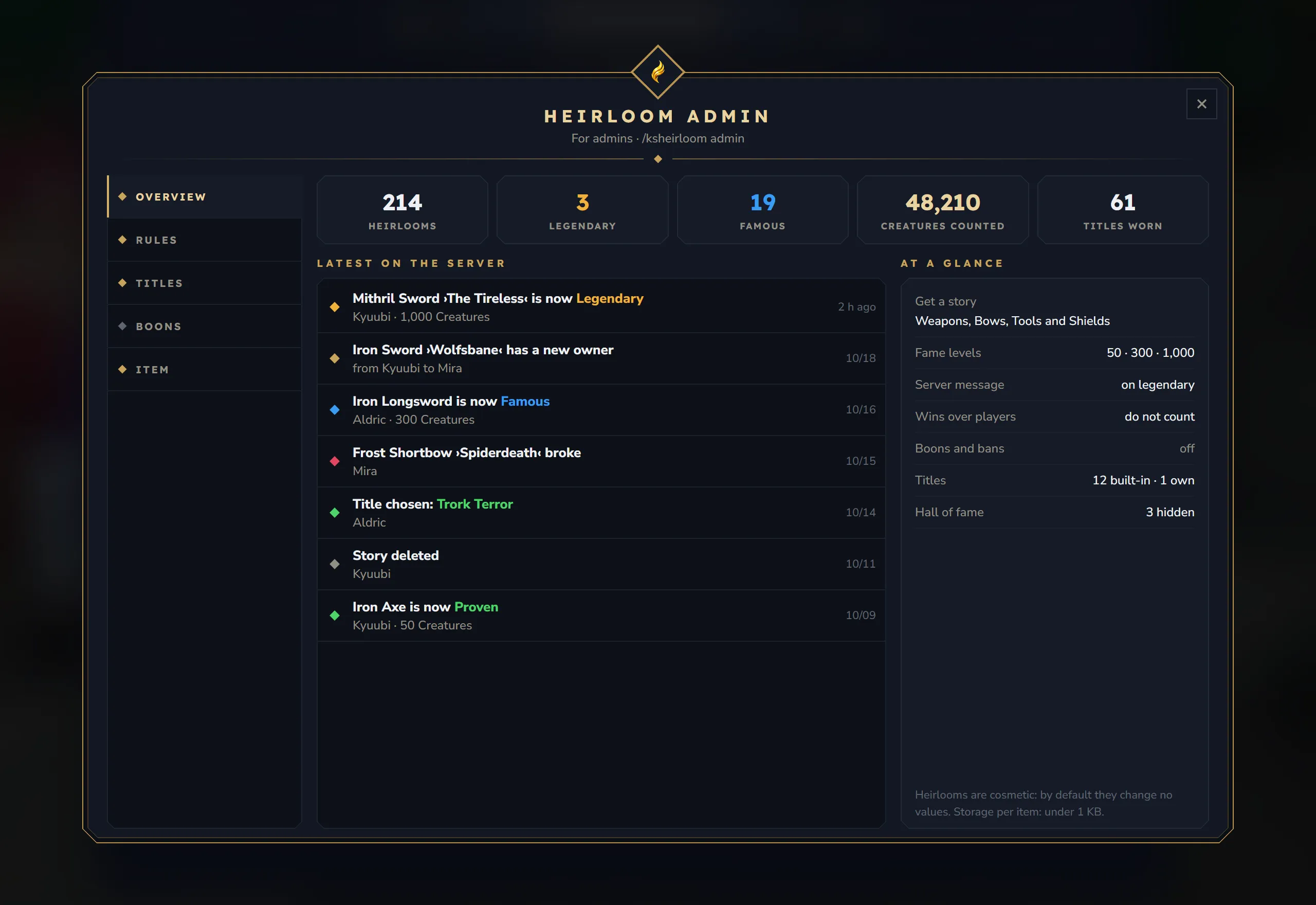
- Tiles: Heirlooms (stories begun), Legendary and Famous (items of that fame in the hall of fame records, hidden ones included), Creatures counted and Titles worn.
- Latest on the server: up to 30 events, newest first, with the time: new fame levels, new owners, broken heirlooms, chosen titles and deleted stories.
- At a glance: which items get a story, the fame levels, the server message on legendary, wins over players, boons and bans on or off, titles (“12 built-in · 1 own”) and how many items are hidden from the hall of fame.
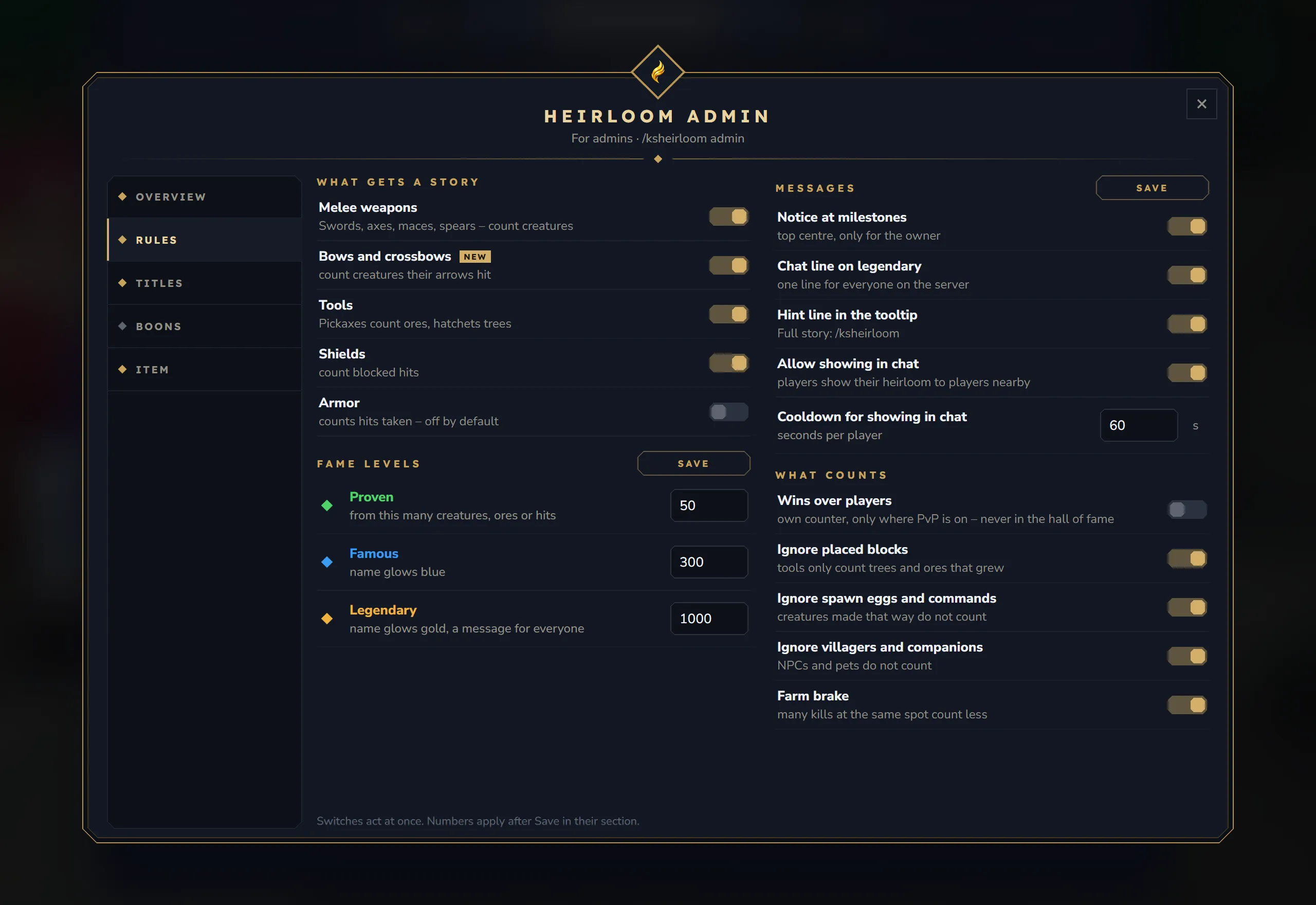
| Section | Contents |
|---|---|
| What gets a story | Melee weapons, Bows and crossbows, Tools, Shields, Armor |
| Fame levels | Proven, Famous, Legendary with Save |
| Messages | Notice at milestones, Chat line on legendary, Hint line in the tooltip, Allow showing in chat, and the cooldown for showing in chat with Save |
| What counts | Wins over players, Ignore placed blocks, Ignore spawn eggs and commands, Ignore villagers and companions, Farm brake |
Titles
Section titled “Titles”- A list of every built-in title and every title of the server, with its state (built-in, own, off).
- Built-in titles have fixed conditions; you can only switch them off and on. “Built-in. Switching it off hides it; whoever wears it keeps it.”
- Own titles: a name per language (the English name is used for every language without its own), the condition (Kind, Group, Boss, Total, Repairs, Age, Owners), the target and the count, with Save, Switch off and Delete (asks “Really?”).
- New title adds a title with the condition Total 100 and the id
custom_1,custom_2and so on: “New title added – enter a name and a condition.”
- Boons and bans: the main switch. “Off – heirlooms are purely cosmetic” or “On – heirlooms learn from their story”.
- Bans – they come by themselves: creatures and percent for each bane level, with Save.
- Boons – the player chooses: one switch per boon, with its kind, its effect and what it is offered for.
- Limits: Damage cap, Bans at once, Status: chance, Status: cooldown, Binding, with Save.
- Cosmetics – on by default: Sparks on a kill, Sound at milestones, Glow on the ground.
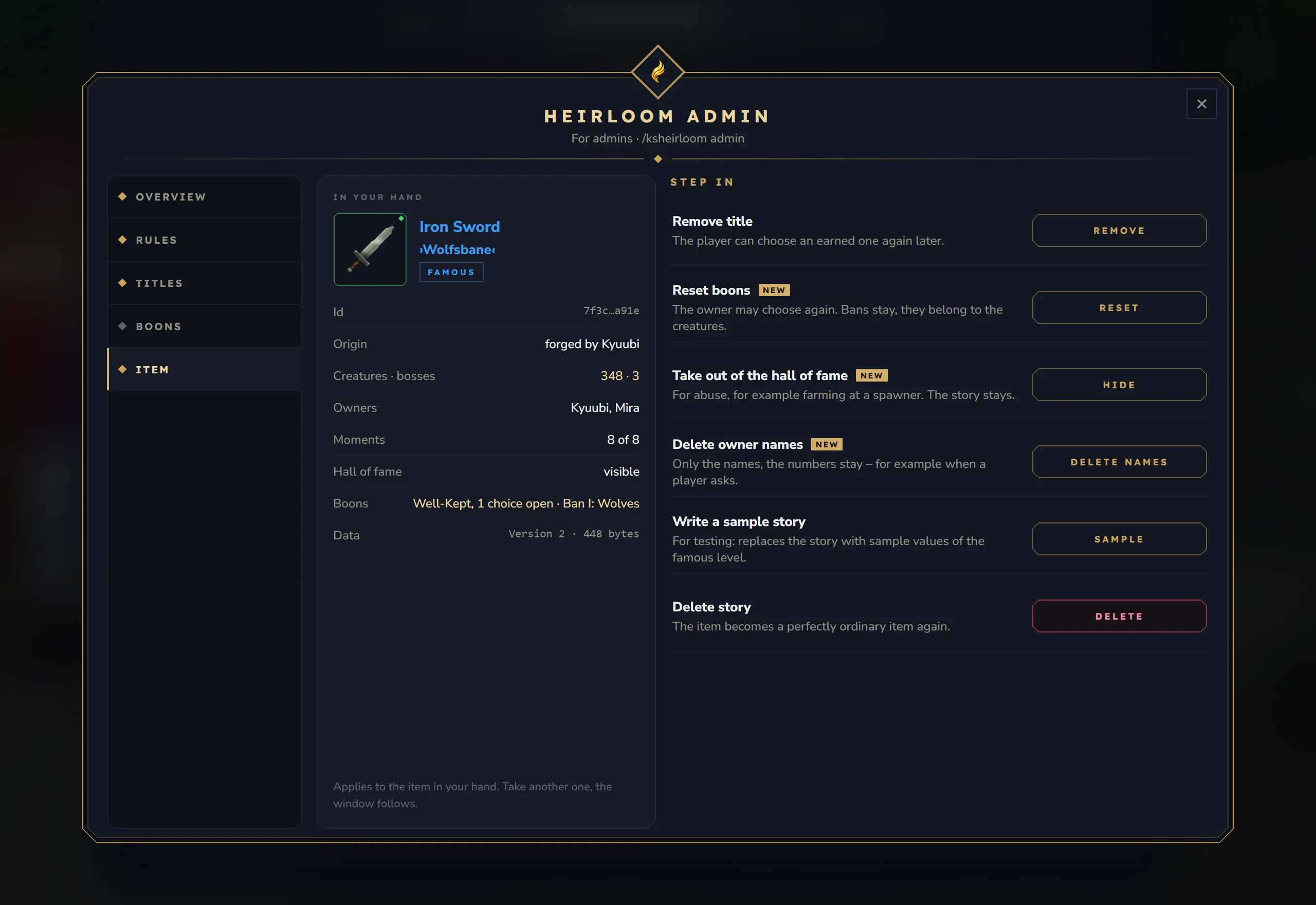
The page shows the item in your hand and follows it when you take another one. In your hand lists the story id, the origin, the counts, the owners, the moments (“8 of 8”), the hall of fame state (visible, hidden or not in yet), the boons and the size of the data on the item.
| Action | What it does | Asks first |
|---|---|---|
| Remove title | Takes off the worn title. The player can choose an earned one again later | no |
| Reset boons | Removes every chosen boon so the owner may choose again. Banes stay | yes |
| Take out of the hall of fame | Hides the item from the hall of fame, for example after farming at a spawner. The story stays. Show again brings it back | no |
| Delete owner names | Deletes the maker’s and owners’ names everywhere in the story. The numbers stay | yes |
| Write a sample story | Writes a story with the sample values of the Famous level, for testing. Replaces a real story | yes, if the item has a story |
| Delete story | The item becomes an ordinary item again and leaves the hall of fame | yes |
Actions that ask first need a second click on the same item. An empty hand shows “Nothing in hand”; an item that cannot carry a story shows “Cannot carry a story”; an item whose kind is switched off says so and points to the Rules page.