
UI Pages
Version: 1.0.0
Players use the order window (/ksorder). Admins use the admin window (/ksorderadmin). Both use the KyuubiSoft “Goldfiligran” look and come in 9 languages.
Overview
Section titled “Overview”| Window | How to open it | Notes |
|---|---|---|
| Order window | /ksorder (also /orders), or the Orders tile on the whisper stone | Needs ks.orders.user.open (allowed by default) |
| Notices | Appear by themselves | Cards at the top, chat lines, whisper stone notes, login summary |
| Admin window | /ksorderadmin, or the Order Board tile in the /ksadmin hub | Needs ks.orders.admin |
All amounts of coins are shown the way the connected economy formats them, with its own currency name. The pictures use “coins”.
Order window
Section titled “Order window”The header shows Order Board and a line for the open tab. Four tabs: Board, New order, My orders and Pickup box. The number on Pickup box shows how many entries wait there. With a connected economy, Wallet at the top right shows your balance. X closes the window.
While a data file cannot be read, the window says “The order board is paused: a data file could not be read. An admin has to check it.” and posting, delivering, withdrawing and collecting cannot be used.
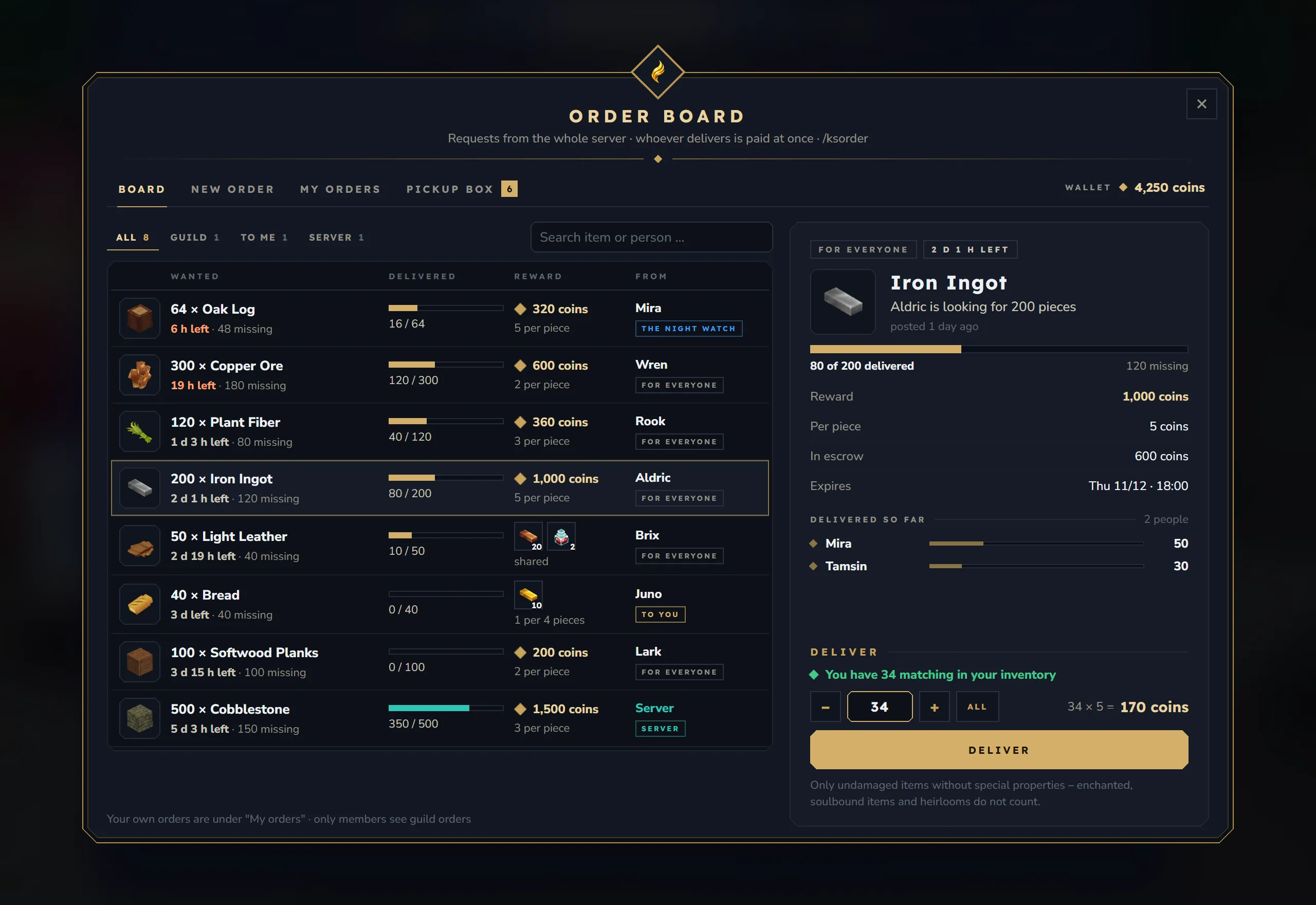
Left side:
- Filters All, Guild, To me and Server with their counts, and a search for item or person.
- One row per order, the ones that end first at the top: the wanted item and quantity, the time left (orange in the last 24 hours) and how many pieces are missing, a progress bar, the reward with the price per piece, and who posted it. Item rewards show their stacks and “1 per 4 pieces” or “shared”.
- The tag under the name says who may deliver: for everyone, the guild’s name, to you or Server.
- Your own orders are not on the board; they are under My orders.
Right side, for the chosen order:
- The visibility and the time left, the item, “Aldric is looking for 200 pieces” and when it was posted.
- “80 of 200 delivered” with a bar, and the facts Reward, Per piece, In escrow and Expires. For server orders, In escrow says “by the server · no escrow”.
- Guild, direct and server orders get one more line that explains who sees them and who pays.
- Delivered so far: the people who delivered and how much, the top three and “N more”.
- Deliver: “You have 34 matching in your inventory”, the amount with –, + and All, a preview such as “34 × 5 = 170 coins” and the Deliver button. Below it: “Only undamaged items without special properties – enchanted, soulbound items and heirlooms do not count.” When you cannot deliver, the line says why.
After delivering, a line says what you got, for example “Delivered: 34 × Iron Ingot · 170 coins paid into your wallet.” or ”… what did not fit into your inventory waits in the pickup box.”
New order
Section titled “New order”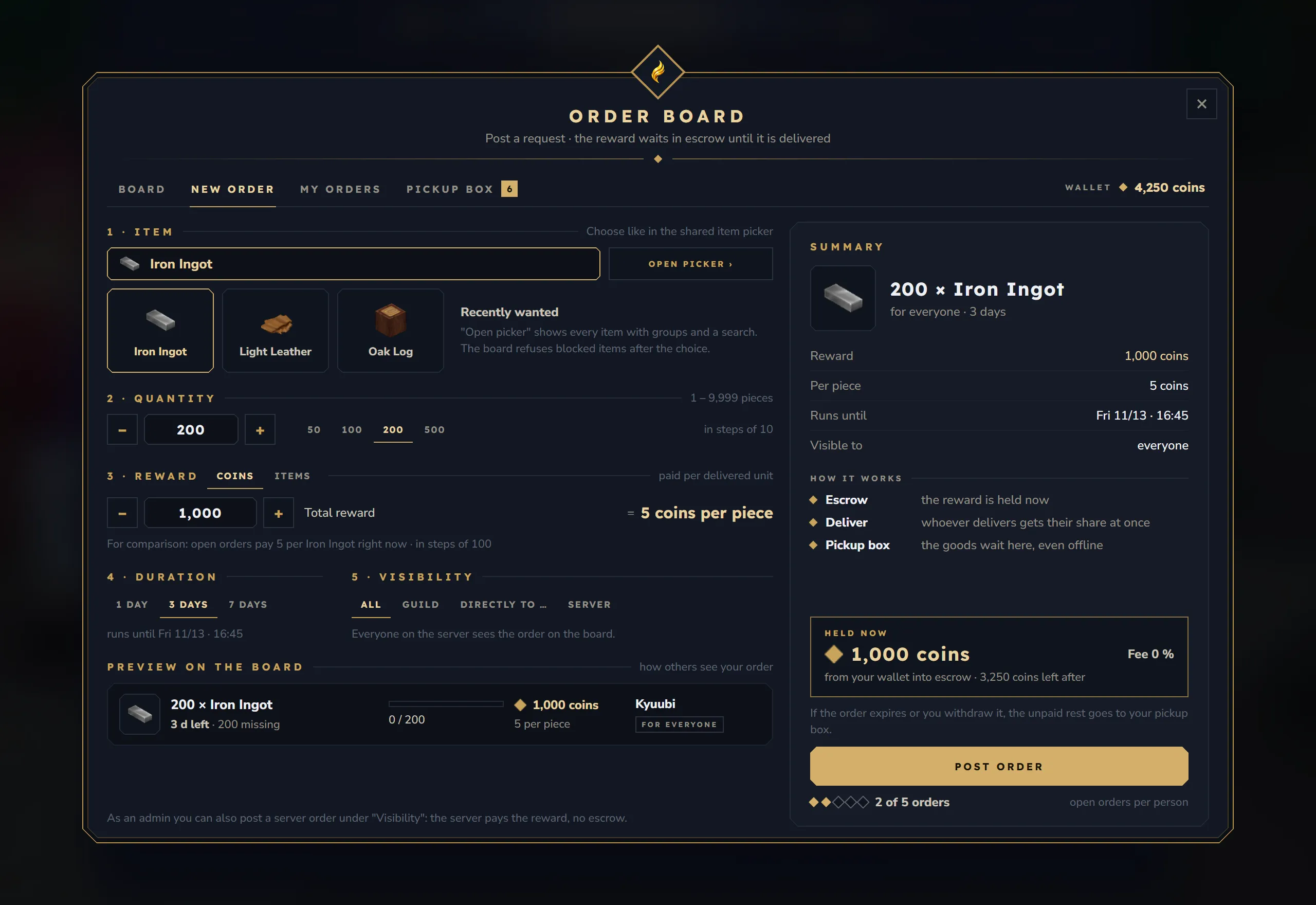
The left side has five steps:
| Step | What you set |
|---|---|
| 1 · Item | Open picker › opens Core’s item picker with every item, groups and a search. Recently wanted shows the items of your own recent orders for a quick choice. Blocked items are refused after the choice |
| 2 · Quantity | A number field and quick amounts 50, 100, 200 and 500 (as far as the server allows), with the allowed range, for example “1 – 9,999 pieces” |
| 3 · Reward | Coins (the button carries the currency name of the economy) with the Total reward, the price per piece and where a rounding rest goes. When at least three open coin orders want the same item: “For comparison: open orders pay 5 coins per Iron Ingot right now”. Items: up to 3 stacks from your inventory; a click on a chosen stack takes it out again |
| 4 · Duration | 1, 3 or 7 days by default, with “runs until …“ |
| 5 · Visibility | All, Guild, Directly to … with a name field, and Server for admins. A line below says who will see the order |
Below the steps, Preview on the board shows the row as others will see it.
The right side shows the Summary, How it works (escrow, deliver, pickup box), Held now with the fee (“Fee 0 %”) and how much stays in your wallet, a note that the unpaid rest comes back to your pickup box, the Post order button and how many of your allowed orders are open (“2 of 5 orders”).
When something is missing, the button says what instead of Post order: “Item missing”, “Item blocked”, “Check quantity”, “No economy”, “Reward too small”, “Not enough in wallet”, “Choose stacks”, “Name missing”, “No guild”, “Limit reached” or “Not allowed”.
Reward from your inventory. The Items reward opens a box with your inventory and hotbar. Click a stack, set the amount and click Add. Stacks with special properties go into escrow exactly as they are (“with properties, goes into escrow exactly like this”). Damaged items cannot be a reward. For a server order the stack is only a template and stays in your inventory; only plain items work there.
Without KyuubiSoft Core there is no item picker: the button says No picker, and only the items of your recent orders and Post again in My orders remain. Without an economy the Coins choice is greyed out (“items only, no economy connected”).
My orders
Section titled “My orders”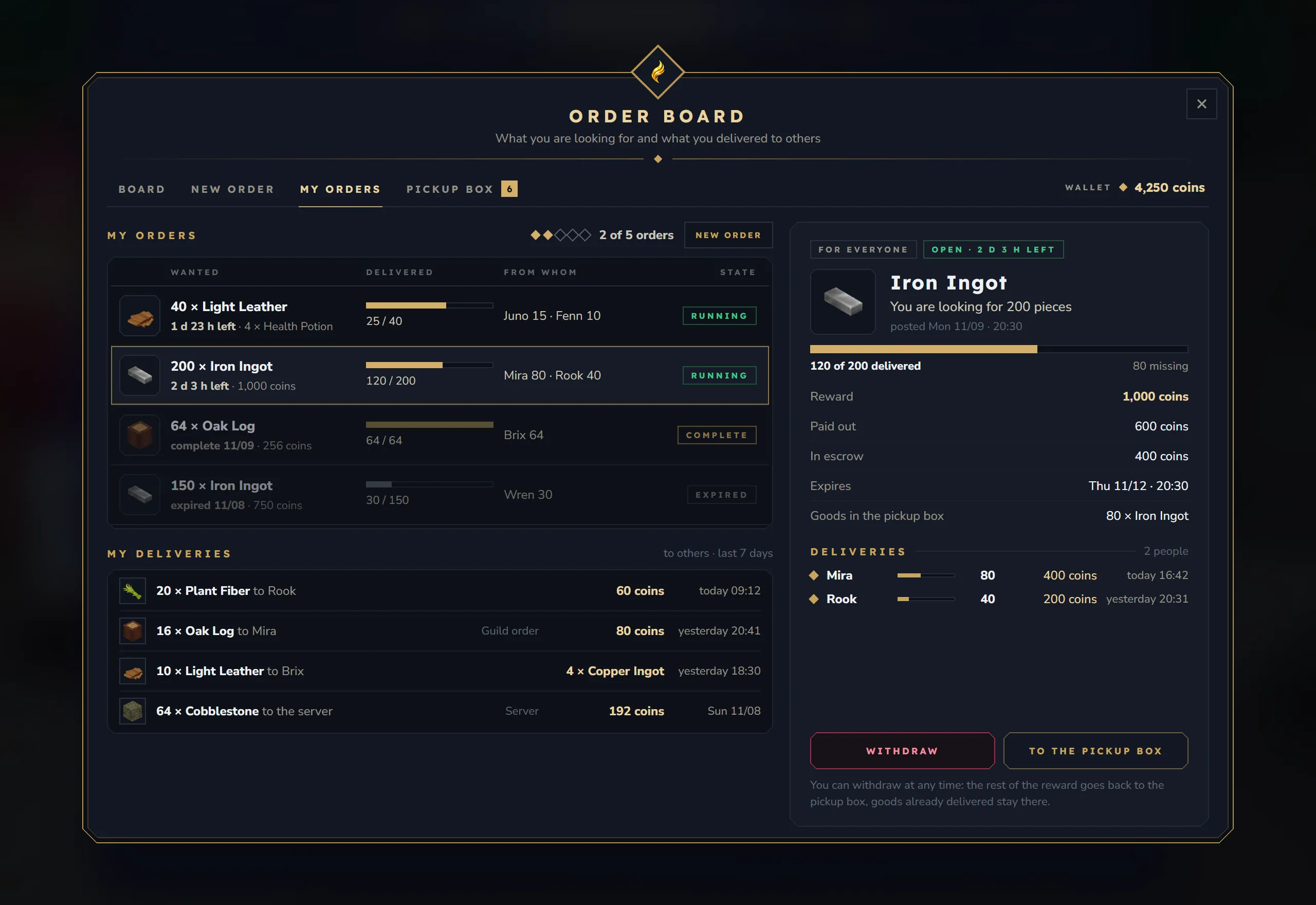
- The list: your open orders first (the ones that end first at the top), then the orders closed in the last 14 days, with Wanted, Delivered, From whom and State (running, complete, expired, withdrawn, removed). New order at the top switches to the New order tab. Server orders are not listed here.
- The chosen order: “You are looking for 200 pieces”, the facts (paid out, still in escrow, runs until, visible to) and the Deliveries with name and amount.
- Withdraw asks “Withdraw this order?” and says what goes back to your pickup box; Yes, withdraw confirms. To the pickup box switches to that tab.
- A closed order says how it ended, for example “Expired · 40 not delivered, 200 coins wait in the pickup box.” or “Removed by Kyuubi: block list avoided.” Post again fills New order with the item, the rest quantity and the same price per piece.
- My deliveries: what you delivered to others in the last 7 days, up to 8 lines.
Pickup box
Section titled “Pickup box”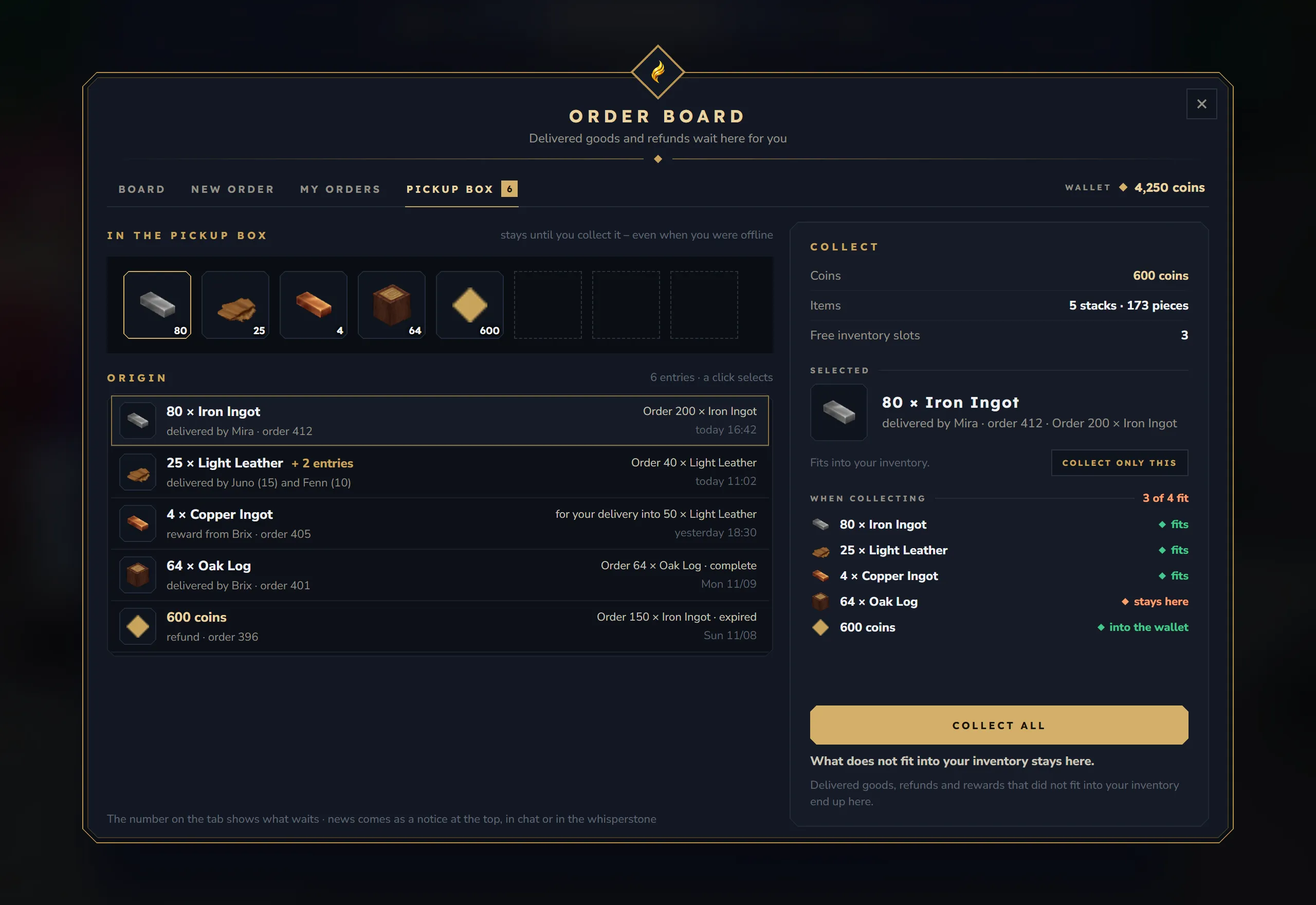
- At the top: a row of tiles with what waits, “stays until you collect it – even when you were offline”.
- The list (Origin): each entry with where it comes from: “delivered by Mira · order 412”, “reward from Brix · order 405”, “refund · order 396” or “given back after a check”. Equal items with equal properties are bundled (“delivered by Juno (15) and Fenn (10)”); + 2 entries unfolds a bundle. Entries that an admin still has to check say being checked and cannot be collected yet.
- Collect panel on the right: the coins and items in the box and your free inventory slots. Selected shows the chosen entry, whether it fits (“Fits into your inventory.”, “Only part of it fits into your inventory.”, “Goes straight into your wallet.”) and Collect only this.
- When collecting: what would happen with Collect all, line by line (fits, fits partly, stays here, into the wallet), and a total such as “3 of 4 fit”.
- Collect all. “What does not fit into your inventory stays here.” Nothing is dropped on the ground. Without an economy, coins stay in the box.
Notices
Section titled “Notices”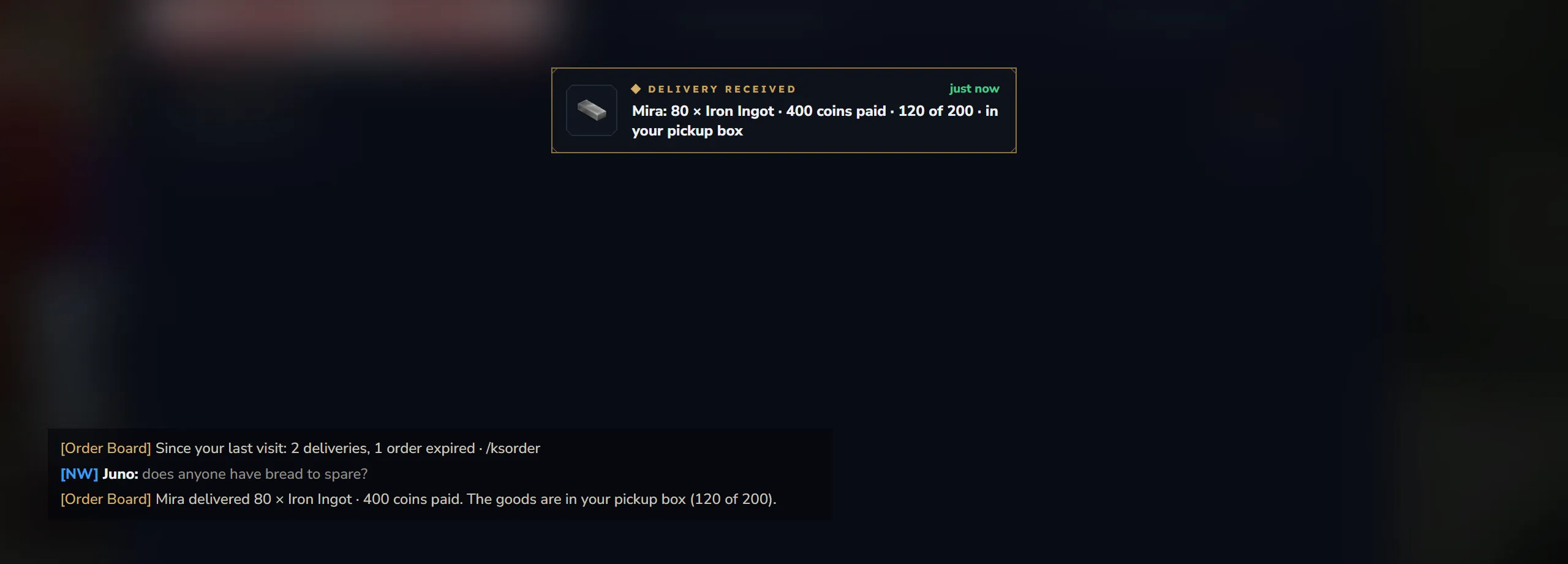
While you are online, a notice comes as a card at the top centre of the screen and as a chat line starting with [Order Board]. With KyuubiSoft Core the cards take a row of Core’s shared card row, so they do not cover the cards of other KyuubiSoft mods. Cards come one after another.
| Card | Who gets it | When |
|---|---|---|
| Delivery received | The owner of the order | Someone delivered: “Mira: 80 × Iron Ingot · 400 coins paid · 120 of 200 · in your pickup box” |
| Order complete | The owner | The last part was delivered |
| Paid | The person who delivered | Their share was paid, or waits in the pickup box. Card only, no chat line |
| Order expired | The owner | The time ran out; says what came back to the pickup box |
| Order closed | The owner | The order was closed for them, for example because they left the guild or the guild was disbanded |
| Order removed | The owner | An admin removed it, with the reason |
| Order for you | The person named in a direct order | Someone posted an order directly to them |
While you are offline, a notice becomes a note on your whisper stone (with KyuubiSoft Whisperstone, if you have a stone). Otherwise it is kept, and at your next login one line sums everything up: “[Order Board] Since your last visit: 2 deliveries, 1 order expired · /ksorder”. At most 50 notices are kept per person.
Players switch each channel on or off on the Order Board page of /kssettings (with KyuubiSoft Core): Notice at the top, Chat line, Note in the Whisperstone (only with Whisperstone) and Summary at login. Admins can switch channels off for everyone, see Configuration. If the card display is not available, the notice comes as a chat line.
Admin window
Section titled “Admin window”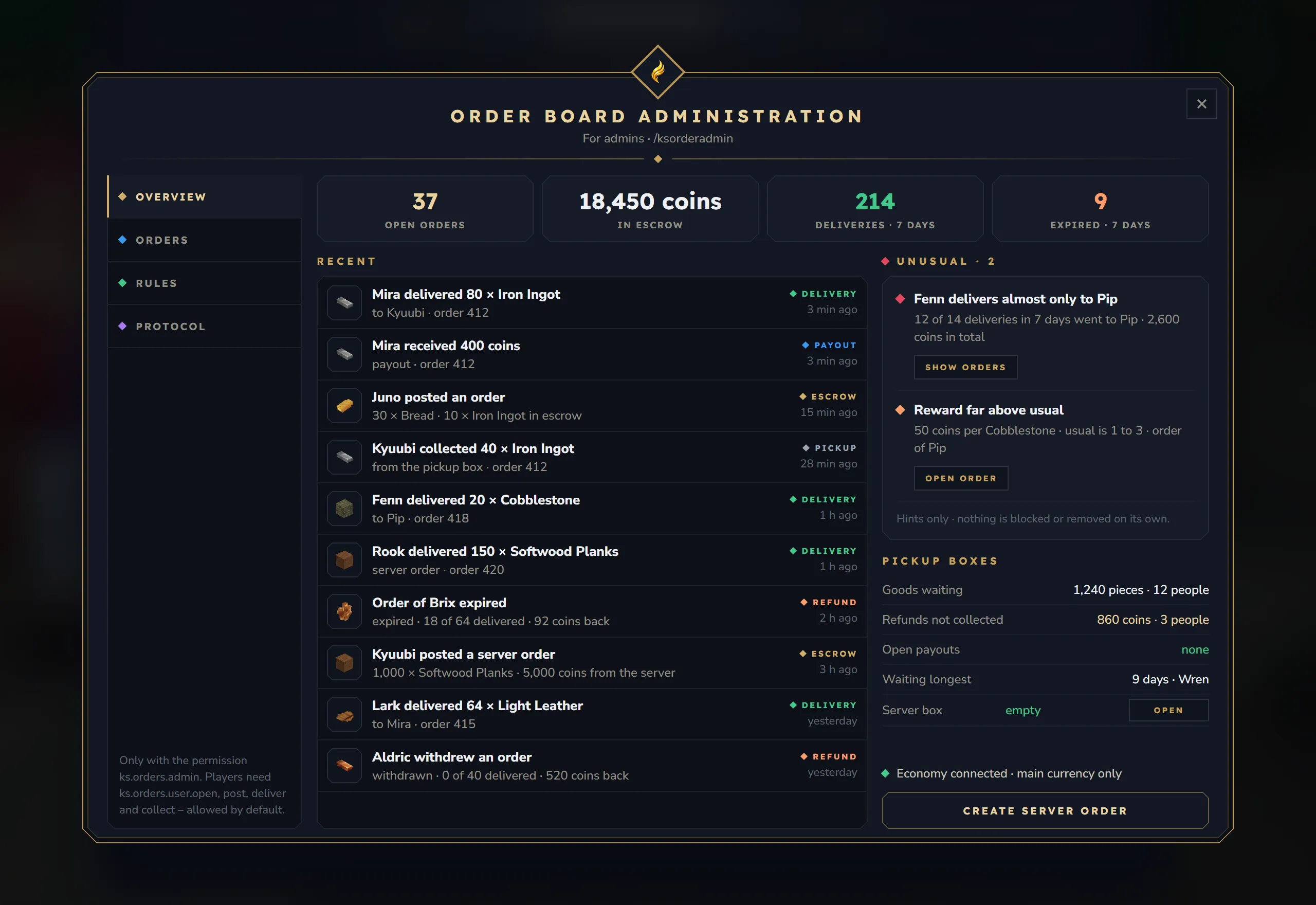
The header shows Order Board Administration and “For admins · /ksorderadmin”. The left side has four sections, Overview, Orders, Rules and Protocol, and a note on the permissions. Close closes the window. Every click checks ks.orders.admin again.
Overview
Section titled “Overview”- Banners: “The board is paused: … could not be read (kept as .broken).” when a data file is broken, and “1 unclear booking waits for your decision · nothing gets lost” with Check when a booking waits for you.
- Tiles: Open orders, In escrow (coins held for open orders), Deliveries · 7 days and Expired · 7 days.
- Recent: the latest 10 bookings, such as “Mira delivered 80 × Iron Ingot” or “Order of Aldric expired”.
- Unusual: hints such as “Mira delivers almost only to Aldric”, “Reward far above usual” or “Rook lets many orders expire”, with Show orders and Open order. “Hints only · nothing is blocked or removed on its own.”
- Pickup boxes: Goods waiting, Refunds not collected, Open payouts and Waiting longest, plus the Server box with Open.
- The economy line: “Economy connected · main currency …” or “No economy connected · item rewards only”.
- Create server order.
Orders
Section titled “Orders”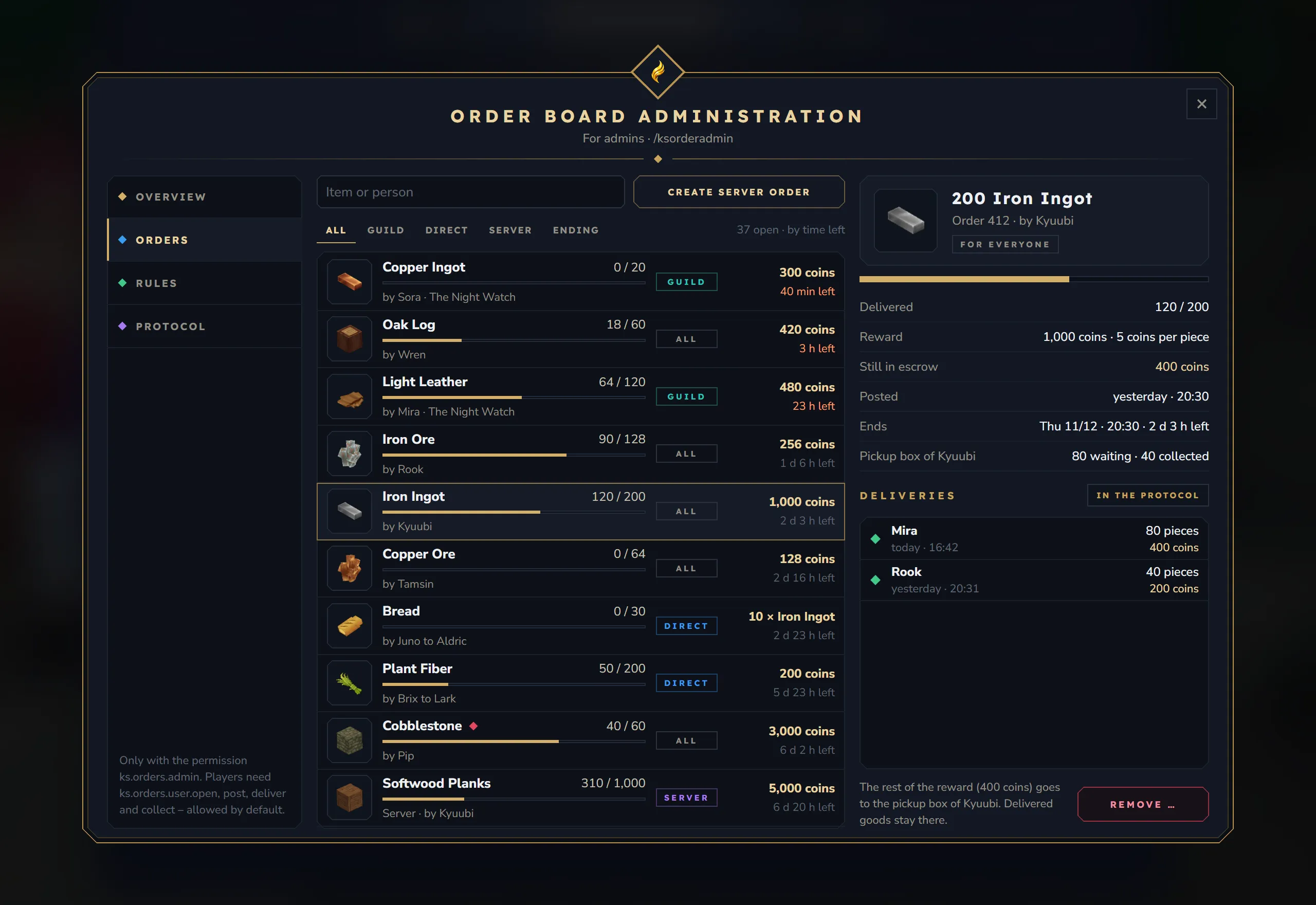
- A search for item or person and the filters All, Guild, Direct, Server and Ending (ends within 24 hours). The list shows the open orders, the ones that end first at the top, up to 100 rows (“showing 100 of 240 · by time left”).
- The chosen order: who posted it and for whom, with Delivered, Reward, Still in escrow, Posted, Ends and where the goods go (the owner’s pickup box or the server box), an Unusual mark when it is flagged, and the Deliveries.
- In the protocol opens the protocol filtered to this order.
- Remove … asks for a reason (required) and says what happens: “The rest of the reward (600 coins) goes to the pickup box of Aldric. Delivered goods stay there.” For a server order: “the rest lapses, nothing is refunded.”
Create server order opens the form New server order: “The reward comes from the server, not from an account – for events, for example.”
| Field | What you set |
|---|---|
| Item | Choose opens the item picker. Without it, a box asks for the item id (for example Ingredient_Bar_Iron) and checks that the server knows it |
| Quantity | Within the allowed quantities |
| Reward as | Coins (only with an economy and when coins are allowed) or Items |
| Total reward | The coins (at least 1 per piece), or the reward item and its number of pieces |
| Duration | One of the offered durations |
The form shows the price per piece, and Post puts the order on the board: “Server order 418 is on the board.” Server orders are visible to everyone and marked Server. Goods delivered into them land in your own pickup box.
| Box | Contents |
|---|---|
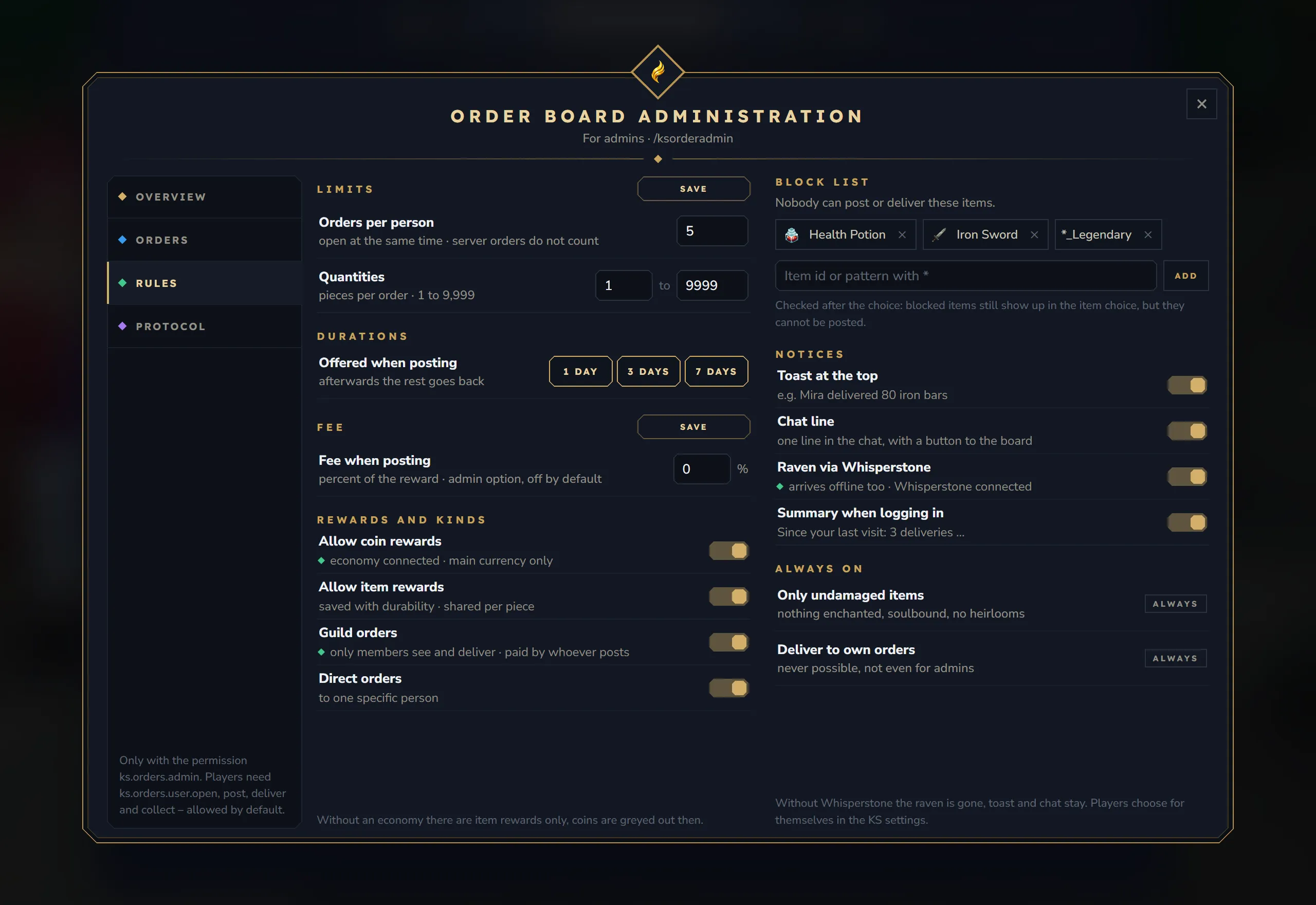
| Limits | Orders per person (server orders do not count), Quantities from–to, with Save. Durations as buttons; a click switches one on or off |
| Fee | Fee when posting in percent, with Save. “admin option, off by default” |
| Rewards and kinds | Allow coin rewards, Allow item rewards, Guild orders, Direct orders. Each switch applies at once; a line says whether the economy or Guilds is connected |
| Block list | ”Nobody can post or deliver these items.” An input for an item id or a pattern with *, Add, and the entries with × |
| Notices | Toast at the top, Chat line, Raven via Whisperstone, Summary when logging in. “Players choose for themselves in the KS settings.” |
| Always on | Only undamaged items and Deliver to own orders (never possible, not even for admins). These cannot be changed |
Every value is explained on Configuration.
Protocol
Section titled “Protocol”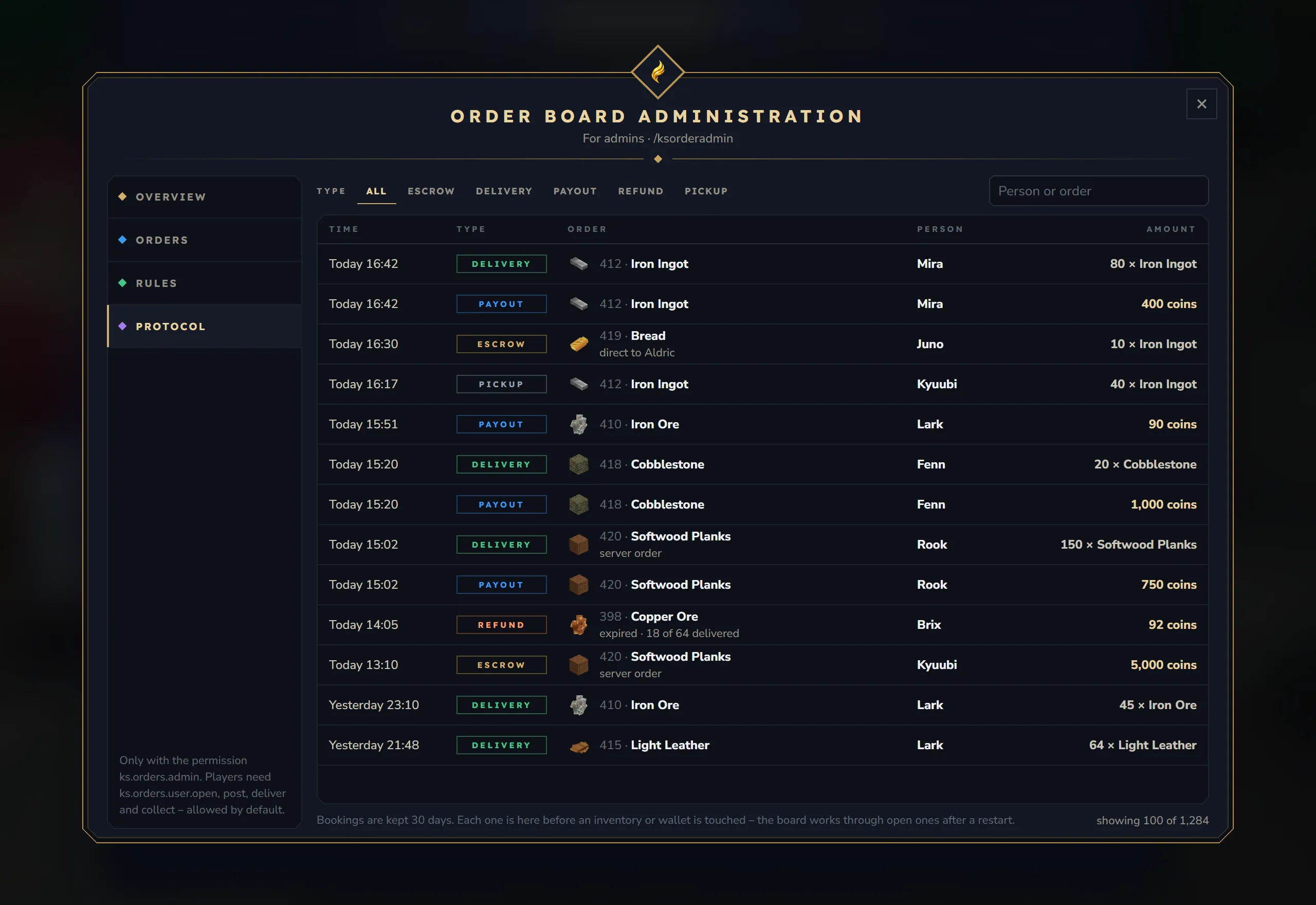
- Filters by type: All, Escrow, Delivery, Payout, Refund and Pickup, and a search for person or order.
- Columns Time, Type, Order, Person and Amount, newest first, up to 100 rows (“showing 100 of 1,284”). Notes say more, for example “fee 10”, “server order”, “expired · 40 of 120 delivered” or “removed by Kyuubi · 80 of 200 delivered”.
- “Bookings are kept 30 days. Each one is here before an inventory or wallet is touched – the board works through open ones after a restart.”
Unclear bookings
Section titled “Unclear bookings”Check in the overview opens the list of unclear bookings: “The answer was missing between booking and moving (a restart or no answer from the engine). Check the inventory or wallet and decide – nothing is guessed.”
Each booking shows what moved, for whom and for which order, and the buttons It happened and It did not happen. A line explains both choices before you click, for example “It happened: it reached Mira, the held entry goes. It did not happen: it can be collected again.” The same works in chat with /ksorderadmin review. See What is an unclear booking?
Server box
Section titled “Server box”Open next to Server box in the overview opens the server box: “Goods of server orders that came from the console. Collecting gives them to you, as much as fits – the rest moves to your own pickup box (/ksorder).”
- Collect takes one entry, Collect all takes everything.
- Discard … removes one entry for good. It asks for a reason (required), which the protocol keeps.