
Patch notes: the Design & Feature Update beta
These are the full patch notes for the Design & Feature Update beta. They cover every KyuubiSoft mod: everything that changed from each mod’s Goldfiligran redesign up to the current beta versions, including the mods shown in Part 1 and every fix that came after.
Before you update
- This is a beta. Not every window has been through a full playtest yet. Back up your server (worlds, the
modsfolder and each mod’s data folder) and test on a copy first. - Update all KS mods together, starting with Core 2.9.3-beta. Quests, Achievements, Season Pass, Lootbags, ChatPlus, Weapon Mastery, Mob Control and Ore Regeneration need KyuubiSoft Core. Several features, such as the console rule for web editor imports, need Core 2.9.2 or newer. Info Hub, Bank, Pets, Player Shops, Graveyard, Item Control, Claims, Dungeons, VoiceHub and Nameplates do not require Core.
- Hytale 0.7 (Update 7). All mods are built against the Hytale 0.7.0 server.
- Language files are replaced (with a backup) when a mod’s bundled texts change. Keep your own texts in
custom_<lang>.json. - Admin rights: each mod uses one
ks.<mod>.adminnode, for exampleks.bank.admin,ks.graveyard.admin,ks.seasonpass.adminorks.achievements.admin. Bank no longer reads the oldbank.admin. Anything that runs as the server console also needsks.core.admin.dialog.console.
Highlights
Section titled “Highlights”- One look for every window. The Questbook, the achievement book, the Info Hub book, the Pet Compendium, the Season Pass book, the bank, the lootbag catalog, the player shop market, the graveyard menu, NPC dialogs and NPC shops all use the Goldfiligran design.
- Admin windows instead of config files. Core brings NPC management, a skin editor, an NPC viewer, a dialog editor and an NPC shop editor; Quests, Achievements, Info Hub and Pets get their own admin windows. The Quests, Achievements and Info Hub windows keep every change as a draft until “Save”, with a check view, backups and “Undo last save”.
- One hub, one settings window.
/ksadminshows every installed KS mod with its version./kssettingsgives players one language choice for every KS mod and a page per mod for trackers, HUDs and messages. - Dialogs that do things. NPC dialogs can give and take items and coins, start quests, open shops, teleport, play sounds and set facts, with repeat rules and without a single command.
- Rewards that never arrived now arrive: achievement and title rewards from quests, Season Pass XP from quests and achievements, achievements that could not be unlocked, and Core’s standard lootbags.
- Safer data. Unreadable files are kept instead of overwritten, saves are atomic, and many data-loss and duplication fixes went into the Bank, Graveyard, Player Shops, Season Pass and the reward code.
- The console rule. Anything that runs as the server console (dialog and NPC commands, shop and reward commands, Info Hub tiles, command blocks) can only be added, changed or removed by admins with
ks.core.admin.dialog.console, also through the web editor. Existing console commands keep running. - Every text in 9 languages, and no more ”?” where a game font lacks a character.
Across the mods
- The redesigned mods share one KS UI kit: the textures exist once on the client, there is nothing extra to install, and every mod still works on its own.
- One shared language system: it follows the server’s default language and the “players may choose” switch, and language choices are no longer lost when several mods save at the same moment.
/kslangwithout an argument answers in chat instead of opening a window that no longer exists.- Messages with placeholders show the full sentence again in Bank, Lootbags, ChatPlus and Claims (they showed only the inserted value).
- Mods remove their Core entries on shutdown, so a plugin reload no longer registers anything twice.
Core 2.7.1 – 2.9.3-beta
Section titled “Core 2.7.1 – 2.9.3-beta”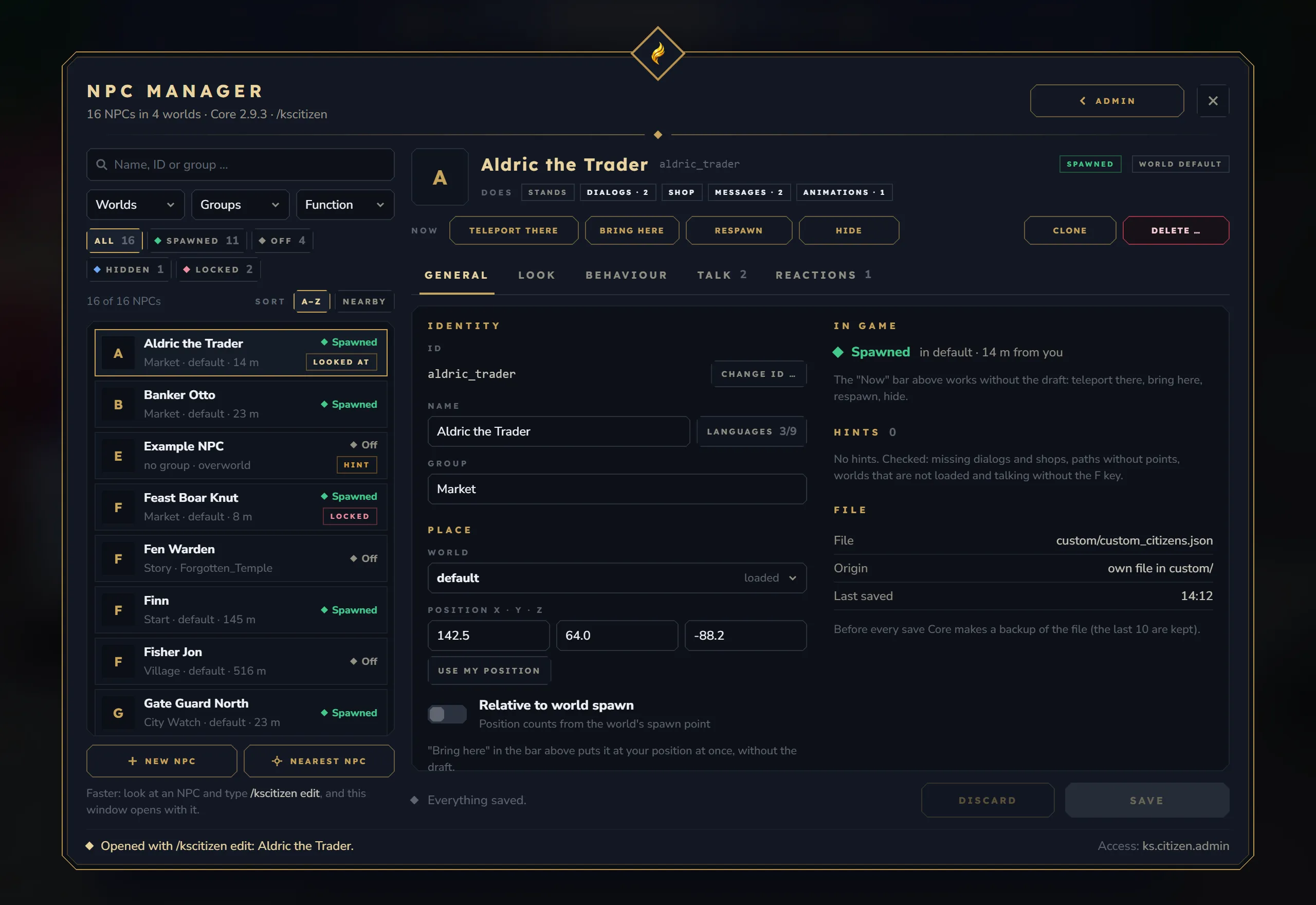
Core carries the admin tools for NPCs (Citizens), dialogs and NPC shops, and the hub and settings window that every KS mod shares.
New
/ksadminhub (“KyuubiSoft Management”). A tile for every KS mod that is loaded and enabled, with its real version; mods without a window get a “Config file” tile. A Status tab (locked NPC files with “Reload”, translation coverage, paused player saves, storage backend, web editor switch, “Reload all”) and a Language tab (server and console language, default player language, whether players may choose their own)./kssettingsfor players: one language choice for every KS mod (“Automatic” or one of 9 languages) and a page per installed mod. Changes apply at once.- NPC management window (
/kscitizen edit [id]or the hub): search, groups, status and distance; teleport, bring here, respawn, hide/show (kept across restarts), clone and delete; tabs General, Appearance, Behaviour, Talk and Reactions with a change list, Undo, Save and Discard. New NPCs from 7 templates, NPC names per language and an item picker for the 6 equipment slots. Before an NPC’s ID changes, the window lists everything that points at it: quests, map markers, other mods, commands and dialogs. - Skin editor: templates (players in your world, any player name, other NPCs, your last 3 skins), every part with search, colours and variants, randomise, up to 30 undo steps and a live 3D stage only the admin sees. It frames the head by itself for hair and face parts. The NPC in the world only changes when you press “Apply”.
- NPC viewer for every NPC, mod NPC, orphan, mount and world creature in a loaded world, with a 3D portrait: teleport (also to other worlds), bring here and “Save here”, remove, “Clean up orphans” with the exact list, and “Adopt as NPC”.
- Dialog editor: nodes with their texts in every language, answers with target, condition, tag, actions and repeat, node and dialog templates, “Check” for one or all dialogs (the same check runs at load time) and “Test as player”, which runs nothing.
- Dialog actions without commands: give or take items or coins, start a quest (with Quests), open a shop or a window, teleport, play a sound, set a fact. Each runs every time, once, or once per hour, day or week per player. An answer whose cost the player cannot pay, or whose items do not fit, is greyed out with the reason and runs nothing. New conditions
has_item,factandquest_ready. - New NPC dialog window at the bottom of the screen: the speaker on a live 3D stage, up to 4 numbered answers with tags such as “Opens shop”, a typewriter you can skip, a history with “Step back” (stepping back never repeats commands, shops or rewards), and input nodes that remember the answer as
{input}. - New NPC shop window with Buy and Sell tabs, your balance in the shop’s currency, the rotation timer, categories, today’s limit, a quantity stepper and the total; the Sell tab shows the price per piece, daily limits and “Sell all”. New shop options
iconandopenVia(any, npc or command);allowBuyMultipleworks. - NPC shop editor in the game: search, entries that can be switched off, sorted and duplicated, buy-back lists and fixed buy-back prices, a player preview, a price tool (−99 % to +1000 % with a preview), new shops from templates, from a shipped shop or as a copy, and NPC links. Renaming a shop moves its NPCs along.
- Item update window (
/ksitemupdate): outdated items with their old and new durability, updated one by one or all at once. - Shared admin comforts: one item picker, drafts that survive Esc for 30 minutes, and errors that block saving and jump to the problem.
- NPC settings that now do something: the proximity “Sound” and the animation triggers “On attack” and “Default”. Name tags and NPC chat lines show the NPC name in each viewer’s language.
- One documented set of placeholders (
{player},{player_uuid},{npc},{npc_id},{world},{x},{y},{z}, plus{killer}in death commands); values are escaped in console commands. - Core ships language files for all 9 languages.
- For mod authors:
KsSettings,KsLanguage,DialogActions,DialogConditions,ItemPicker,AdminDrafts,CommandUtils.dispatch,LootbagService.replaceExternal,PlayerDataStorage.peekJsonand more. Existing methods keep their signatures.
Changed
- Console rule: commands that run as the server console can only be added, changed or removed with
ks.core.admin.dialog.console. This covers dialog commands, NPC interact, death and proximity commands, shop command entries and the permissions that decide who may trigger them, in the windows, again on the server when saving, and in web editor imports. - Permissions:
/ksadminand its reload need onlyks.admin. The NPC tools and/kscitizenacceptks.citizen.adminorks.admin(the oldcitizen.adminstill works). “Back to Core” from other mods’ admin windows needsks.admin. - NPC shops have their own command,
/ksnpcshop open|sell|list, because Player Shops registers/ksshop. On servers without Player Shops,/ksshopstill opens NPC shops. - Web editor: a session only applies changes after it was confirmed in game with
/kstrusteditor <code>. Codes work once, a confirmed session expires after 30 minutes without changes (webEditor.trustIdleTimeoutMinutes),/ksapplyconfigonly applies your own confirmed session, and imports may only write a mod’s own config files. - One language choice is stored for all KS mods. Choices from Core’s old player preferences move over on the next join, and a change reaches every mod’s HUD at once.
- NPCs: teleports use the game’s teleport instead of the console
tp, “Move here” always respawns, proximity reactions also check height, and NPCs created inside an instance copy are saved with the template name. Death commands always run as the console. Attitude, gradient, name tag colour, live skin and invulnerable left the NPC window; their values stay in the files. - NPC files keep their last 10 backups in
citizen-backups/. Shipped shops you deleted or renamed are not extracted again, and shop entries can be switched off withenabled: false. No prices or balancing were changed. - Dialog answers, dialog states and the economy balance load in the background when a player joins.
- New installs no longer spawn the example NPC; Finn stays for the Quests tutorial.
Fixed
- Player data is never overwritten after a failed read (MySQL error, timeout or broken file): saving pauses until the data can be read again. File storage writes atomically, keeps broken files as
.corrupt-<time>and falls back to the.bakcopy. Two saves of the same player at logout could race and lose data; they now run one after another. - NPC files that fail to load are kept with a
.corruptcopy and are not written until they load again. The 60-second save no longer reverts hand edits, and day/night schedules no longer end up in the files. - Shops and rewards: item grants are all or nothing; a purchase with a full inventory is refused before you pay; a sale never takes items without paying; command items whose command cannot run are refused or refunded; currency rewards report a failure instead of vanishing and are never paid in a different currency; invalid amounts are refused; damaged or modified items no longer count as sellable; daily limits no longer reset on every open; the fallback sell price for bundles is calculated per item.
- Lootbags: the standard lootbags load again (none had loaded since March), old lootbag ids such as
chapter_1_rewardresolve again, broken lootbag files are kept instead of overwritten, and the Lootbags tile in/ksadminno longer disconnects the client. - NPCs in several worlds: animations, healing, effects, reactions and schedules run in every world that has players; admin actions act in the NPC’s own world; world names match exactly; the orphan cleanup no longer removes ridden mounts; respawns and deaths no longer leave duplicates; a hidden NPC stays hidden after it dies; closing a world (for example a dungeon instance) cleans up that world and not the one the players moved to.
- Dialogs: a double or late click no longer repeats a choice and its commands; a command that opens another window no longer breaks the client; far fewer clicks are lost at high ping; a step without a visible answer shows “Close”; “once” actions do not run again when their state could not be read.
- Distance tracking counts every player again and zone discovery works again, so distance and zone quests, achievements and Season Pass challenges progress.
- Tracker HUDs hide again while the world map is open (broken since Hytale 0.7.0).
modules.webEditor: falsestays off after a restart.- Language files on existing servers update again; they were stuck and could show raw text keys.
- The console
tp <name>could move a different player whose name starts the same way. /ksadmin migrate-storageuses the real data folders, includes Season Pass, preferences and dialog data, and writes safely.- The skin editor’s area tabs are easier to find, and the item picker opens as a framed window.
Core docs · Citizens & NPCs docs · NPC shop docs
Quests 2.0.0 – 2.1.3-beta
Section titled “Quests 2.0.0 – 2.1.3-beta”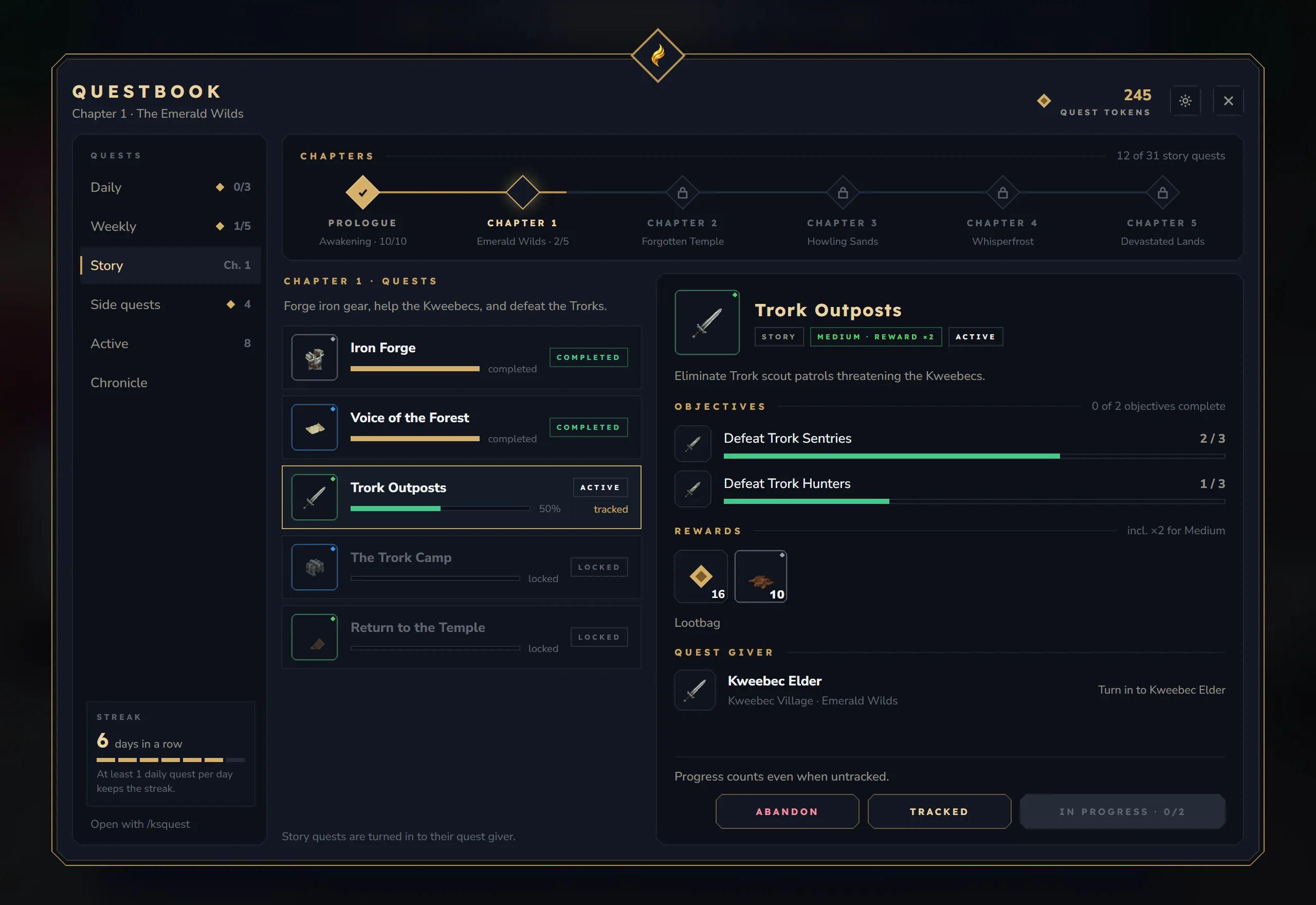
New
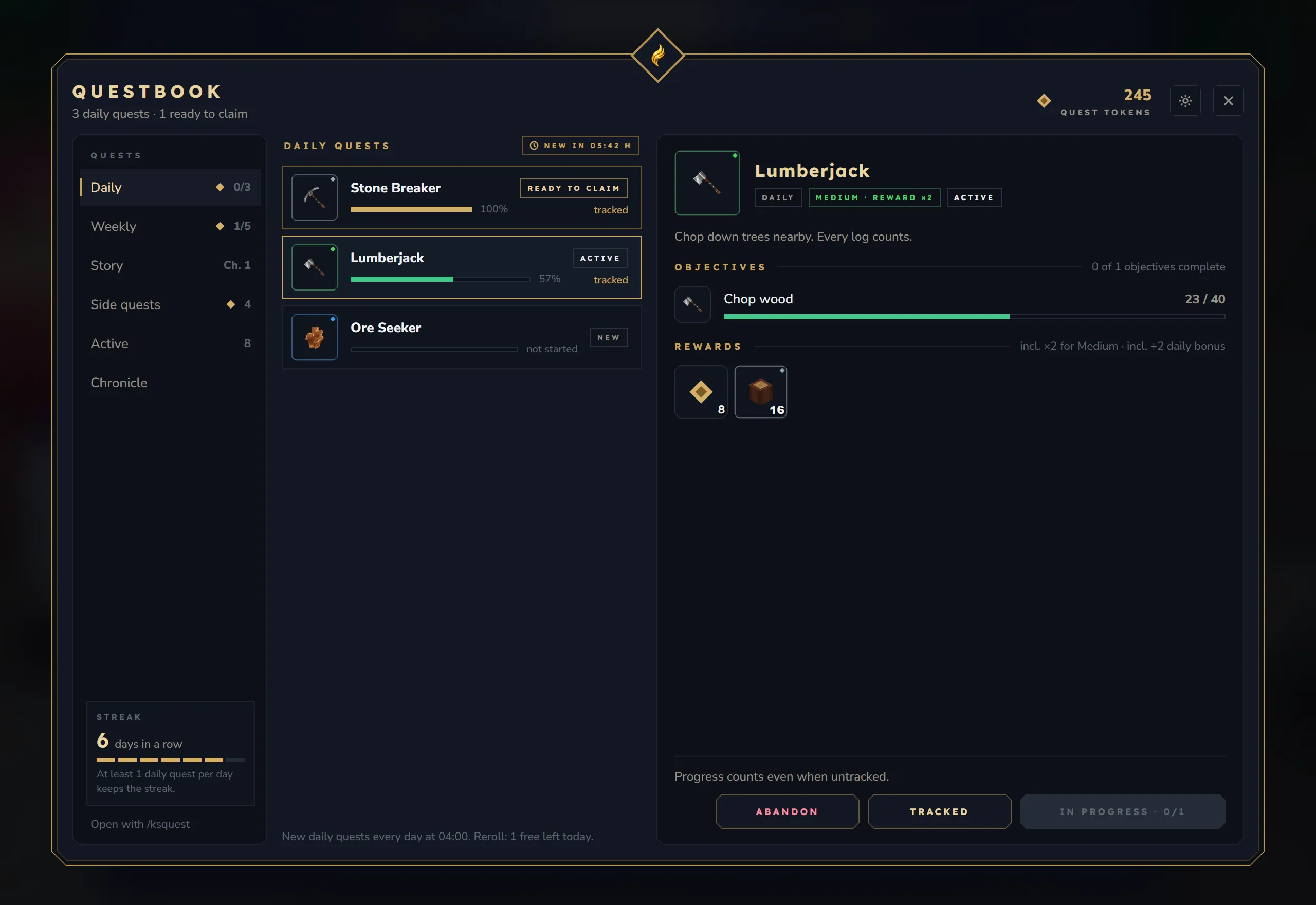
- The Questbook (
/ksquestor the QuestBook item): tabs for Daily, Weekly, Story, Side quests, Active and Chronicle, your token balance and reset countdowns. The detail panel shows each objective with its own progress bar, the rewards as item slots with rarity rings and the game’s tooltips, the quest giver and the buttons for the quest’s state. - Story chapter map with finished, current and locked chapters, and a Chronicle with lifetime totals and every completed quest by day.
- Windows inside the book for the settings, for abandoning a quest (it warns about items already handed in) and for rerolling (price, free rerolls and your balance before you confirm).
- Quest giver window: a greeting, a strip for quests ready to claim, and every offer as a card with objectives, rewards and the reason it is still locked.
- Delivery confirmation: a quest giver shows exactly which items it takes and takes them only after “Hand in”, and only what is still missing.
- New tracker HUD in the pet HUD style with a ready-to-claim notice. Its options are in the book and in
/kssettings. - Quests admin window (
/ksquestadmin panel, the/ksadminhub or theshowcase_questsNPC). Everything is a draft until “Save”:- a quest list with search, filters and translation state; new quests from 6 templates, duplicate, delete with restore, and rename with “Used in”;
- a quest editor with basics, texts per language, 20 objective types, 11 reward types with their final values, flow and triggers, NPC phases, a player preview and “Test for me”;
- a check view with about 75 rules, each with “Go to”;
- chapters with the story path, quest chain and unlock rules, and daily and weekly pools with weights, chances and a rotation preview;
- a players tool for online and offline players with 11 actions (queued for offline players, logged and revertible) and a read-only “View questbook”;
- statistics, settings in four tabs, and NPC profiles with a dialog node editor and “Test dialog”;
- every save makes a backup (the last 20 are kept), writes atomically and rolls back on failure, with “Undo last save” and a “Save anyway?” check when another admin changed the same entries.
- Dialogs (with Core): the dialog actions “Start quest” and “Set fact”, the conditions
factandquest_ready, and “Open in Core’s dialog editor” from an NPC profile. Core’s NPC management lists everything Quests links to an NPC before it is renamed or deleted. - Options whose defaults keep the old behaviour: a real quest streak, the all-dailies bonus, free rerolls per week, reset announcements and a repeat cooldown for repeatable quests.
/ksquestadmin claimis new,setstreak,resetdailyandresetweeklywork, andpermissionprerequisites are checked.
Changed
- Rewards that never arrived are paid: achievement and title rewards (they always turned into 25 tokens) and XP rewards written as
amount. - Daily and weekly resets run at the configured time and time zone, survive daylight saving changes and apply after
/ksquestadmin reload. - The NPC “complete quest” action claims normally, so objectives and handed-in items are checked.
- Quest data, timers and HUD updates run on the player’s world thread, and the autosave never writes an older snapshot over newer data.
- Permissions: every way into the admin window needs
ks.quest.admin. Command rewards and NPC profile actions that run as the console also needks.core.admin.dialog.console, including web editor imports. - Exports go to
exports/. Old panel exports incustom/, which overrode later changes on every restart, are moved once toexports/legacy-panel/. quest_token_shop.jsonkeeps your edits; a newer shipped version replaces it only with a backup.- New installs get a production config, and an untouched 1.12 test config is migrated.
- Texts in all 9 languages, including the generic objective texts; quotes and dates follow the reader’s language.
Fixed
- Dailies and weeklies no longer stay “completed” forever, and a reset no longer abandons quests that are ready to claim.
- Rerolls are only charged when another quest was found and the payment succeeded.
- Achievement prerequisites and rewards work with the Achievements mod.
notifications.progressThreshold = 0froze the server thread.- Book buttons could act on a different quest after the list changed (for example “Abandon”).
- Claiming a quest with
consumeItemschecks the items first; nothing is taken when they are missing. - Item and lootbag rewards that do not fit wait as pending rewards and are never handed out twice.
- Corrupt player files are backed up to
players_corrupt/instead of being replaced, and story facts are saved. - Wait objectives survive relogs,
level_reachedis checked after level-ups, group objectives from older data count again, and triggers apply their facts. - The story map no longer disconnects players after a reload, and quest givers walk again after their window closes.
- A broken admin file,
config.jsonor language file is never replaced silently; the chapter editor no longer drops rewards; deleted shipped NPC profiles stay deleted. - Actions queued for an offline player are no longer lost when the player leaves right after joining.
- “Back” from an NPC profile always returns to Core’s NPC management.
Achievements 3.0.0 – 3.1.1-beta
Section titled “Achievements 3.0.0 – 3.1.1-beta”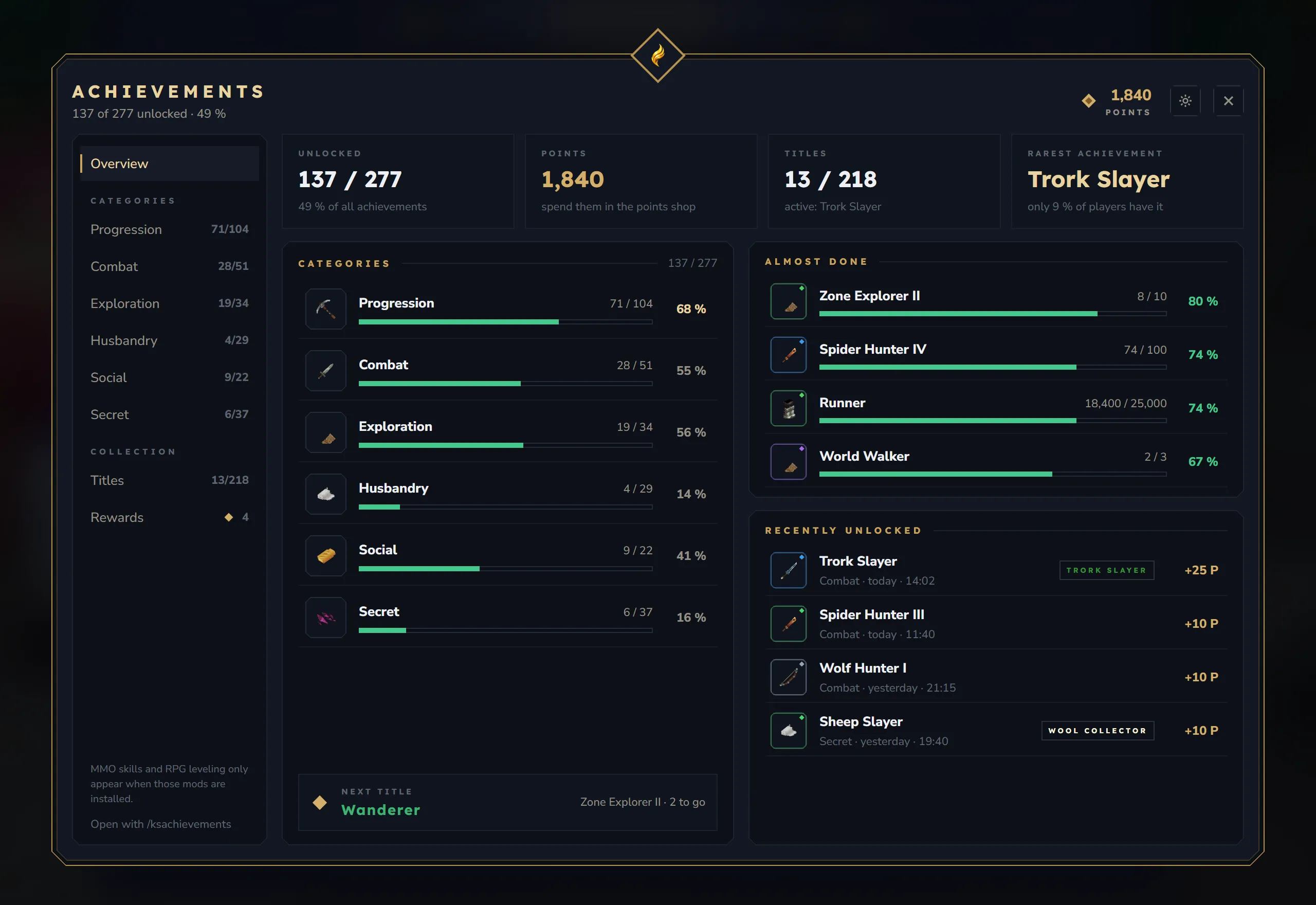
New
- The achievement book: one window for
/ksachievements,/kstitles,/ksrewardsand the Achievement Book item. Overview tiles, categories with search, filters and sorting, stage chains as one line with a stage path, and a detail panel with progress, requirements, rewards with item tooltips and the title. - Rarity and server firsts: “14 % of players” for each achievement and the first player who got it (
display.showRarity,display.showServerFirst). - Hidden achievements stay ”???” until they are unlocked, with optional hints.
- Titles tab with chat and nameplate previews, and a Rewards tab: collect one reward, the rest or all of them, open lootbags and see what you collected recently. After joining, a hint says when rewards are waiting.
- New tracker HUD with up to 3 achievements and one unlock toast that bundles achievement, points, title and reward. Tracker settings are in the book and in
/kssettings. - Points per difficulty can be configured; the defaults are the old values.
- New triggers: dungeon runs (
dungeon_complete_any,dungeon_complete_<biome>,dungeon_rarity_<rarity>,dungeon_no_death), wildcards in targets (Snake_*) anditems_collected(the most of an item held at once). - With ks-nameplates installed, the active title is shown as a nameplate tag.
- Achievements admin window (
/acadmin panel, the/ksadminhub or theshowcase_achievementsNPC) with drafts until “Save”, backups (the last 20 are kept), rollback, “Undo last save” and a conflict check:- edit standard achievements without copying them; players keep their progress, and “Reset to default” removes the change;
- a list with chains, filters and templates, and “Add stage” for chains;
- an editor with texts per language, a trigger catalog with abuse hints, prerequisites, title, rewards, an impact preview and every reference before renaming or deleting; renaming can keep player progress;
- a check view, categories, titles, and disabling achievements without losing player data;
- a players tool for online and offline players (queued, logged and revertible), statistics and five settings pages.
Changed
- One notification per unlock, and every text in the player’s language.
- All lootbags come from one registry in Core.
- Revoking an achievement takes back its points and the rewards that were not collected yet.
- MMO-Skills and RPG-Leveling achievements only show when those mods are installed.
- Several settings that had no effect now work, for example
notifications.showRewardsInBanner,trackerHud.positionand thetracking.*switches. - Permissions: every admin path checks
ks.achievements.admin. Command rewards that run as the console needks.core.admin.dialog.console, and new command rewards run as the player. /acadmin grantandrevokego through the players tool, are logged and work for offline players.- The default achievements file moves to version 4; the old file is backed up.
Fixed
- Item rewards with a full inventory are no longer duplicated, and lootbags are rolled once and saved.
- A broken player file falls back to its
.bakcopy; saves are atomic, and rewards are saved right after collecting. - Editing while
custom_achievements.jsonhad a syntax error deleted the other custom achievements. Unreadable files are never overwritten now. - Wood achievements count chopped logs, “any block” no longer counts twice, playtime no longer loses about 10 %, and
welcomecan be reached. - Hidden achievements no longer leak through chains, the search or tracking.
- The showcase NPC and the
/ksadminhub always checkks.achievements.adminbefore opening admin tools. - An achievement whose id equals a trigger type no longer takes over that trigger’s counter.
- The item picker in the admin window opens as a framed window.
Achievements that could not be unlocked before because of these bugs (wood, wildcard, items_collected, welcome, Dungeon Diver) can now unlock, with their titles, points and rewards.
Info Hub 3.0.0 – 3.1.1-beta
Section titled “Info Hub 3.0.0 – 3.1.1-beta”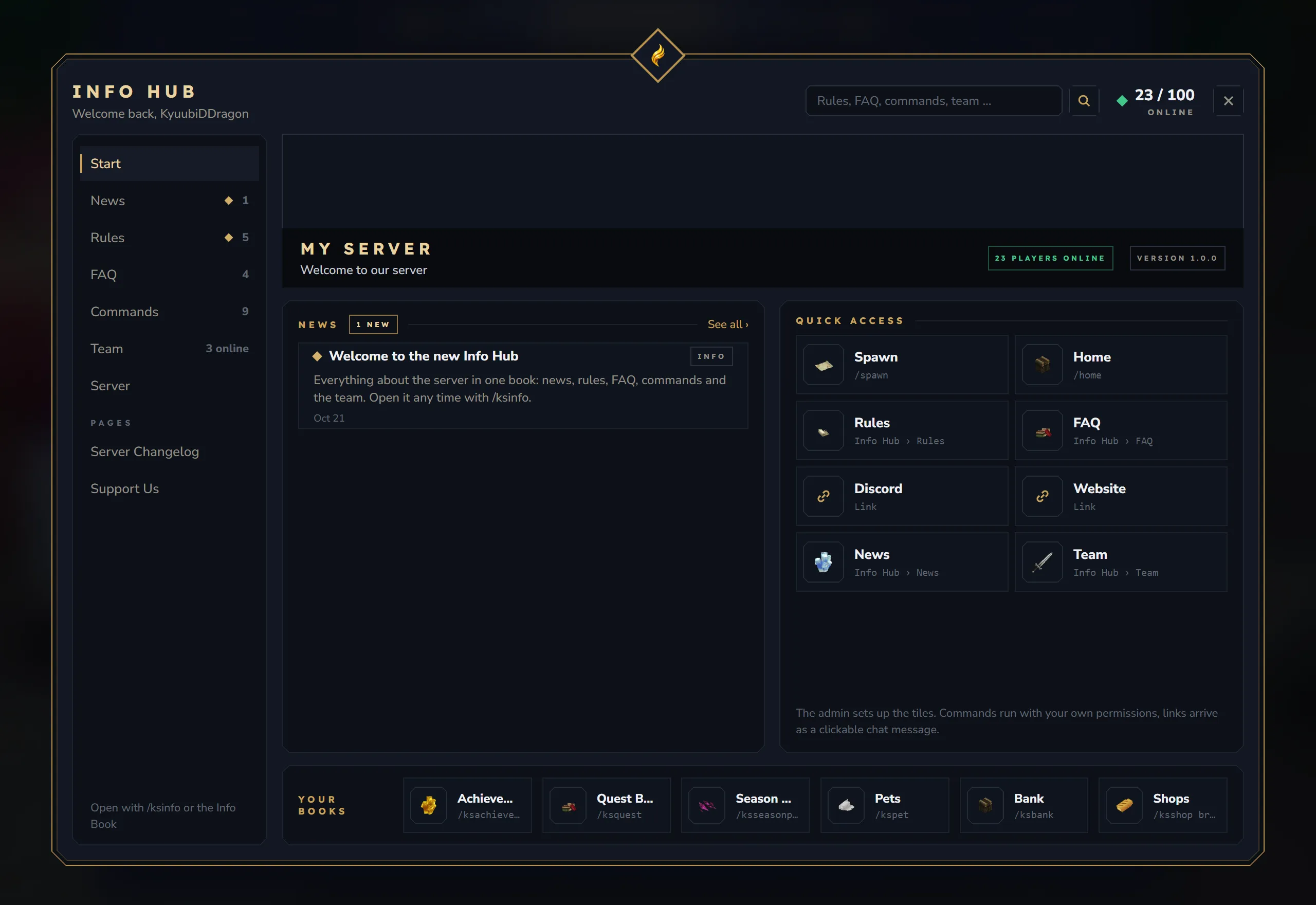
New
- The Info Hub book (
/ksinfo, the Info Book item, or section commands such as/rulesand/faq) replaces the old overlay and its 13 pages: Start, News, Rules, FAQ, Commands, Team, Server, custom pages, Search and all tiles in one window. - News with types, pinned entries, expiry dates and links into the book; unread news are marked. An optional chat hint after joining (
news.joinHint, off by default). - Rules with severity chips and an optional rules confirmation (
rules.requireAcknowledgement, off by default) that asks again when a rule changes and marks what changed. - FAQ with expandable answers and command chips, a command browser with usage, aliases, sub-commands, “To chat” and “Run”, Team with online counts, and Server with live numbers and the online record.
- Custom pages with simple markup and paging, and a search across rules, FAQ, commands, news, pages and team that opens the exact entry.
- Quick tiles with icons and jumps inside the book; tiles with placeholders ask for the values first.
- “Your books” links to the other installed KS books.
- Every text can be translated per language in the content files.
- Optional: open the hub once on a player’s first join (
onboarding.openHubOnFirstJoin, off by default). - Info Hub admin window (
/ksinfoadmin panel, the/ksadminhub or theshowcase_infohubNPC): boards for News, Rules, FAQ, Pages (with a live preview), Tiles, Team and Server, plus settings for the book, the join message, commands and general options. Texts per language with “missing” and “outdated” markers, a check view with about 50 rules, and saving in the background with per-entry merging, backups (the last 20 are kept), rollback and “Undo last save”. Rule edits can be marked “Correction only” so players do not have to confirm again.
Changed
- New installs get English default content with German translations and ready-to-use tiles.
- The
helpalias is no longer registered; the game’s own/helpalways wins. banner.enabledworks.- Permissions:
ks.info.admin(or the oldinfohub.admin) for every admin path. Tiles that run as the console needks.core.admin.dialog.consoleand cannot use placeholders. - The server language is set in
/kssettings. Info Hub still runs without Core.
Fixed
- Broken config JSON is never overwritten: the file is kept as
.corrupt-<time>and the defaults are used until it is fixed. Writes are atomic, and unknown keys are kept. - A trailing comma in
quickaccess.jsonno longer stops the mod from starting. - A failed admin save is reported instead of looking saved, two admins no longer overwrite each other, and fixing a typo no longer deletes all translations of a text.
- Custom list pages no longer stop after 5 entries; news expiry, category permissions and priorities are respected; a literal
&stays readable. - Every click in the book is checked on the server, hidden pages stay hidden, and team avatars are validated before they reach players.
- Default icons that do not exist in Hytale are replaced, and the unread news hint shows a readable ”•”.
Companions (Pets) 1.9.0 – 1.12.1-beta
Section titled “Companions (Pets) 1.9.0 – 1.12.1-beta”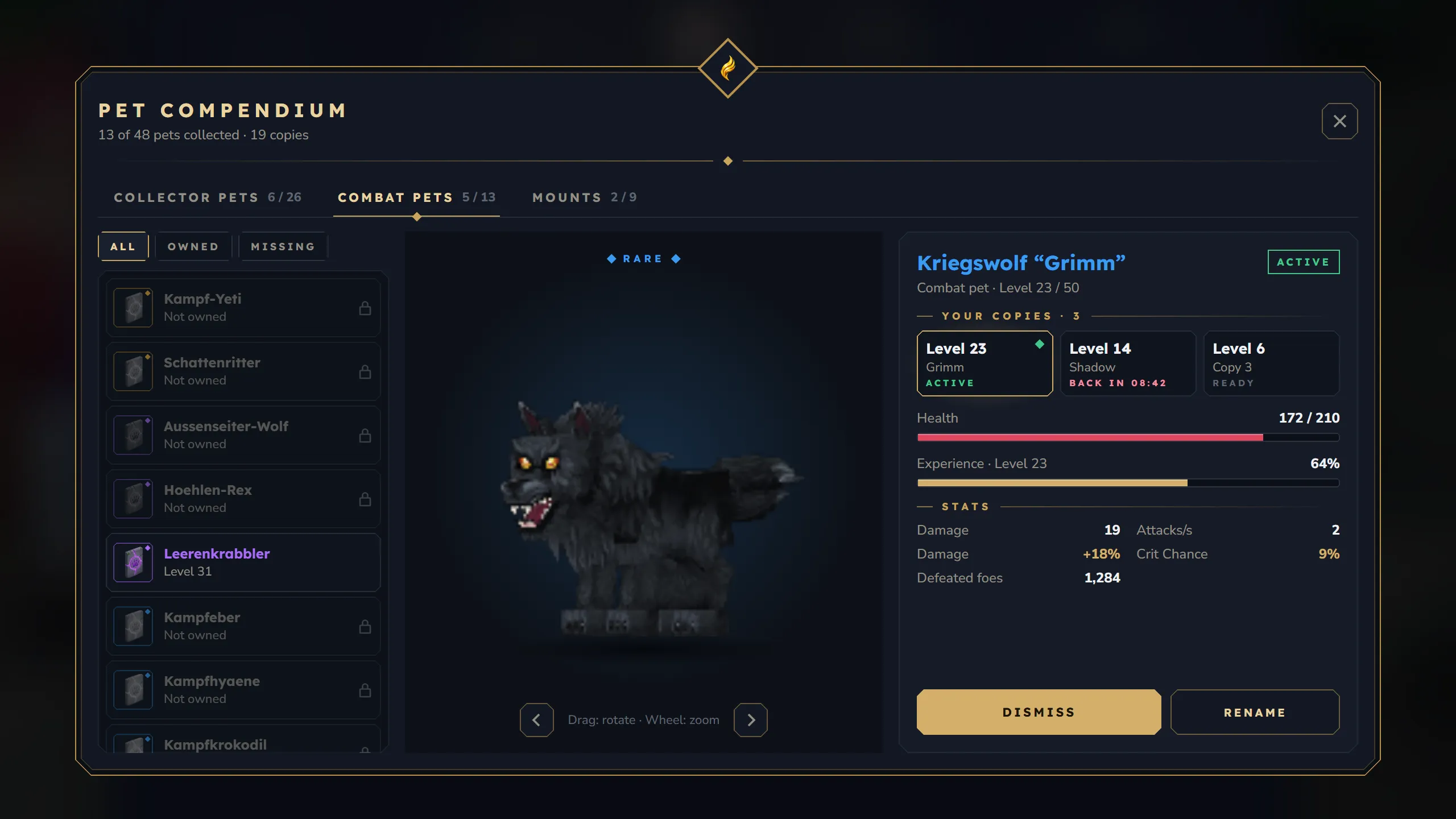
New
- Pet Compendium (
/kspet): collector pets, combat pets and mounts with filters, a live 3D preview you can rotate and zoom (nothing is spawned in the world), details, “How to get it”, and every copy you own with summon, dismiss, rename and revival scroll. The classic menu stays available withui.compendium: false. - Reroll dice in the compendium: reroll one stat with a reroll scroll or all stats with a Reroll All Scroll. A preview shows the value after the next level-up, and locked stats show when they unlock.
- New pet HUD with a card per active pet; a defeated combat pet shows its recovery countdown. The pickup filter has the same look and opens for one specific copy.
- Pet admin window (
/kspetadmin): create pets with exact stats, manage the loot-luck blacklist with quick picks and real hit counts, and look after online players’ pets (level, XP, reroll, max out, revive, replace a lost item, remove). /kspetadmin restoregives a player a replacement for a lost egg, Battle Rune or Mount Horn with its level, stats and name. Older copies of the item stop working, so a restore cannot duplicate a pet.- Options, off by default:
maxPetsEverywhere(the pet limit also stops hatching and admin creation) andcombatBalance.levelUpCombatStatsOnly.hudPositionandhudLayoutnow set the HUD default for new players. - A tile in the
/ksadminhub. With KyuubiSoftAPI 2.1, a status page in the KyuubiSoft Panel shows active companions per world and warnings, offers “Reload configuration” and “Remove orphaned pet NPCs”, and sends pet events to panel webhooks.
Changed
/kspetadminwithout arguments opens the admin window, and all of its replies use the admin’s language.- Core and KyuubiSoftAPI are optional; Pets runs without them.
- All nine languages have every text (Spanish, French, Italian, Polish, Portuguese, Russian and Turkish were missing 143 of them).
Fixed
- Removing a pet removes it: every copy of its item stops working and its database entry is deleted, so it cannot come back.
- Death protection works in worlds that drop everything on death, with or without Graveyard; there, pet items no longer end up in gravestones.
- Opening the pet menu could lose recent XP and reset a combat pet’s HP.
- The item-loss guards did not recognise current pet items, so moving any pet item out of the inventory sent the active pet home.
- Summoning through a Battle Rune applied no stat buffs,
/kspet combatshowed the collector pet, and/kspet mountcould summon the wrong mount. /kspetadmin addxpcould change a different pet, and admin commands failed or did nothing for players outside the default world.- The old loot-luck quick toggles matched almost nothing; a banner offers to replace them.
- Creating a pet for a full inventory no longer leaves a pet without its item, and the pet menu respects disabled modules.
- Readable arrows and corrected texts in several languages.
Season Pass 2.0.0 – 2.0.3-beta
Section titled “Season Pass 2.0.0 – 2.0.3-beta”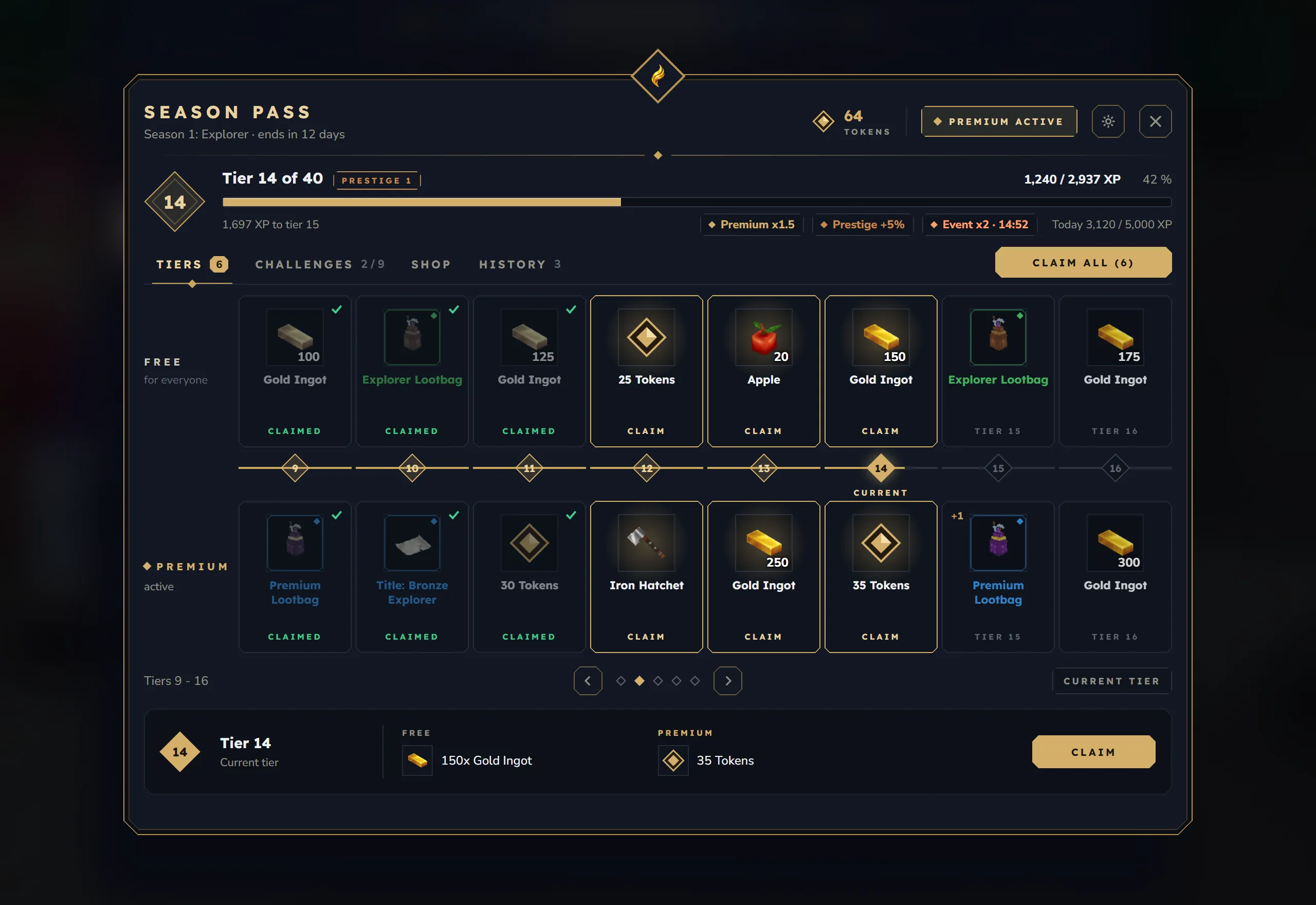
New
- The Season Pass book with Tiers (8 per page, every reward of a tier visible, “Claim all”), Challenges with real reset countdowns, the Shop and your History. The header shows the XP bar, today’s XP toward the cap and every active XP boost.
- Premium, settings and prestige open as windows inside the book. The premium pass can be bought there, and prestige asks for confirmation and shows what is reset and what is kept.
- Progress HUD at the right edge with tier, XP, tokens and waiting rewards, plus a short toast on tier-ups and finished challenges. Its options are in
/kssettings. - Quests and achievements give pass XP when KyuubiSoft Quests or Achievements is installed.
- A rebuilt admin panel: every reward per track in the tier, shop and prestige editors, warnings for unknown item ids and for challenge types nothing counts, season statistics and confirmations.
- New option “Keep leftover XP” (
tokenXpCarryOver, off by default). config.jsonkeys that were never read now work:timezone,debug,enabled(pauses the pass) andtrackerHudEnabled.
Changed
- Season end: unclaimed rewards that do not fit wait until there is room, and players who were offline get their item, lootbag and command rewards on their first join.
- The daily XP cap resets at the day boundary for players who stay online.
- Permissions:
ks.seasonpass.adminalone is enough for/spadmin. Command rewards run as the console and needks.core.admin.dialog.consoleto be added, changed or removed, in the admin window and in web editor imports. - New installs get a default season with a real premium currency and Core’s lootbags.
Fixed
- Bonus tiers could be claimed twice.
- XP booster offers took tokens and granted nothing.
- Five item ids of the default season did not exist in Hytale; season files on a server are corrected when they load.
- A full inventory destroyed rewards. Claims, shop purchases and prestige now check free space first, and prestige waits until every reward is claimed.
- Rewards that cannot be handed out wait in a queue and arrive automatically. The 22 lootbag rewards of the default season work again (with Core 2.7.4 or newer).
- Adding or deleting tiers in the admin panel moved players’ claims to other tiers.
- Seasons were archived under the wrong name in the history.
- Challenges nothing counts are no longer rolled; the XP chat, tier-up and challenge settings work; shop resets, countdowns and the season currency after a reload are correct.
Player Shops 2.0.0 – 2.0.2-beta
Section titled “Player Shops 2.0.0 – 2.0.2-beta”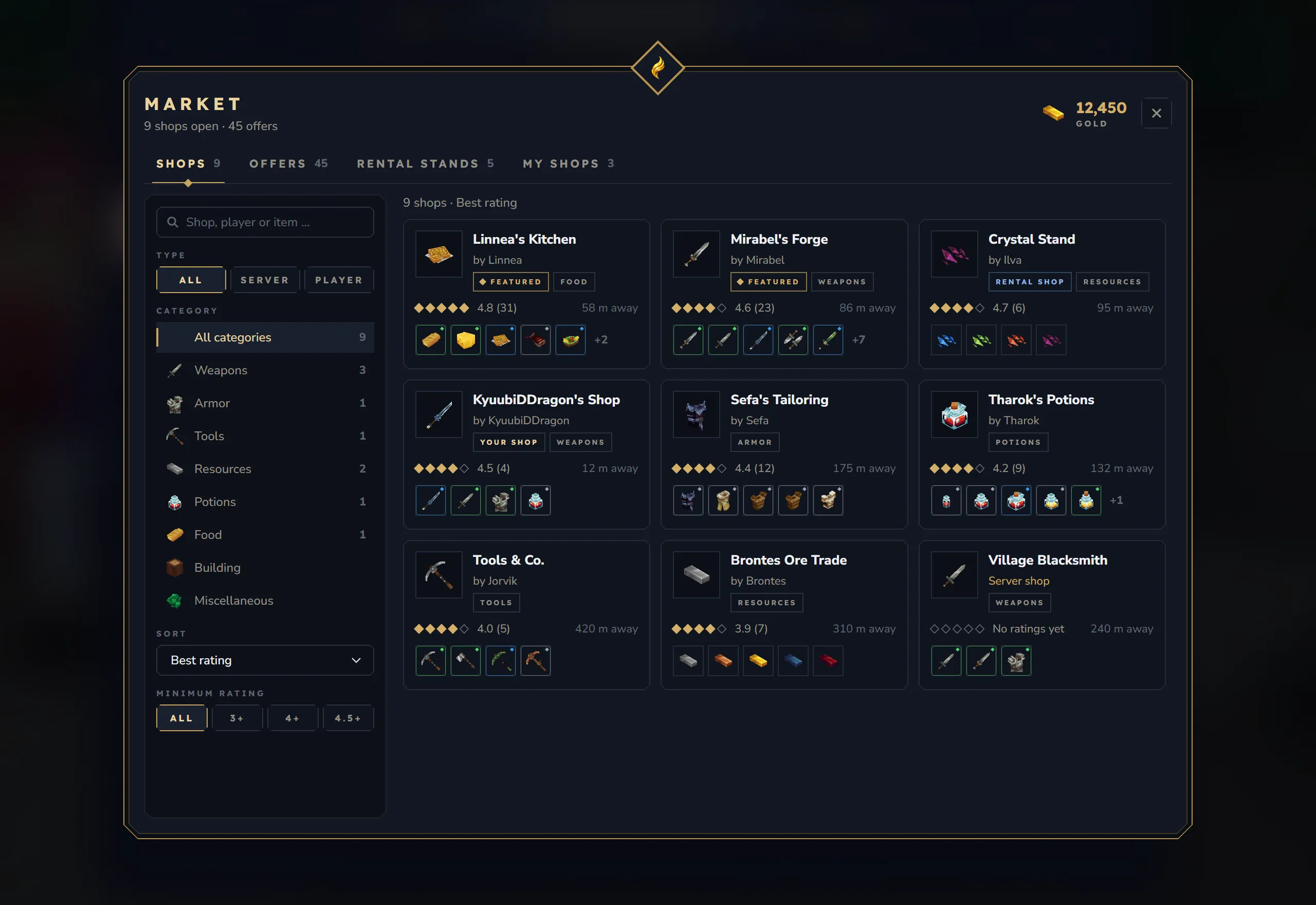
New
- Marketplace (
/ksshop) with Shops (filters, sorting, search), Offers (every offer of every open shop, with direct buying), Rental stands (fixed price and auctions with a live countdown and bid history) and My shops. - Shop window with Buy, Sell and Reviews. The quantity limit (stock, wallet, max stock, daily quota, buyback pool) is shown. Reviews have 1–5 stars and a comment.
- Shop editor with drag and drop between your inventory and a 45-slot shop grid, tabs for offers, shop settings, till and history, and pack-up with a confirmation.
- Mailbox to collect purchases, earnings and returned stock (only what fits is taken) and a list of your sales.
- License dialog to open a new shop or set a packed one up again.
- Admin panel (
/ksshopadmin admin) with settings, all shops, rental stands, transactions, statistics and the blacklist, and a tile in the/ksadminhub. - Options whose defaults keep the old behaviour: purchases straight into the inventory, combined sale earnings, buyback withdrawals, and whether rental shops count toward the shop limit.
Changed
- The rental, rating and notification pages are now part of the marketplace, the shop window and the mailbox.
- Clicking a merchant opens the editor for its owner and the shop for everyone else.
- A purchase is refused with “the offer changed” when item or price changed after the window showed it.
- Every language is complete.
Fixed
- Purchases, buyback sales, editor moves and saves run under one lock per shop, which closes several ways stock or buyback money could be used twice or lost.
- Pack-up, rental end and admin delete close and empty the shop first. Failed mailbox writes and database errors no longer lose stock or gold, and mail is marked as claimed before it pays out.
- Buyback refuses damaged items and items with different metadata.
/ksshop deleteand the unpaid-rent delete send stock and till to the owner’s mailbox instead of destroying them.- Rental stands in other worlds: the shop and its merchant go to the stand’s world, and merchants are removed in their own world.
/ksshop transferchecks the receiver’s shop limit and refuses rental shops; a transfer whose save fails reports “Transfer failed” and keeps the old owner./ksshop ratefollows the cooldown and the rating switches and keeps the comment, and shop events fire only once.- Readable arrows and minus signs.
Lootbags 2.0.0 – 2.0.1-beta
Section titled “Lootbags 2.0.0 – 2.0.1-beta”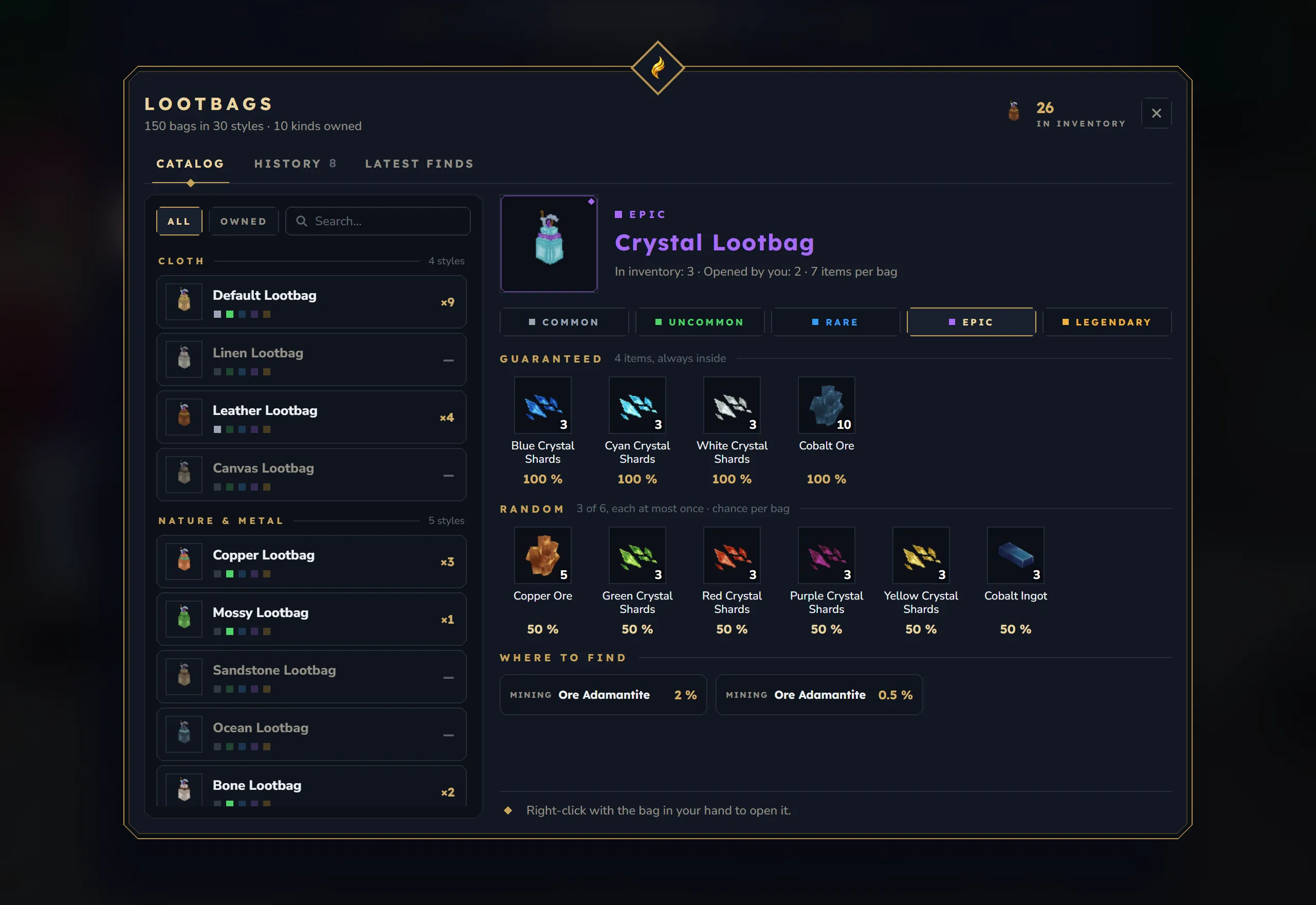
New
- Catalog (
/kslootbagsor a placed crate): all 150 bags as 30 styles with up to five tiers, search, an “Owned” filter, the real chance of every item per bag, and where each bag drops (showDropSources). - History (your record and your last 50 openings) and Latest finds (the best item of the last 30 openings on the server).
- New opening window with every item, guaranteed and drawn items apart, items that landed on the ground, “View in catalog” and “Open another”.
- Rebuilt admin panel with a bag editor with live chances, drop rules, giving bags, server statistics and settings; edits stay drafts until saved.
- Blocks placed by players drop no lootbags (
ignorePlacedBlocks, on by default). - Names and texts in 9 languages.
Changed
- KyuubiSoft Core is now a required dependency; opening bags always needed it.
- Bag names come from the translations; names an admin set are kept.
- Player data is written atomically, and
/lbadmin langrespects the server’s “players may choose” switch.
Fixed
- The catalog showed only 24 of the 150 bags, the opening window at most 8 items, and the chance ignored how many items a bag draws.
/lbadmin reloademptied the drop tables.- Item ids that do not exist in Hytale and a drop rule pointing at a missing bag are mapped to real ones.
- Players could see texts in another player’s language.
- Admin edits of items and the duplicates switch were not saved; the admin panel opened from the Core menu checks
ks.lootbag.admin. - A bag with nothing to give is no longer used up, and right-click opening checks
ks.lootbag.user.use. - Uncommon Easter bags can be given, dropped and opened; old Easter items keep working.
/lbadmin givehands out bags only and drops what does not fit at the player’s feet.- Turning “Lootbags active” off also closes the catalog.
Bank 2.6.0 – 2.6.3-beta
Section titled “Bank 2.6.0 – 2.6.3-beta”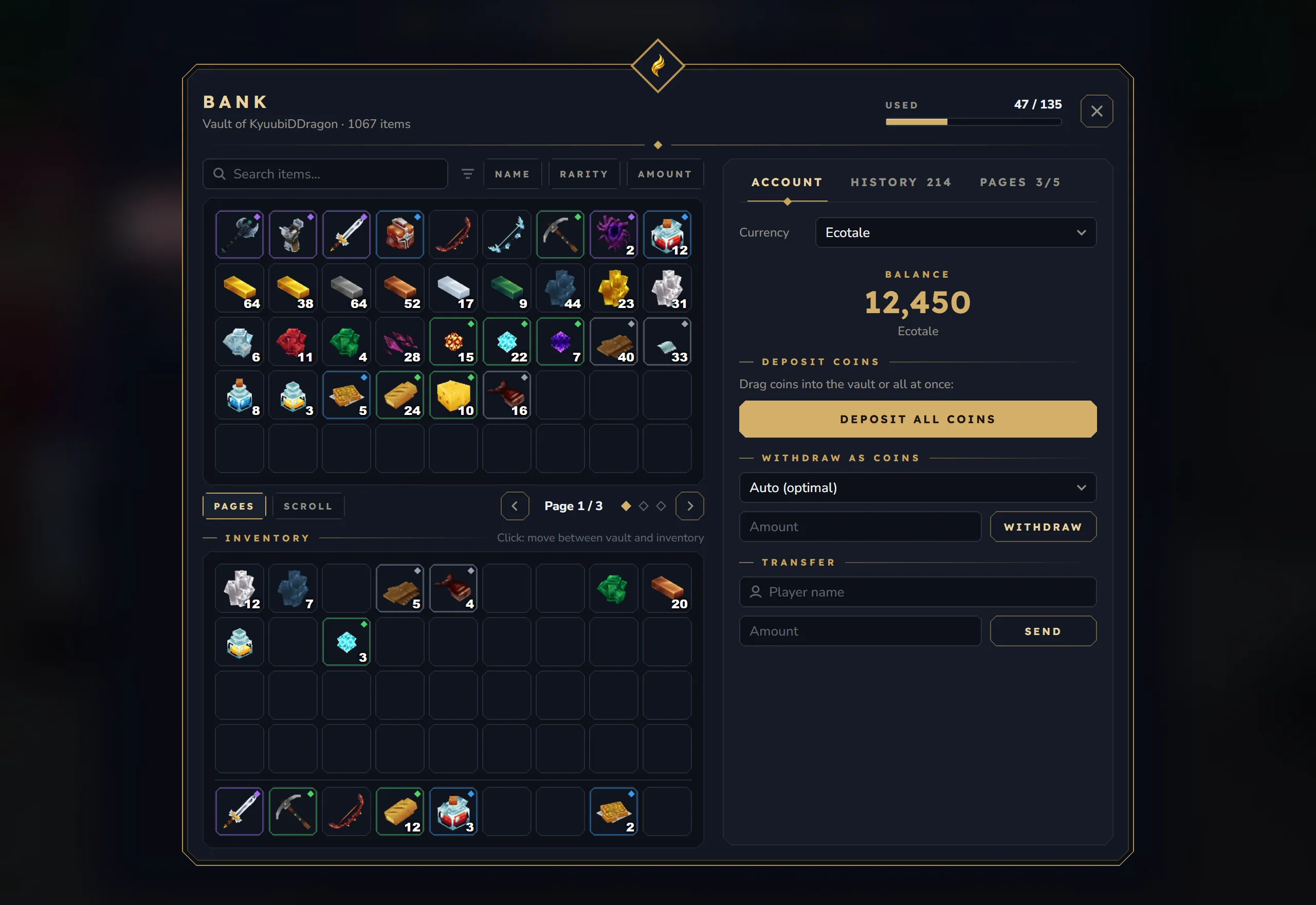
New
- One bank window instead of three: search, sorting by name, rarity or amount, the 9 × 5 vault with page or scroll view and a pager, your storage and hotbar, and rarity rings on every slot.
- A side panel with Account (balance, coins, transfers), History grouped by day and Pages with every tier and its price.
- The search finds item names in your game language and your
/kslanglanguage, not only item IDs. - A restyled admin panel (
/ksbank admin) with a navigation column and delete buttons, and a tile in the/ksadminhub.
Changed
- One admin node,
ks.bank.admin. The oldbank.adminis no longer used. - The money permissions in
config.jsonwork (permissions.upgrade,transfer,withdraw,deposit), and so dohistoryMaxEntriesandupgrade.enabled. - The balance shows the currency name, and typed amounts accept thousands separators.
- The bank and its commands work without KyuubiSoft Core.
- The bank’s item texts moved to their own
bank.langfile.
Fixed
- The 60-second auto-save works, and a server stop saves open banks.
- Changing
slotsPerPageno longer deletes items: pages are fitted, and items without room wait in the player’s file. - Items from removed mods stay stored and come back when the mod returns.
- Admin changes (
/ksbank give, resets, page changes) are no longer undone by an open bank window. - A bank page that cannot be read is locked instead of being saved empty, and an unreadable bank file is kept as a copy.
- Withdrawing as coins keeps the remainder in the account, and failed transfers are refunded.
- Every admin entry point checks
ks.bank.admin, and admins viewing another player’s bank cannot move that player’s money. - Rank pages are checked correctly on servers without LuckPerms.
- Wildcards in the restriction list work, and click transfers and drag and drop respect the list.
- An unreadable
config.jsonno longer stops the bank and is not replaced. - History entries show ”›” instead of ”?”.
Graveyard 2.0.0 – 2.0.1-beta
Section titled “Graveyard 2.0.0 – 2.0.1-beta”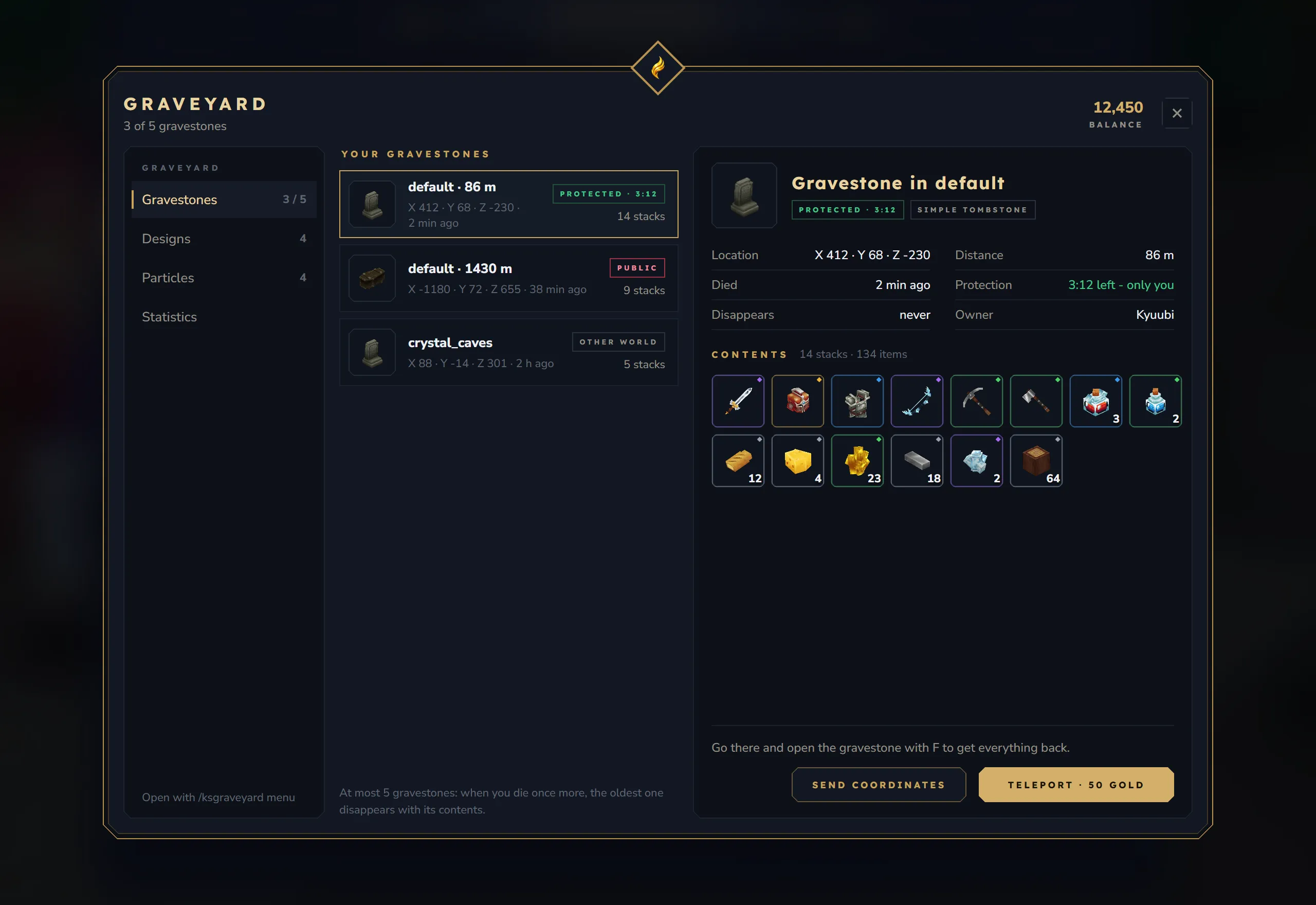
New
- New menu (
/ksgraveyard menu) with your gravestones and their full contents, designs, particles and statistics. - New grave window with the owner’s head, the contents with rarity rings and item tooltips, and a memorial view while someone else’s grave is still protected.
classicLootLookbrings back the old stone window. - Premium designs and particles can be bought with the server economy (
purchaseWithEconomy, on by default). - Teleport to your gravestone in the same world (
allowTeleportToGravestone, off by default, withteleportCost). - New options are written into an existing config on start.
Changed
- Admins need only
ks.graveyard.admin.
Fixed
- Item data survives death: enchantments, pet eggs and runes, soulbound stamps and other item data stay intact.
- Gravestone contents can no longer be duplicated or taken early: only one player at a time can open a grave, “Loot all” claims the grave first, and protected graves are checked on the server.
- Partly looted gravestones and grave windows still open at shutdown are saved.
- Removing a gravestone in a world that is not loaded no longer clears a block in the default world.
- Admin commands, particles and
admin_tpwork in every world. captureMode: "ALL_ITEMS",showWorldMapMarker: falseanditemLosschanges on reload work.- The statistics count deaths, lost and recovered items correctly.
- An unreadable
graveyard.jsonis no longer overwritten, and every gravestone gets a block that opens. - The owner’s head no longer shows as a red X, and the menu and command texts are translated.
Item Control 2.5.1 – 2.5.4-beta
Section titled “Item Control 2.5.1 – 2.5.4-beta”New
- The admin hub’s command block list marks console blocks with “[Console]”.
Changed
- Command blocks that run as the console need
ks.core.admin.dialog.consoleto be created, changed, switched to console or removed; without it, an indestructible console block cannot be broken. New command blocks run as the player. - The
/ksadminhub tile shows the real version, and the language system follows Core.
Fixed
- The compare window (
/ksitem compare) shows its item icons again and colours higher and lower values green and red. /ksitem module list,/ksitem dropsand the item browser show readable markers and arrows.- Startup no longer stops with an older Core installed.
Dungeons 4.4.1 – 4.4.3-beta
Section titled “Dungeons 4.4.1 – 4.4.3-beta”Changed
- Built for the final Hytale 0.7.0 release.
Fixed
- Void Sanctum spawns its full mob pool again. Update 7 renamed two vanilla NPC roles; the bundled biome and biome files already on your server are mapped automatically.
- Achievement triggers arrive: dungeon runs count for KyuubiSoft Achievements (Dungeon Diver I/II). Dungeons still runs without Achievements.
- Chat headers, map stone results and the combine hint are readable, and
/ksdungeon browseprefabsmessages are coloured again.
Smaller mods
Section titled “Smaller mods”- ChatPlus 1.3.1 – 1.3.4-beta: a Chat page in
/kssettings(speech bubbles, mentions, focus mode, timestamps, item links, RP and private messages). Messages with placeholders show the full sentence again (private messages,/me,/do, mutes, channels and many errors showed only the inserted value)./kschatand/kschat settingsopen in every world, and web editor language edits only accept plain language codes. - Claims 1.3.1 – 1.3.3-beta: claim messages with placeholders show the full sentence again (the entry notification, claim info, trust, flags, transfers and more), and the language follows Core’s shared settings.
- Weapon Mastery 1.4.1 – 1.4.4-beta: the language system follows Core, web editor language edits only accept plain language codes, and a reload leaves no stale web editor entry.
- VoiceHub 1.2.4-beta: rebuilt for the Hytale 0.7.0 release. VoiceHub docs
- Nameplates 1.2.1 – 1.2.2-beta: nameplates of players outside the default world update on their own world, without error lines in the log or holding up the default world, and the first nameplate after joining is retried until the player is in a world. Nameplates docs
- Mob Control 1.3.1-beta:
cullOnLastPlayerLeaveculls the world that is closing, not the world the players were sent to. - Ore Regeneration 1.3.1-beta: rebuilt for the Hytale 0.7.0 release.
How to give feedback
Section titled “How to give feedback”This is a beta, and your reports decide what goes into the release. Please reply in the beta thread on our Discord and include:
- the mod and its version, for example “Quests 2.1.3-beta”,
- what you did, what you expected and what happened instead,
- any errors or warnings from the server log around that moment, ideally as a file or a paste.
Screenshots help a lot with window and HUD problems. Thank you for testing!