
Custom Designs
Version: 2.0.1
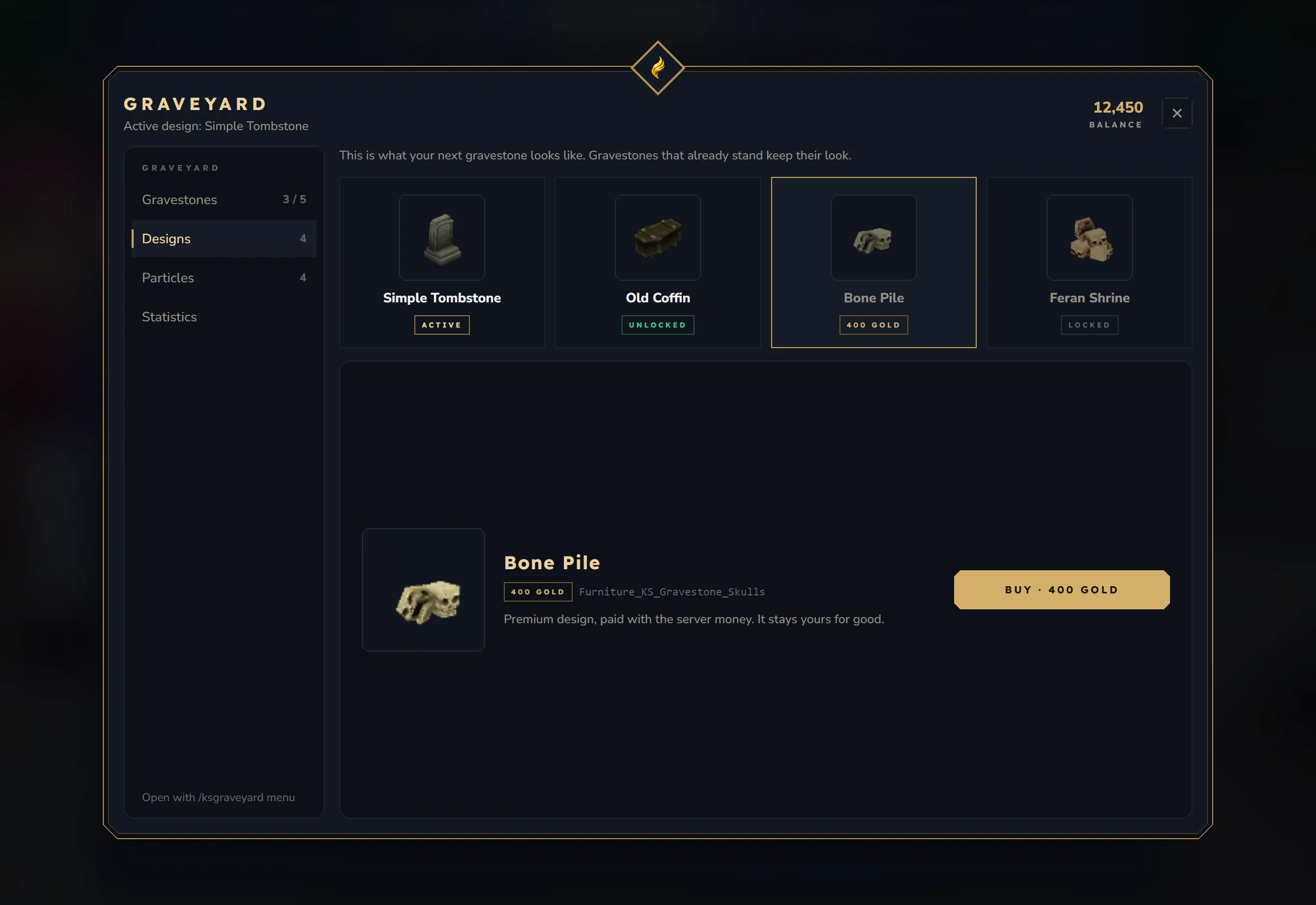
A design decides which block a player’s gravestone uses. One design is built in, “Simple Tombstone” (default). You add more by putting JSON files into mods/kyuubisoft_graveyard/custom-items/. Each file turns a vanilla furniture model into a gravestone block that players can choose in the menu.
How it works
Section titled “How it works”- On every start the plugin reads the JSON files in
custom-items/and buildsmods/KyuubiSoftGraveyard_Designs.jar: a small asset pack with one gravestone block per file. The jar is only rebuilt when a JSON file is newer than the jar. - The server loads that jar at the next start. Only then do the new blocks exist.
- Each file also gets an entry in
designsingraveyard.json, so the design appears in the Designs tab.
That is why a new or changed design needs two restarts: the first builds the jar, the second loads it.
Add a design
Section titled “Add a design”- In
mods/kyuubisoft_graveyard/custom-items/, copy_template.jsonand name the copy after your design, for exampleEmeraldStatue.json. Files starting with_are ignored, and files in subfolders are not read. - Edit the file:
{ "Parent": "Furniture_Temple_Emerald_Statue", "TranslationProperties": { "Name": "Emerald Statue Gravestone", "Description": "A radiant emerald statue honoring the fallen." }, "Premium": true, "Price": 500}- Restart the server. The log shows:
[Graveyard] Custom designs JAR generated/updated![Graveyard] RESTART the server to activate new designs.- Restart the server again.
- Open
/ksgraveyard menu→ Designs. “Emerald Statue Gravestone” is listed with its price.
From the file EmeraldStatue.json | Value |
|---|---|
| Block / item ID | Furniture_KS_Gravestone_EmeraldStatue |
Design ID (for design_give) | emeraldstatue (the file name in lower case) |
| Name in the menu | TranslationProperties.Name, or the file name when it is missing |
Do not start the file name with Furniture_KS_Gravestone_ (the README.txt in the folder shows such names): the plugin adds the prefix itself, and a prefixed file name creates two design entries.
Fields
Section titled “Fields”| Field | Required | Meaning |
|---|---|---|
Parent | yes | A vanilla item ID. The gravestone uses that item’s model and look. Always set it |
TranslationProperties.Name | no | Name in the menu and of the block. Default: the file name |
TranslationProperties.Description | no | Description of the block |
Premium | no | true = players must buy it or get it from an admin. Default false (free for everyone) |
Price | no | Whole number. With Premium: true: the price; 0 = only admins can unlock it. Default 0 |
Currency | no | Only used for the graveyard-only currency, see Configuration. Default coins |
BlockType | no | Extra block settings copied into the gravestone block, for example Light. Flags, Interactions and Gathering are set by the plugin and cannot be changed |
Every generated block opens the grave window with F, and players cannot break it.
On every start the design entry in graveyard.json (displayName, blockId, premium, price, currency) is overwritten from the JSON file. Change prices in the JSON file, not in graveyard.json.
Example parents
Section titled “Example parents”| Parent ID | Model |
|---|---|
Furniture_Village_Tombstone | Village tombstone (also the model of the built-in “Simple Tombstone”) |
Furniture_Village_Statue | Village statue |
Furniture_Temple_Emerald_Statue | Emerald temple statue |
Furniture_Temple_Scarak_Statue | Scarak temple statue |
Furniture_Ancient_Coffin | Ancient coffin |
Furniture_Village_Coffin | Village coffin |
Other furniture items work the same way. Check the exact item ID (upper and lower case matter); with a wrong Parent the design does not work.
With light
Section titled “With light”{ "Parent": "Furniture_Village_Tombstone", "TranslationProperties": { "Name": "Glowing Tombstone", "Description": "A tombstone that glows in the dark." }, "BlockType": { "Light": { "Color": "#ff4400", "Radius": 5 } }, "Premium": true, "Price": 1000}Free, for sale or admin-only
Section titled “Free, for sale or admin-only”Premium | Price | In the Designs tab |
|---|---|---|
false | any | Free: every player can select it |
true | more than 0 | For sale: Buy with the server economy, then it stays unlocked |
true | 0 | Locked: only /ksgraveyard design_give <player> <design> unlocks it |
Buying a design also makes it the active design. Without an economy (or with purchaseWithEconomy: false), designs cannot be bought; give them with design_give.
Change or remove a design
Section titled “Change or remove a design”Change: edit the JSON file and restart twice.
Remove:
- Delete the JSON file.
- Delete the design’s entry from
designsingraveyard.json. The plugin does not remove it by itself. - Run
/ksgraveyard reloador restart. The design is gone from the Designs tab.
The block itself stays in the designs jar until the jar is rebuilt (when another design file changes); when no JSON file is left, the jar is deleted at the next start. Players whose active design was removed get defaultDesign for their next gravestone. Remove a design only when no gravestone with that design is standing any more.