
UI Pages
Version: 2.0.1
Players use two windows: the menu (/ksgraveyard menu) and the grave window (press F on a gravestone). Both use the KyuubiSoft “Goldfiligran” look. The settings mentioned here are on Configuration.
Overview
Section titled “Overview”| Window | How to open it | Notes |
|---|---|---|
| Menu | /ksgraveyard menu (also /grave menu, /gy menu) | Needs ks.graveyard.user.use (allowed by default) |
| Grave window | F on a gravestone | Own grave, foreign grave, or memorial view |
| Classic grave window | F on a gravestone with classicLootLook: true | The stone window of version 1.x |
| World map markers | The world map | Only your own gravestones |
/ksgraveyard list, locate and the admin commands only answer in chat.
The menu
Section titled “The menu”The menu has a header, a navigation column on the left and one panel on the right.
Header
- Graveyard and a subtitle that depends on the tab: “3 of 5 gravestones”, “Active design: Simple Tombstone”, “Active particles: Ghost Smoke” or “Your record on this server”.
- Balance: the player’s server balance. Only shown when prices are paid with the server economy.
- A status line with the result of the last action, green for success and red for errors.
- X closes the menu (Escape works too).
Navigation
| Entry | Number next to it |
|---|---|
| Gravestones | Standing gravestones / limit, for example “3 / 5” |
| Designs | Number of designs |
| Particles | Number of particle presets. Hidden when enableParticles is false |
| Statistics | none |
The menu shows times as they were when it was last drawn; they update with the next click.
Gravestones
Section titled “Gravestones”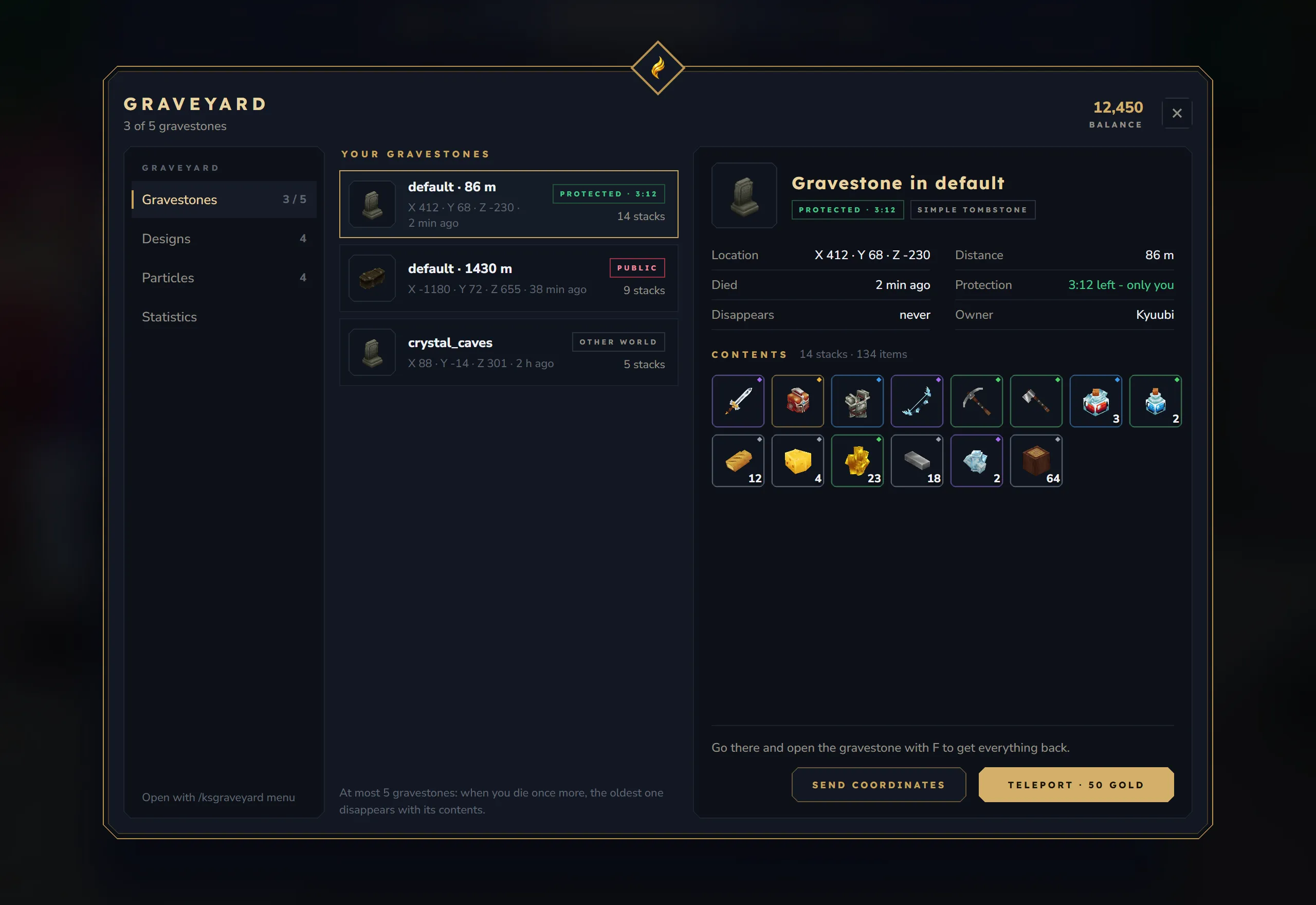
The list (“Your gravestones”) shows every gravestone of the player, newest first. Each row has:
- the icon of the gravestone’s design,
- the world and, in your current world, the distance: “default · 86 m”,
- the coordinates and the age: “X 412 · Y 68 · Z -230 · 2 min ago” (just now, minutes, hours or days),
- a state chip: Protected · 3:12 (green, with the protection time left), Public (red) or Other world (grey),
- the number of stacks inside.
Below the list a hint explains the limit: “At most 5 gravestones: when you die once more, the oldest one disappears with its contents.” Without any gravestone the tab shows “No gravestones” and a short explanation.
The selected gravestone (click a row) shows:
| Part | Content |
|---|---|
| Title | ”Gravestone in default”, the state chip and the name of the design |
| Location | ”X 412 · Y 68 · Z -230” |
| Distance | ”86 m”, or “other world” |
| Died | ”2 min ago” |
| Protection | ”3:12 left - only you” (green) or “over - anyone may loot” (red) |
| Disappears | ”in 1:00:00” with a lifetime, otherwise “never” |
| Owner | The player’s name |
| Contents | ”14 stacks · 134 items” and every stack as an item slot with rarity ring and amount (9 per row). Items whose ID no longer exists (for example from a removed mod) are not shown and counted as “unknown” |
A note below the contents says what to do: “Go there and open the gravestone with F to get everything back.” while protected, “The protection has run out - hurry before someone loots it.” afterwards, or “This gravestone is in another world.”
Buttons
- Send coordinates writes “Your gravestone in default: X 412 Y 68 Z -230” to your chat.
- Teleport (only with
allowTeleportToGravestone: true) teleports you one block above the gravestone. With a cost the button reads “Teleport · 50 Gold”. For a gravestone in another world it is greyed out and reads “Only in this world”.
| Teleport status | When |
|---|---|
| ”Teleported to your gravestone” / ”… · 50 Gold paid” | Done |
| ”You can only teleport to gravestones in this world” | The gravestone is in another world |
| ”Not enough money (50 Gold)“ | Your balance is too low |
| ”The payment did not go through” | The economy refused the payment |
| ”Teleport failed” | The gravestone was looted, expired or removed meanwhile |
Everything is checked before the cost is charged.
Designs
Section titled “Designs”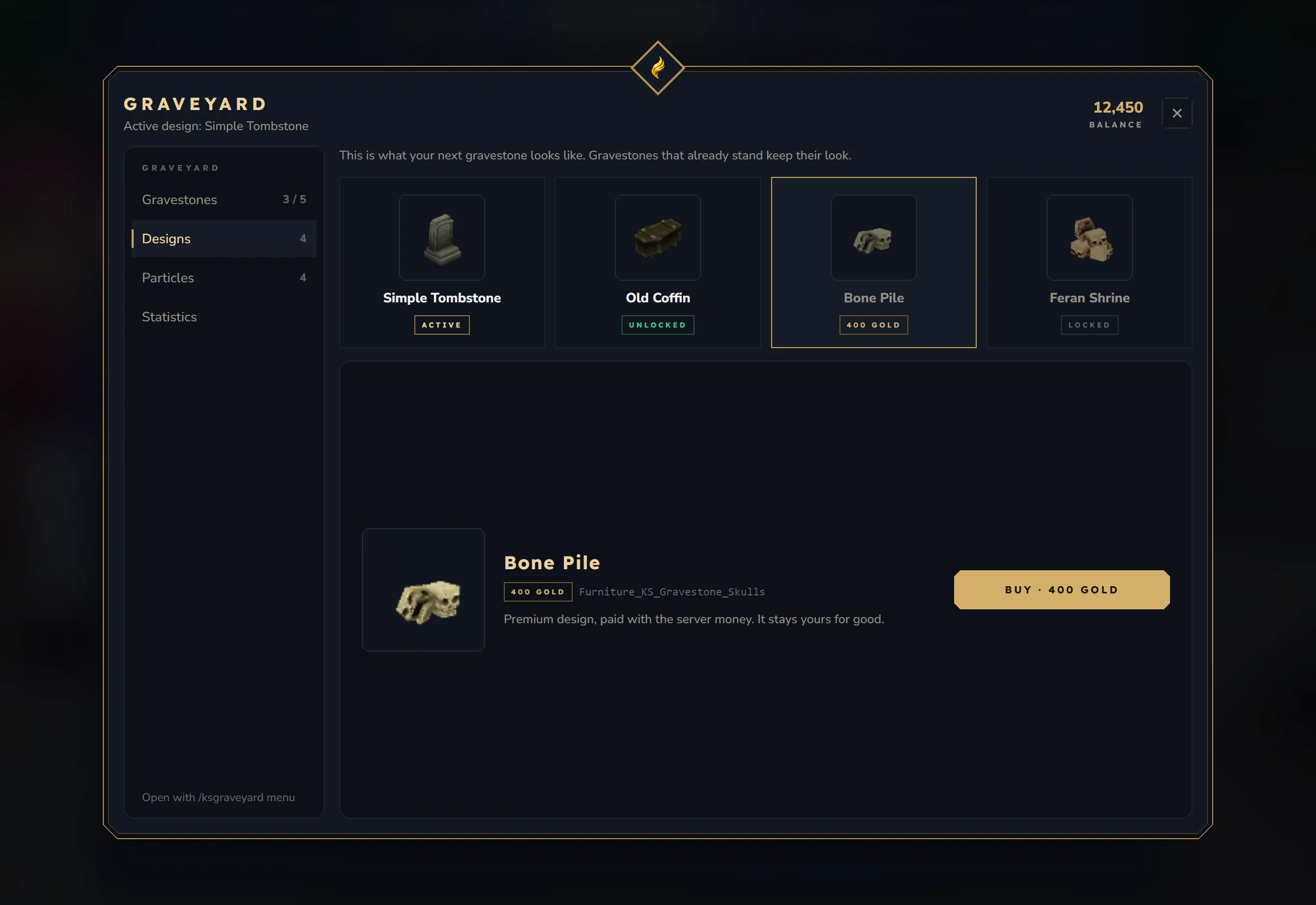
The hint at the top reads “This is what your next gravestone looks like. Gravestones that already stand keep their look.”
Cards (4 per row; free designs first, then by price, then by name) show the design’s block, its name and a chip:
| Chip | Meaning | Button in the detail |
|---|---|---|
| Active (gold) | Your current design | Active (greyed out) |
| Unlocked (green) | Free, bought or given by an admin | Select |
| Price, for example 400 Gold | For sale | Buy · 400 Gold, greyed out when your balance is too low |
| Locked (grey) | Premium without a price: only an admin can unlock it | Locked (greyed out) |
The detail below the cards shows the block, the name, the chip, the block ID and a short text, for example “Premium design, paid with the server money. It stays yours for good.”
- Select makes the design active: “Emerald Statue Gravestone is now your gravestone design”.
- Buy pays and makes the design active at once: “Bone Pile bought · 400 Gold paid”. Errors: “Not enough money (400 Gold)” or “The payment did not go through”.
New designs are added by the server, see Custom Designs.
Particles
Section titled “Particles”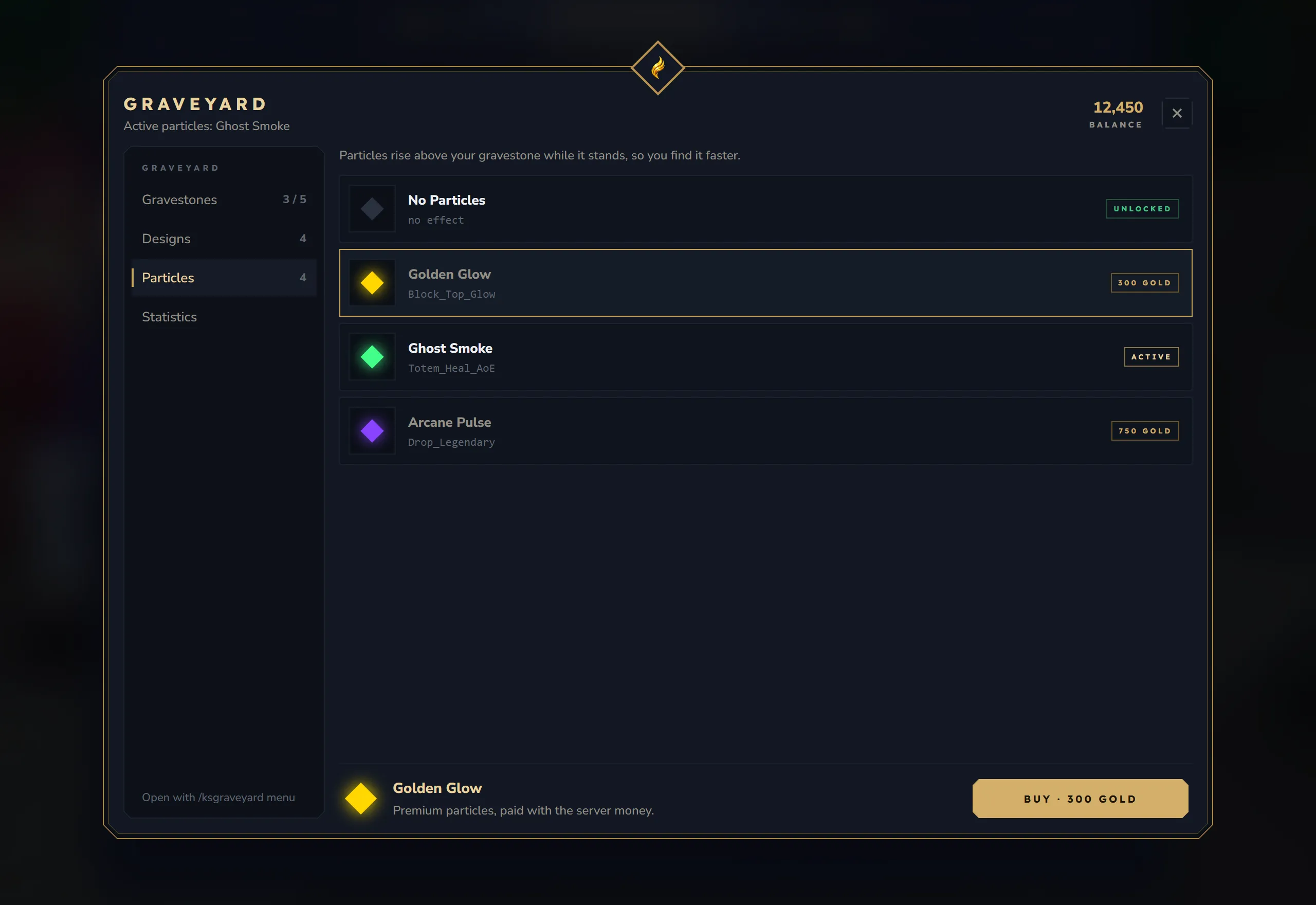
Only shown when enableParticles is true. The hint reads “Particles rise above your gravestone while it stands, so you find it faster.”
Each row shows a colour swatch, the name, the particle system (or “no effect”) and the same chips as designs. “No Particles” comes first, then free presets, then by price. The detail bar at the bottom has the swatch, the name, a short text and the button (Select, Buy · price, Active or Locked). Selecting answers “Golden Glow selected”.
The particles follow your current choice on all your standing gravestones, not only on the next one (the detail text “Rises above your next gravestone.” says otherwise). They are visible to players within 64 blocks, in every world.
Statistics
Section titled “Statistics”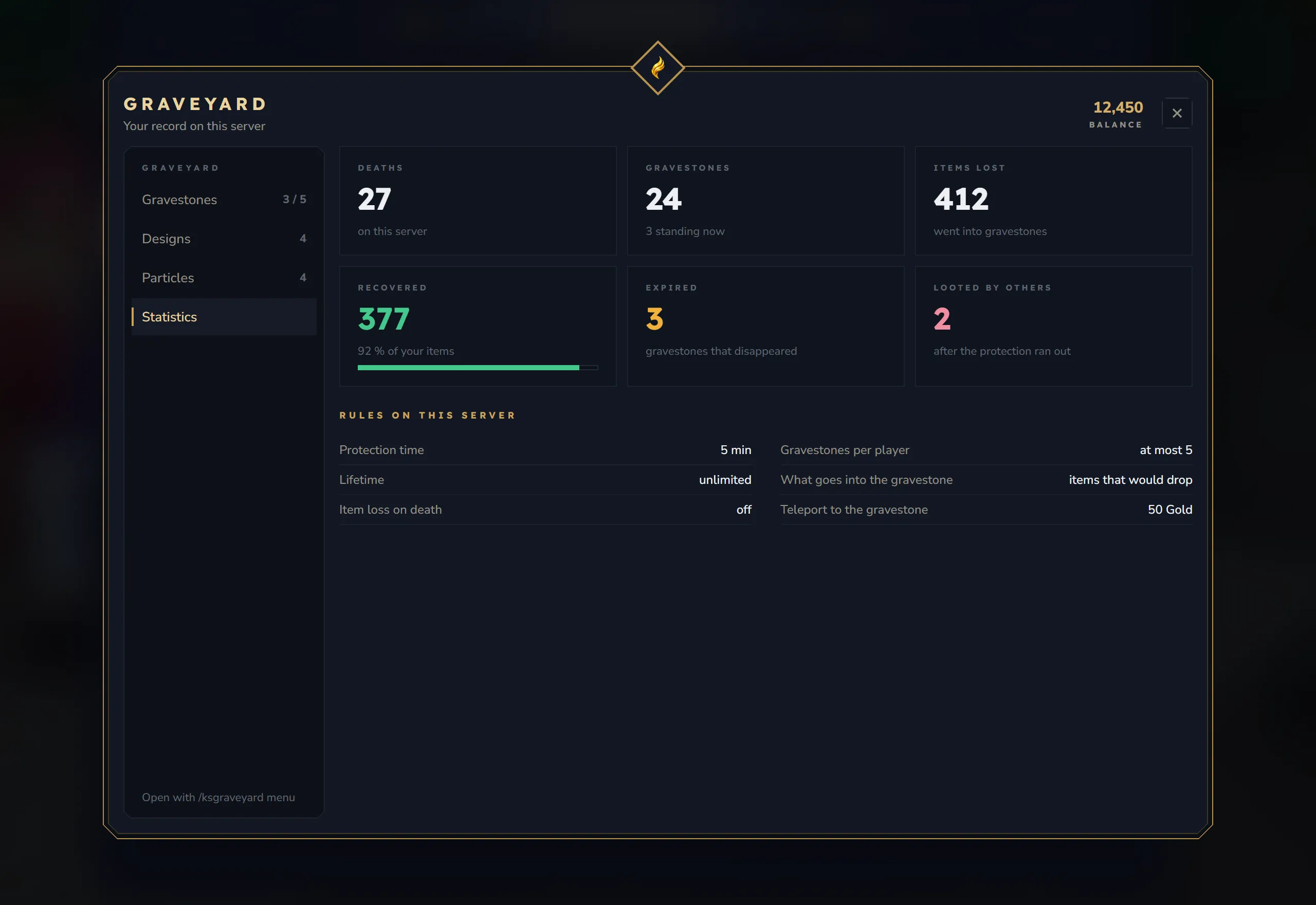
Tiles
| Tile | What it counts |
|---|---|
| Deaths | Every death outside creative mode and outside excludedWorlds, also deaths that left no gravestone |
| Gravestones | Gravestones created; below it how many stand now |
| Items lost | Every item a death put into a gravestone, including items destroyed by item loss |
| Recovered | Items you took back out of your own gravestones, with Loot all or by hand. The percentage and the bar compare this number with Items lost |
| Expired | Gravestones that disappeared at the end of their lifetime |
| Looted by others | Your gravestones that another player emptied, with Loot or by hand |
Items count single items, not stacks. Items another player takes from your gravestone do not count as recovered. Numbers stored by older versions are kept and continue from there. Admins see the same numbers with /ksgraveyard admin_stats <player>.
Rules on this server lists the server’s settings:
| Rule | Shows |
|---|---|
| Protection time | protectionTimerSeconds, for example “5 min” (“none” below 0) |
| Gravestones per player | ”at most 5” |
| Lifetime | gravestoneLifetimeSeconds or “unlimited” |
| What goes into the gravestone | captureMode: “items that would drop” or “the whole inventory” |
| Item loss on death | ”off”, or defaultLossPercent (“10 %”) when item loss is on |
| Teleport to the gravestone | ”off”, “free” or the price |
The grave window
Section titled “The grave window”Press F on a gravestone. The window has three views, depending on who you are and whether the gravestone is still protected.
Header (all views): the owner’s head (loaded from hyvatar.io), “Here lies”, the owner’s name, “Died 2 min ago · default · X 412 · Y 68 · Z -230” and status chips. X and Close close the window. Protection times are the time left when the window was opened.
Your own gravestone
Section titled “Your own gravestone”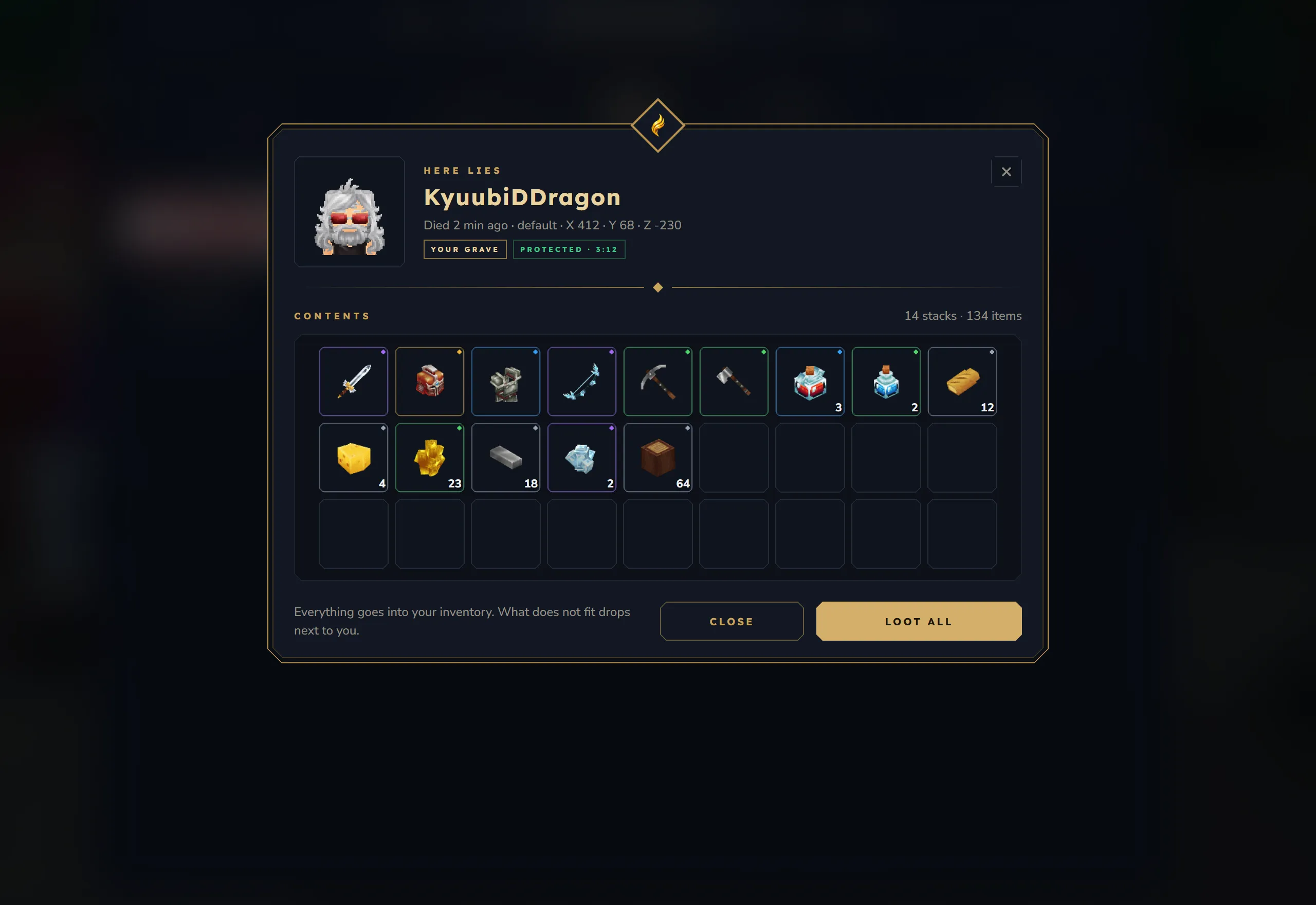
- Chips: Your grave and Protected · 3:12 (or Public after the protection).
- Contents: “14 stacks · 134 items” and the item slots with rarity rings and amounts, 9 per row. The grid has at least 3 rows and scrolls when there are more than 4.
- Hint: “Everything goes into your inventory. What does not fit drops next to you.”
- Loot all takes everything (see Looting).
Another player’s gravestone after the protection
Section titled “Another player’s gravestone after the protection”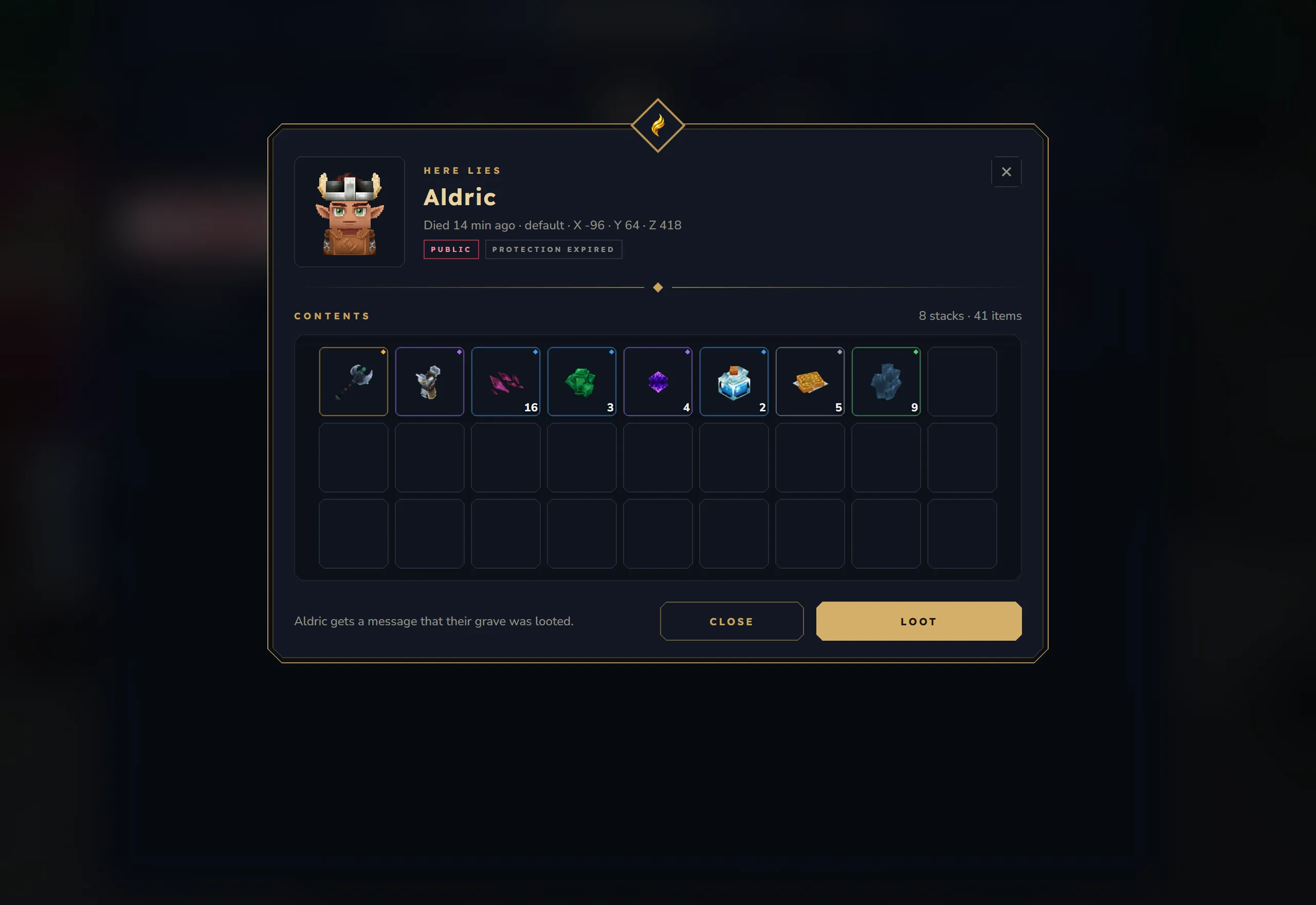
- Chips: Public and Protection expired.
- The same contents as above.
- Hint: “Aldric gets a message that their grave was looted.”
- Loot takes everything. The owner gets “Another player looted your gravestone!” when online, and the gravestone counts for their “Looted by others”.
Another player’s gravestone while it is protected
Section titled “Another player’s gravestone while it is protected”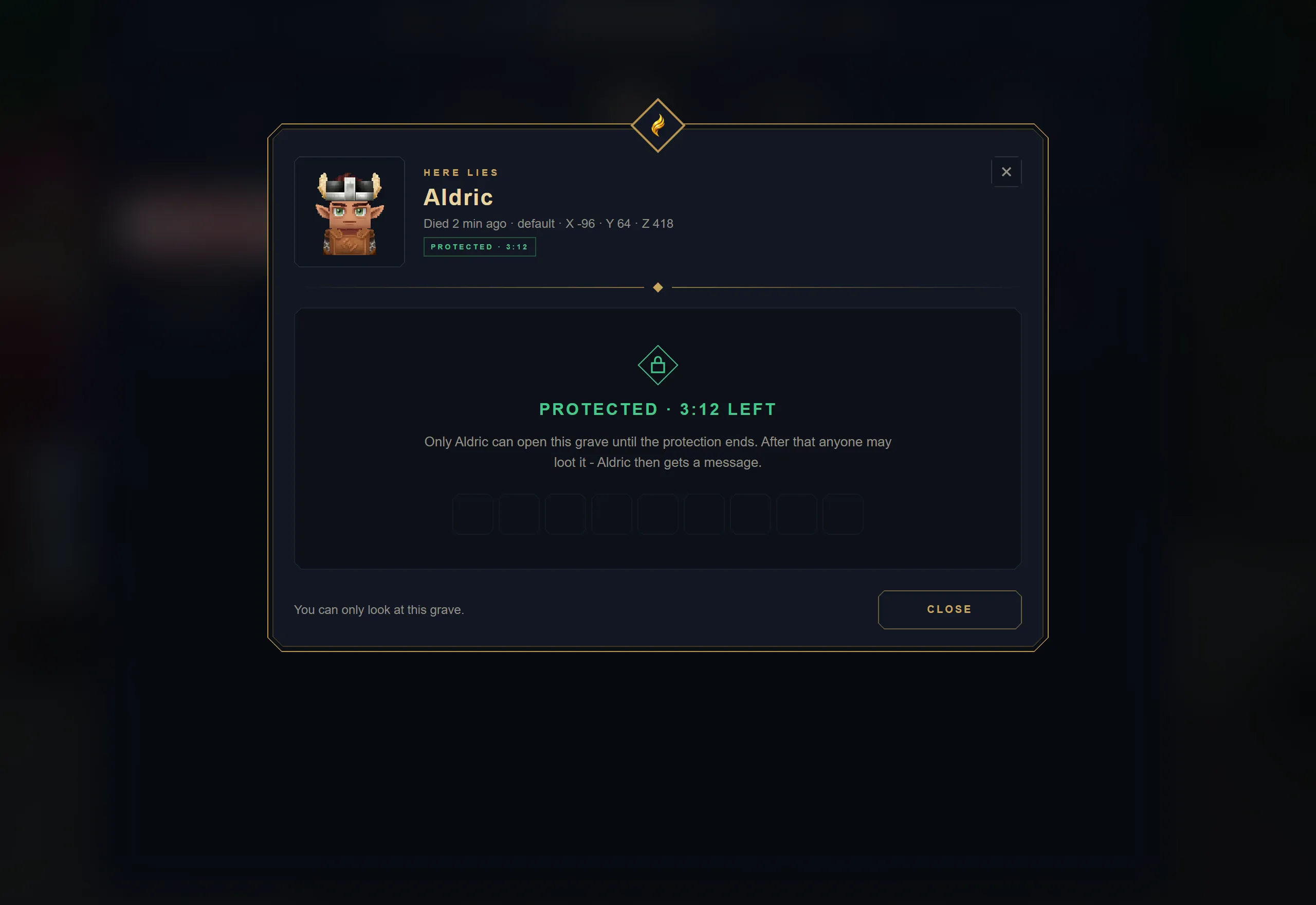
- Chip: Protected · 3:12.
- No items. Instead: “Protected · 3:12 left” and “Only Aldric can open this grave until the protection ends. After that anyone may loot it - Aldric then gets a message.”
- Hint: “You can only look at this grave.” Only Close is shown.
The server checks the protection itself: a protected foreign grave cannot be looted.
Looting
Section titled “Looting”Loot all and Loot:
- move every stack into your storage, hotbar and backpack, filling up stacks you already carry first,
- drop what does not fit at your feet (“Some items were dropped on the ground (inventory full).”),
- remove the gravestone and answer “You looted your gravestone!” (the same text is shown when you loot someone else’s grave),
- close the window.
On a gravestone you may loot, the contents also open as a container window, so you can take single stacks by hand. When you close the window, the remaining items stay in the gravestone, also after a server restart. When nothing is left, the gravestone disappears with “You looted your gravestone!”; if you emptied another player’s gravestone this way, its owner gets “Another player looted your gravestone!” too.
One player at a time. Only one player can have a gravestone’s contents open; this also counts for the owner. Anyone else who presses F meanwhile gets “This gravestone is already open. Try again in a moment.” and no window. The gravestone is free again when the window closes, when it is looted or removed, and at the latest after 5 minutes: a window that is still open then is closed (the items taken in it are saved) before the next player opens the gravestone. The memorial view of a protected grave is not limited.
Item data such as enchantments and pet IDs on eggs is kept (for gravestones created by 2.0.0).
A gravestone that turns out to be empty is removed when it is opened: “This gravestone is empty.”
Classic grave window
Section titled “Classic grave window”With classicLootLook: true the grave window of version 1.x is used:
- a stone gravestone background (
images/gravestone_bg.png, 350 x 497) with the owner’s head, - “Gravestone of Steve” and the number of stacks (“14 Items”),
- up to 16 items, then “+N more items”,
- the Loot All button as an image (
images/loot_all_button.png).
On a protected foreign grave it shows “Protected — 3m 12s remaining” and no items. Loot All works like Loot all above. The images can be replaced, see Configuration.
World map
Section titled “World map”Each player sees their own gravestones on the world map:
- a death marker at the gravestone’s position, labelled “Gravestone — 14 Items” (the number counts stacks),
- only for gravestones in the world the player is in, and within the map’s view range,
- other players never see your markers.
The markers update by themselves when gravestones are created, looted or removed. With showWorldMapMarker: false no markers are shown.
Chat messages and notifications
Section titled “Chat messages and notifications”| When | Message |
|---|---|
| You die and a gravestone is placed | ”Your gravestone was placed. Coordinates: 412, -230” and a notification “Gravestone placed” with “X:412 Y:68 Z:-230 (14 items)”. The death screen lists the items that went into the gravestone |
| Your oldest gravestone is removed by the limit | ”Your oldest gravestone was deleted (limit reached).” |
| A gravestone is about to expire | ”Your gravestone at 412, -230 expires in 42s!” (repeated every 10 seconds) |
| A gravestone expired | ”Your gravestone at 412, -230 has expired!” |
| Someone emptied your gravestone (with Loot or by hand) | “Another player looted your gravestone!” |
| You press F on a gravestone another player has open | ”This gravestone is already open. Try again in a moment.” |
These messages only reach players who are online.