
Admin Panel
Version: 1.12.1 · Permission: ks.pet.admin
Since 1.11.0 all admin tools of the pet system live in one window, “Pet Management”, in the KyuubiSoft Goldfiligran look. It replaces the old Pet Creator and the old loot luck blacklist window. Its texts follow the admin’s language (all 9 bundled languages).
Opening the Window
Section titled “Opening the Window”| Command | Opens on |
|---|---|
/kspetadmin | Create pet |
/kspetadmin creator or /kspetadmin create | Create pet |
/kspetadmin lootluck | Blacklist |
/kspetadmin players | Player pets |
The window only opens for players. In the console, /kspetadmin prints the command list instead (/kspetadmin help prints it in game).
With KyuubiSoft Core 2.8.0 or newer installed, the window is also a tile in Core’s /ksadmin hub (“KyuubiSoft Management”, which itself needs ks.admin). The tile opens the window for players with ks.pet.admin; others get a “no permission” message in their own language. Since 1.12.1, /kspetadmin answers in the admin’s language as well.
Layout
Section titled “Layout”- Header: the title “Pet Management”, a subtitle that describes the current section, and a status line for the result of your last action (green for success, red for errors). On the right: Reload and the close button.
- Navigation (left): under “Tools” the sections Create pet and Blacklist (with the number of patterns), under “Manage” the section Player pets (with the number of online players). The hint at the bottom repeats the shortcuts
creator,lootluck,players. - Reload does the same as
/kspetadmin reload(config, pet types, stat table, languages and the blacklist file) and also recounts the blacklist hits. The window stays open.
Numbers are shown with the decimal separator of your language; typing 5,5 and 5.5 both work.
Create Pet
Section titled “Create Pet”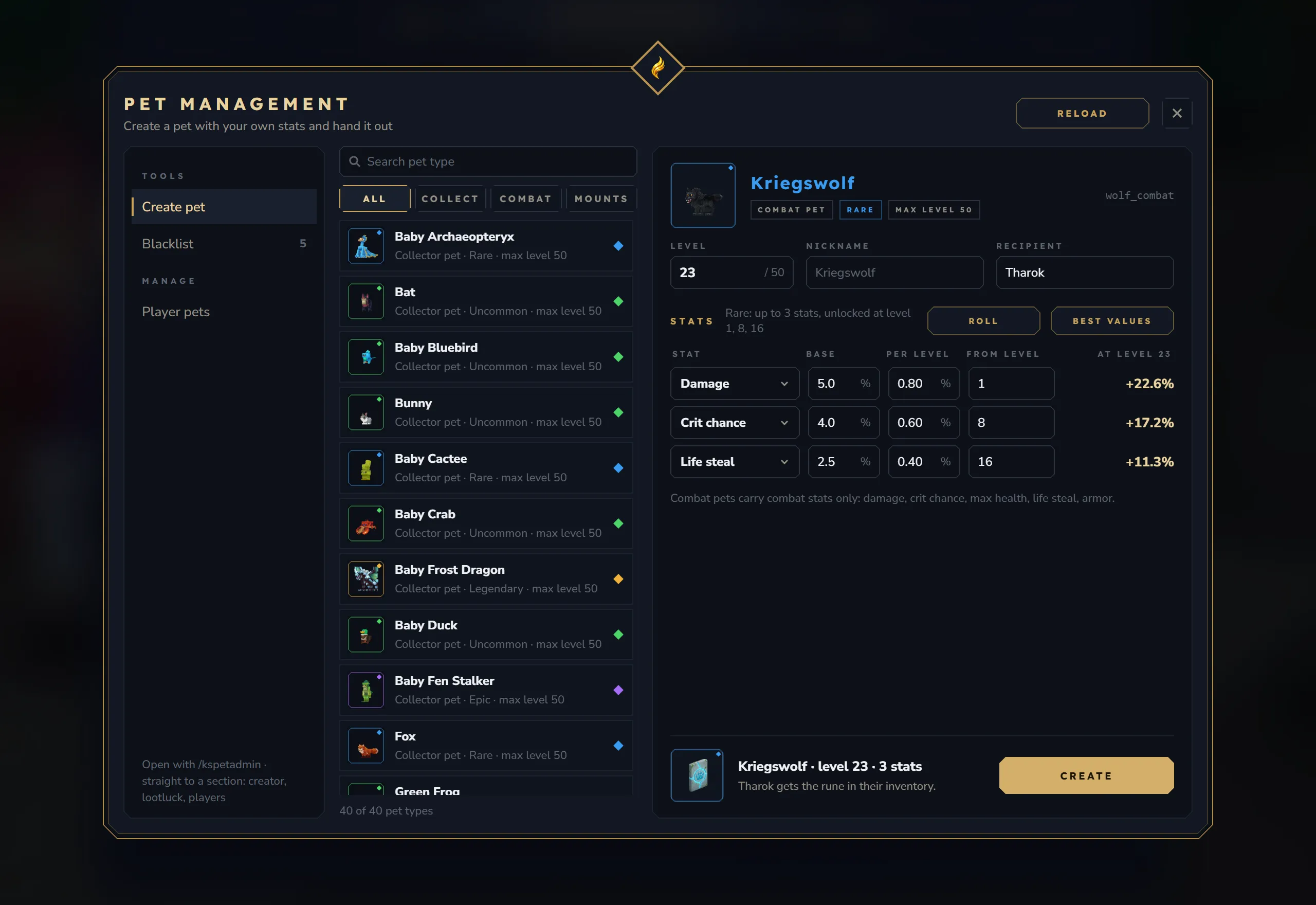
Create pet: the pet type list in the middle, the selected type with level, nickname, recipient and stat rows on the right.
This section builds one pet with exactly the values you choose and hands out its egg, battle rune or mount horn.
1. Pick the pet type (middle column)
Section titled “1. Pick the pet type (middle column)”- Search by display name or type ID.
- Filter with All / Collect / Combat / Mounts.
- Each row shows the summon item icon with a rarity ring, the name in its rarity color and “module · rarity · max level N”. The list is sorted collector pets, combat pets, mounts, then by name. Below it: “N of M pet types”.
2. Check the pet and set level, nickname, recipient (right column, top)
Section titled “2. Check the pet and set level, nickname, recipient (right column, top)”- The header repeats the item icon, the name, chips for module, rarity and max level, and the type ID.
- Level: 1 up to the type’s max level.
- Nickname: empty = the type’s display name.
- Recipient: empty = yourself. Otherwise the name of any online player, in any world. If nobody with that name is online, the footer turns red (”… is not online.”).
3. Set the stats
Section titled “3. Set the stats”The rule line names the rarity, its number of stats and its unlock levels, for example “Rare: up to 3 stats, unlocked at level 1, 8, 16”. There are as many stat rows as the rarity rolls (up to 5), pre-filled with average values and the rarity’s unlock levels.
| Column | Meaning |
|---|---|
| Stat | Click to pick a stat. The list holds “no stat” plus the stats of the stat table (stat-pool.json) with their ranges; combat pets only get combat stats (damage, crit chance, max health, life steal, armor). Picking a stat fills the row with average values. |
| Base | Value at level 1 |
| Per level | Growth per level |
| From level | Level at which the stat unlocks |
| At level X | The value at the chosen level; “from level N” while the stat is still locked; “not a number” when a field cannot be read |
Values are typed in display units:
| Stat | Unit |
|---|---|
| Damage, Pet XP, Crit chance, Armor, Loot luck, Life steal | percent (5 = 5 %) |
| Max health | health points |
| Pickup range | blocks |
| Stamina regen, Mana regen | per second |
| Thorns | plain number |
A result shown in amber with “above the maximum for” and the rarity (for example “above the maximum for Rare”) means the value is higher than a pet of that rarity can keep. The pet is still created with it, but see the note below.
Two buttons fill the rows for you:
- Roll rolls the rows like a natural pet of this rarity: random stats (respecting
maxSameType), random quality, the rarity’s unlock levels. - Best values sets the rarity’s best quality for every stat, unlocks every stat at level 1 and sets the level to the max level.
4. Create
Section titled “4. Create”The footer shows the item icon, a summary (“Name · level N · K stats”) and who gets which item (“You get the rune in your inventory.” or “Steve gets the rune in their inventory.”). Create checks the level, the numbers and the recipient, saves the pet and puts the item into the recipient’s inventory in the recipient’s own world.
- If the recipient’s inventory is full, the player left the world or the database is not available, nothing is created and the status line says why.
- Every created pet is written to the server log with the admin’s name.
- A second click on Create while the first one is still on its way answers “Still working on the last action.” (no duplicate pets from a double click).
- The created pet joins the recipient’s pet list at once and counts against their slots, like a pet from
/kspetadmin give. - The slot limit (
maxPetsPerPlayer) is only checked here whenmaxPetsEverywhereistrueinconfig.json: then a full recipient gets nothing and the status line says “Steve already has 5/5 pets, nothing was created.” With the defaultfalsethe window creates the pet anyway.
Blacklist (Loot Luck)
Section titled “Blacklist (Loot Luck)”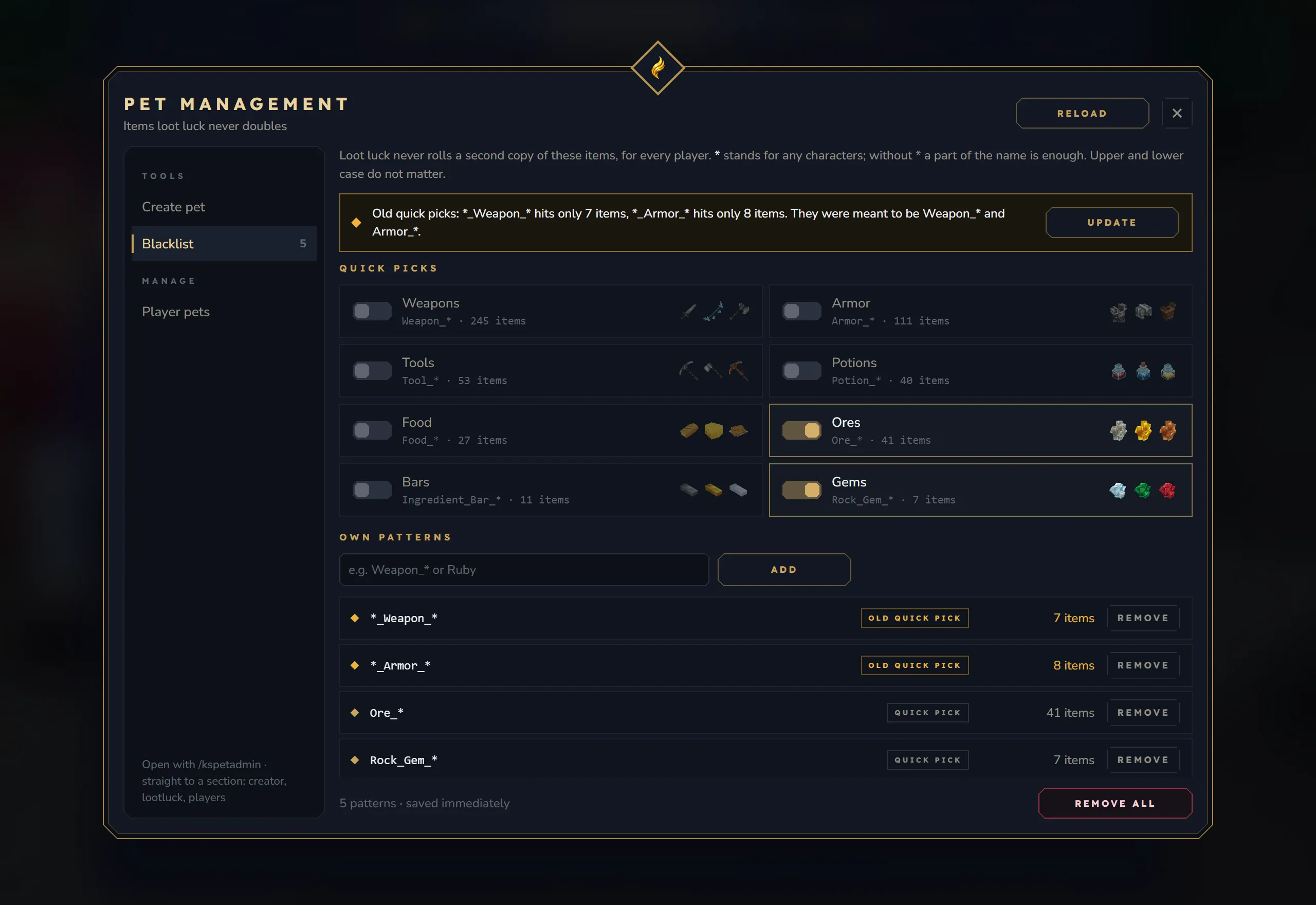
Blacklist: the banner for old patterns, the eight quick picks with hit counts and the list of own patterns.
Items on this list are never doubled by the Loot Luck stat, for every player. The pet still collects them and the player still gets the item once; only the extra copy is not rolled. To make a pet ignore items completely, use the player’s own pickup filter.
Pattern rules
Section titled “Pattern rules”*stands for any characters, and the whole item ID must match:Ore_*hits every ID that starts withOre_.- Without
*a part of the item ID is enough:Rubyhits every ID that containsRuby. - Upper and lower case do not matter. All other characters are taken literally.
Hit counts are computed with exactly these rules against the item list of your server (vanilla and every installed mod).
Quick picks
Section titled “Quick picks”Eight switches for common groups, each with three example item icons and the number of items it really hits on this server:
| Quick pick | Pattern |
|---|---|
| Weapons | Weapon_* |
| Armor | Armor_* |
| Tools | Tool_* |
| Potions | Potion_* |
| Food | Food_* |
| Ores | Ore_* |
| Bars | Ingredient_Bar_* |
| Gems | Rock_Gem_* |
Click a quick pick to add its pattern; click again to remove it.
Own patterns
Section titled “Own patterns”Type a pattern into the field: while you type, the line below shows how many items it hits (“Hits N items on this server”, red at 0). Press Enter or click Add. A pattern that is already on the list is refused; a pattern that hits nothing is added with a warning.
The list
Section titled “The list”Every pattern is a row with its hit count, a chip “quick pick” or “old quick pick” where it applies, and a Remove button. Counts of 0 and old patterns are shown in amber. Below the list: the number of patterns and Remove all, which asks for confirmation (“Remove all N patterns? Loot luck can then double every item again.”).
The “Update” banner for old patterns
Section titled “The “Update” banner for old patterns”The quick toggles of the old blacklist window (before 1.11.0) used patterns that hit almost nothing, because the real item IDs start with the group name. A list that still holds them shows a banner with their real hit counts and an Update button. Nothing changes until an admin clicks it. Update replaces each old pattern with what it was meant to block, keeps the order and drops duplicates:
| Old pattern | Replaced by |
|---|---|
*_Weapon_* | Weapon_* |
*_Armor_* | Armor_* |
*_Tool_* | Tool_* |
*_Consumable_* | Food_* and Potion_* |
Resource_* | Ingredient_* |
Saving
Section titled “Saving”Every change is saved at once to mods/kyuubisoft_pets/loot_luck_blacklist.json and applies to the next pickup; no reload needed. Changes from two admins at the same time are handled safely. The file format is on Configuration.
Player Pets
Section titled “Player Pets”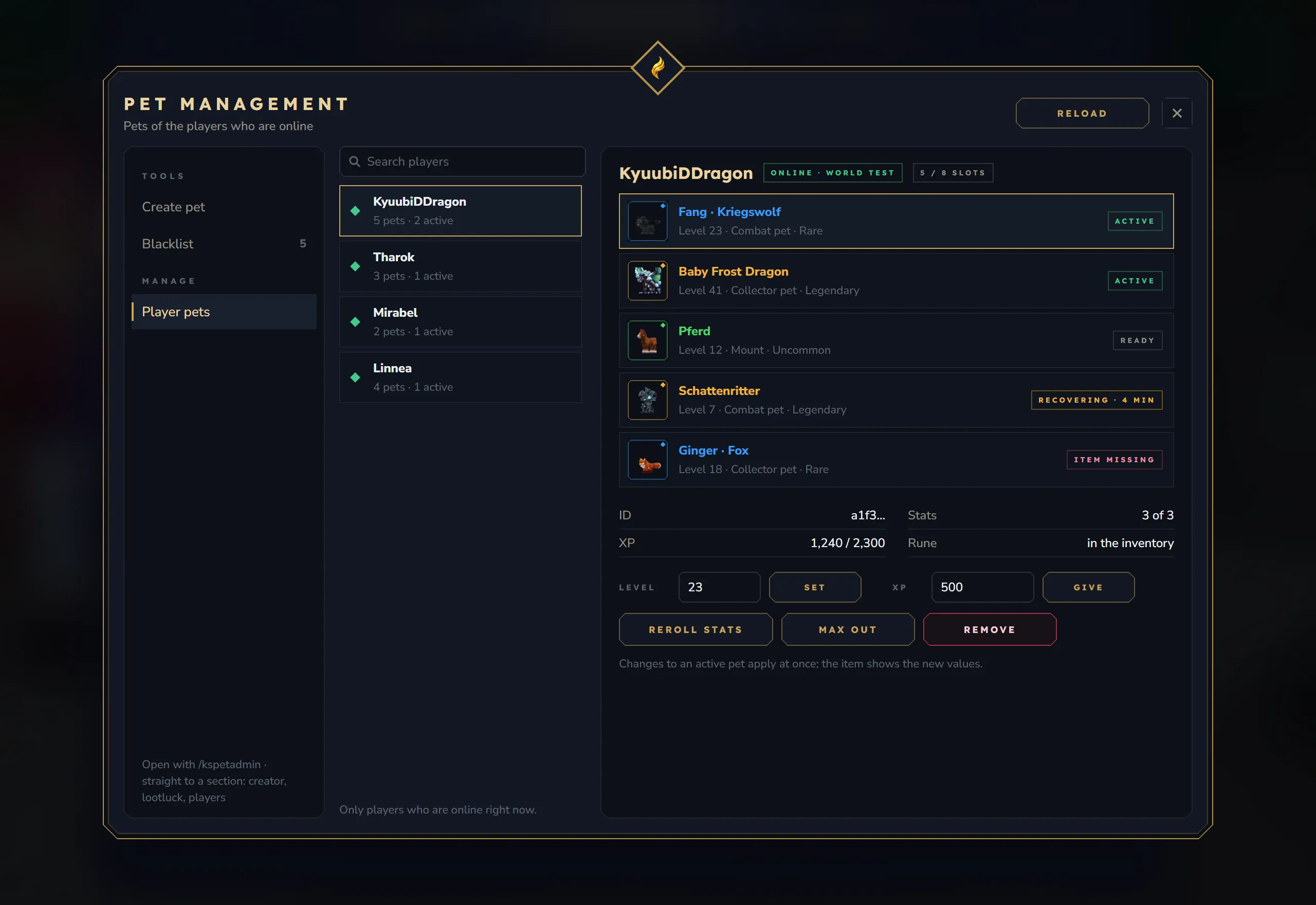
Player pets: the online players in the middle, the selected player’s pets on the right with the actions for the selected pet below.
Everything /kspetadmin does to a single pet, as buttons. The window and the commands share one implementation.
Players (middle column)
Section titled “Players (middle column)”Only players who are online right now, sorted by name, with a search field. Each row shows “N pets · M active”. When you open the section, you are selected first.
Pets of the selected player (right column)
Section titled “Pets of the selected player (right column)”- Header: the player’s name, the world they are in and their slots (“5 / 8 slots” = pets owned /
maxPetsPerPlayer). - Pet rows: item icon with rarity ring, name (nickname and type in brackets when renamed), “Level N · module · rarity” and a status:
| Status | Meaning |
|---|---|
| Active | the pet is summoned |
| Ready | owned, not summoned |
| Item missing | its egg / rune / horn is not in the player’s inventory |
| Recovering · N min | a defeated combat pet that is still recovering |
- Details of the selected pet: the first 8 characters of its instance ID, stats (“3 of 3” = rolled / maximum of its rarity), XP of the current level (or “Max level”) and whether its item is in the inventory (“checking” until the player’s world has answered).
Actions
Section titled “Actions”| Button | What it does |
|---|---|
| Level + Set | Sets the level (1 to max). Raising it rolls the stats of the passed unlock levels; XP of the level starts at 0. |
| XP + Give | Gives the typed amount of XP (default 500, must be positive) with normal level-ups. |
| Reroll stats | Rolls every stat again for the pet’s current level (combat pets: combat stats only). |
| Max out | Max level and every empty stat slot rolled; stats the pet already has keep their values. The status line says “Fox maxed out: level 50, every stat slot filled.” |
| Revive | Only shown for a recovering combat pet: ends the recovery at once. |
| Replace item | Only shown when the item is missing: hands out a new egg / rune / horn with level, stats and name; every old copy becomes void. Same as /kspetadmin restore. |
| Remove | Asks for confirmation (“Remove Fox? The pet is gone for good and its item becomes worthless.”), then deletes the pet for good. Same as /kspetadmin remove. |
What Remove does:
- Every copy of the pet’s item becomes void (its item generation is raised, as with Replace item). A copy in a chest, on the ground or with another player crumbles when it is used: “This pet was removed by an admin. Its item crumbles to dust.”
- Every online player who has the pet out sends it home (collector pet, combat pet or mount) and loses the item from their inventory, with the message “An admin removed your pet Fox. Its item is gone.”
- The pet’s database record is deleted and its slot is free.
If the pet database cannot be written, nothing is removed and the status line says “Fox was not removed: the pet database could not be written. See the server log.” A removed pet that is still listed in an old player file is dropped when that player joins.
Changes to a summoned pet apply at once: buffs are re-applied and the item tooltip and the HUD update.
Busy protection: every action runs in the world the owner is in; the window updates when it is done. Until then a second click answers “Still working on the last action.” (for at most 10 seconds).
KyuubiSoft Panel Status Page
Section titled “KyuubiSoft Panel Status Page”When the KyuubiSoft Panel plugin (KyuubiSoftAPI 2.1 or newer) is installed on the server, Pets adds a page to the panel’s Mod Status page. Without that plugin nothing changes.
The page shows:
- active companions: collector pets and combat pets that are out, players on a mount, players with a companion, and the number of loaded pet types,
- a table per world,
- the companions that are out right now (player, pet, kind, level, world; the first 100),
- the module switches,
- warnings when the pet database did not start, a game system failed to register or no pet types are loaded.
Two admin actions are offered. Only panel accounts with the permission to run mod admin actions can use them, and the panel records them in its audit log:
| Action | Same as |
|---|---|
| Reload configuration (asks for confirmation first) | /kspetadmin reload |
| Remove orphaned pet NPCs (summoned pets stay) | /kspetadmin cleanworld |
Pets also sends the events pet_level_up (player, pet type, new and previous level) and config_reloaded to the panel’s event stream, so panel webhooks and event actions can react to them.
Admin Command Reference
Section titled “Admin Command Reference”Exact syntax, console use and examples are on the Commands page.
| Command | Purpose |
|---|---|
/kspetadmin, creator/create, lootluck, players | Open this window |
/kspetadmin give <player> <type> | New pet with rolled stats, item into the inventory |
/kspetadmin remove <player> <type | id> | Delete a pet for good (its items become void) |
/kspetadmin setlevel <player> <type | id> <level> | Set the level |
/kspetadmin addxp <player> <type | id> <amount> | Give XP |
/kspetadmin reroll [<player> <type | id> | combat | collector | mount] | Roll all stats again |
/kspetadmin maxout [<player> <type | id> | combat | collector | mount] | Max level, fill empty stat slots |
/kspetadmin revive <player> | End the recovery of all defeated combat pets |
/kspetadmin restore <player> [type | id] | List or replace lost items |
/kspetadmin inspect hand / inspect <player> | Read pet data from items and records |
/kspetadmin list | All loaded pet types |
/kspetadmin reload | Reload config, blacklist, stat table, pet types, languages |
/kspetadmin cleanup / cleanworld / despawnall | Remove stuck or orphaned pet NPCs |
/kspetadmin dbreload <player> / dbflush | Database maintenance |
Troubleshooting
Section titled “Troubleshooting”| Problem | What to do |
|---|---|
| Orphaned pet NPCs after a crash | /kspetadmin cleanworld (all worlds, keeps summoned pets) or /kspetadmin cleanup (default world) |
| A player lost an egg, rune or horn | Player pets → Replace item, or /kspetadmin restore <player> |
| Two pets of the same type, command picks neither | Use the instance ID from /kspetadmin inspect <player> |
| Created pet did not arrive | Read the status line: full inventory or recipient not online means nothing was created |
| Combat pet stuck recovering | Player pets → Revive, or /kspetadmin revive <player> |
| Blacklist hit counts look wrong after adding a mod | Click Reload in the window |