
FAQ & Troubleshooting
Getting and owning pets
Section titled “Getting and owning pets”How do I get a pet?
Section titled “How do I get a pet?”Every pet lives in an item: a Pet Egg (collector pet), a Battle Rune (combat pet) or a Mount Horn (mount). The plugin ships no crafting recipes for them, so the server decides how players get them:
- Admins hand them out with
/kspetadmin give <player> <type>or in the admin window (/kspetadmin, section Create pet). - Shops, loot tables, events or
/givecan hand out blank pet items. A blank item hatches into a new pet with freshly rolled stats on its first right-click.
The compendium shows a “How to get it” text for pets you do not own. Server owners set it per pet type with obtainHint (see Custom Pets); without it the compendium shows a generic hint.
How many pets can I have?
Section titled “How many pets can I have?”You can have one collector pet, one combat pet and one mount out at the same time. You can own the same pet type several times; every copy has its own level, stats and name.
maxPetsPerPlayer in config.json (default 5) is the number of pets a player may own, all kinds together. /kspetadmin give always refuses when the player already has that many. With maxPetsEverywhere: true the limit also stops a blank egg, rune or horn from hatching (“You already have 5/5 pets. No new pet can hatch.”) and “Create pet” in the admin window; with the default false only give checks it.
Can I trade pets?
Section titled “Can I trade pets?”Yes. The item only carries the pet’s ID, all data stays in the database, so whoever holds the item owns the pet. Trading, selling or storing the item moves the pet with it.
After an admin restored a pet item (see below), older copies of that item no longer work.
Why does the compendium not show my pet as owned?
Section titled “Why does the compendium not show my pet as owned?”A pet counts as owned only while its item is in your inventory (hotbar, storage, backpack, tool or utility slots). Items in a chest do not count. An old copy of a restored pet item does not count either.
What happens when I drop the pet item while the pet is out?
Section titled “What happens when I drop the pet item while the pet is out?”The pet is sent home. The same happens when its item leaves your inventory in another way.
Why did my pet disappear when I changed worlds or logged out?
Section titled “Why did my pet disappear when I changed worlds or logged out?”Pets and mounts are sent home on every world change and when you log out. Summon them again with the item or in the compendium. Nothing is lost: level, XP and stats stay in the database.
Do I lose my pet items when I die?
Section titled “Do I lose my pet items when I die?”No. Pet eggs, Battle Runes and Mount Horns stay in their inventory slots in every death mode of the world, also “Drop All”, and also with KyuubiSoft Graveyard (they never go into the gravestone) or Item Control installed. Everything else follows the world’s death rules and those mods as usual.
During the death the items are briefly held in your player file. Normally they are back in the same tick (in their old slots, otherwise in any free slot, or on the ground next to you as a last resort; they are never deleted). If the server stops or you log out at exactly that moment, you get them back in free slots on your next join; an item that does not fit stays held and comes back on a later join.
Are pets saved when the server restarts?
Section titled “Are pets saved when the server restarts?”Pet data is stored in pets.db (SQLite). The active pets are written to it every 30 seconds (petDbFlushIntervalSeconds), on every level-up and when you log out, so a crash loses at most about 30 seconds of XP. The pet NPCs themselves are not kept: summon your pet again after a restart.
Compendium and HUD
Section titled “Compendium and HUD”How do I open the Pet Compendium?
Section titled “How do I open the Pet Compendium?”Run /kspet (or /pet, /pets). If the server set ui.compendium to false in config.json, /kspet opens the classic pet menu instead. /kspet collection and /kspet bestiary still open the collection and bestiary pages. See UI Pages.
Why are some pets shown as ”???”?
Section titled “Why are some pets shown as ”???”?”The server set ui.lockedPets to "hidden": pets you do not own stay hidden until you own one. With "visible" (the default) they are shown dimmed with their name, base stats and the “How to get it” text.
Can I rename my pet?
Section titled “Can I rename my pet?”Yes, in the compendium: select your copy, rename it in the text field (1 to 24 characters). This works for every pet type. The command /kspet rename <name> only renames your active combat pet.
How do I move the pet HUD?
Section titled “How do I move the pet HUD?”Open the compendium and use the HUD settings in the header: six positions (top, middle or bottom, left or right) and a vertical or horizontal layout. The setting is saved for you. Until you pick one, you get the server default (hudPosition / hudLayout in config.json, top left and vertical unless the admin changed it).
Why does the HUD not show anything?
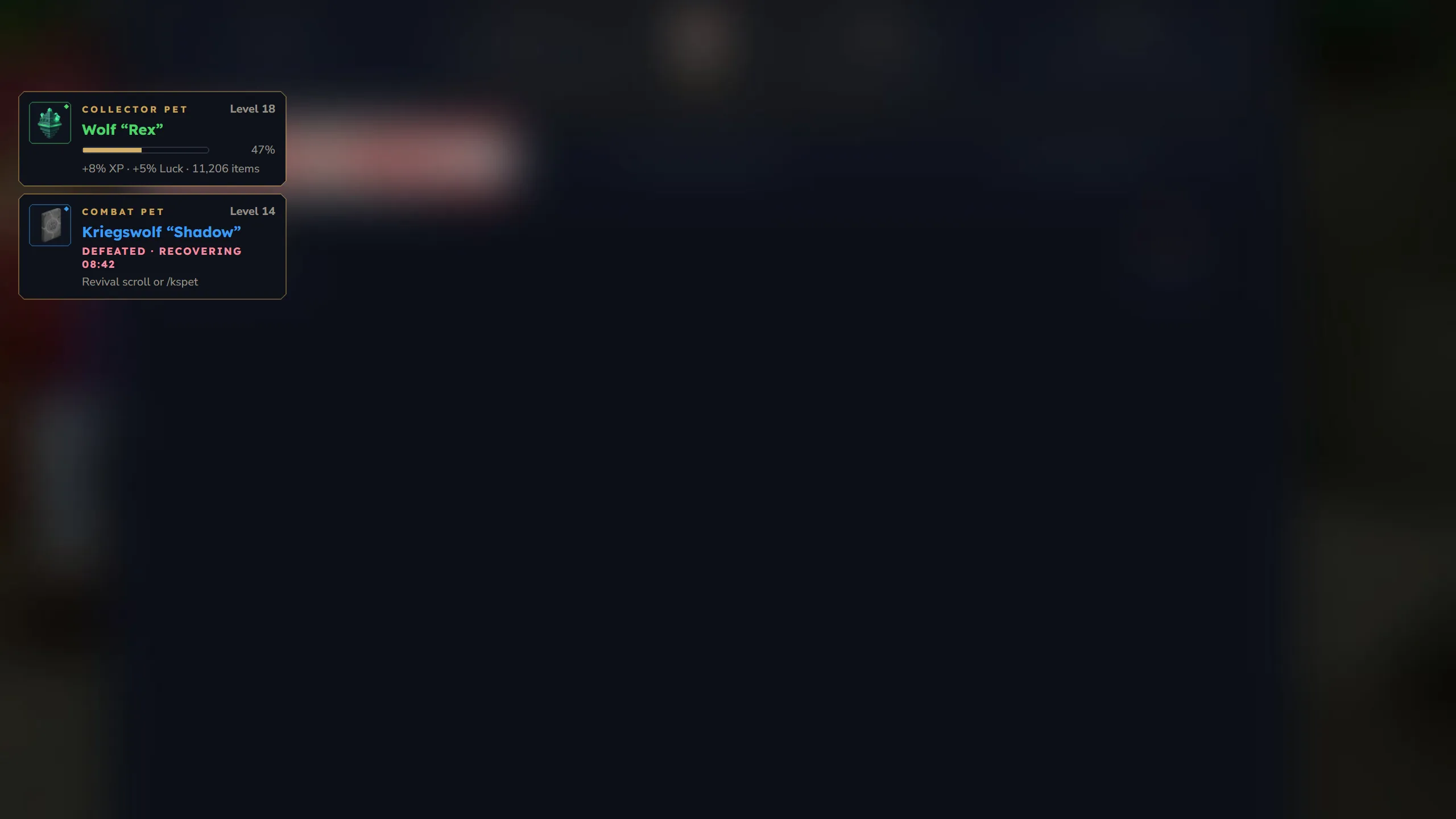
Section titled “Why does the HUD not show anything?”The HUD shows a card for your active collector pet and your active combat pet, and a countdown card for a combat pet that is recovering from a defeat. Without one of those there is nothing to show. Mounts have no HUD card.
XP, stats, scrolls and dice
Section titled “XP, stats, scrolls and dice”How do pets earn XP?
Section titled “How do pets earn XP?”Default values from xpSources in config.json:
| Source | XP | Goes to |
|---|---|---|
| You kill a mob | 25 | active collector pet |
| You break a block | 2 | active collector pet |
| You craft something | 10 | active collector pet |
| The pet picks up an item | 2 | active collector pet |
| The combat pet kills a mob | 25 x the mob’s max HP / 100 | combat pet |
Items you dropped yourself, your death drops and the contents of chests you break give no XP when the pet collects them. Breaking a chest or crate gives no block XP.
The XP needed for the next level is baseXpPerLevel x xpScaleFactor ^ (level - 1), set per pet type.
When do new stats unlock?
Section titled “When do new stats unlock?”Default rarity rules from stat-pool.json:
| Rarity | Stats | Unlock levels | Quality |
|---|---|---|---|
| Uncommon | 2 | 1, 10 | 0 - 0.7 |
| Rare | 3 | 1, 8, 16 | 0 - 0.85 |
| Epic | 4 | 1, 6, 12, 20 | 0 - 1.0 |
| Legendary | 5 | 1, 5, 10, 15, 25 | 0 - 1.2 |
A new pet starts with its level-1 stat. Each further stat is rolled when the pet reaches its unlock level. The same stat type can appear up to 3 times on one pet (maxSameType). A stat that already exists but is still locked shows as “Hidden stat” with its unlock level in the compendium.
What is the difference between Reroll and Refine?
Section titled “What is the difference between Reroll and Refine?”- Reroll gives a stat a new type and a new value.
- Refine keeps the type and rolls a new value.
There are scrolls for collector pets (Pet_Reroll_Scroll, Pet_Refine_Scroll, Pet_Reroll_All_Scroll, Pet_Refine_All_Scroll) and for combat pets (the same with Battle_). Right-clicking a scroll opens its window for your summoned pet; the “All” scrolls show a preview first. The plugin ships no crafting recipes for scrolls; servers hand them out through shops, loot or /give.
How do the dice in the compendium work?
Section titled “How do the dice in the compendium work?”Every unlocked stat of an owned copy has a small dice. Clicking it uses one reroll scroll from your inventory and rerolls that stat right away: the Pet Reroll Scroll for collector pets and mounts, the Battle Reroll Scroll for combat pets. The dice above the stat column rerolls all unlocked stats for one Reroll All Scroll and asks once for confirmation.
The dice work for any copy you own, summoned or not. They are gold when you have a matching scroll and grey when you do not; the tooltip shows the scroll and how many you have. Refine scrolls have no dice, use them by right-clicking.
Combat pets
Section titled “Combat pets”Can combat pets die?
Section titled “Can combat pets die?”Only if the server switched on combatBalance.mortality.enabled in config.json. It is off by default, and then combat pets cannot be hurt. With it on, combat pets have HP that grows with their level and their Max Health stat. Only hits from hostile NPCs count (other players only with playerDamage: true); the owner, other pets, fall damage and drowning never hurt them. See Combat Pets.
Why did my combat pet disappear, and when does it come back?
Section titled “Why did my combat pet disappear, and when does it come back?”With mortality on, a defeated combat pet disappears and needs deathCooldownMinutes (default 15) to recover:
- The HUD keeps its card with a live countdown, and the compendium shows the copy as “Recovering”.
- Trying to summon it shows the remaining time.
- The recovery is saved in the database and keeps running through relogs, world changes and restarts.
The pet is ready again when the time is up, or right away with a Battle Pet Revival Scroll or an admin revive.
If mortality is off, the pet was sent home for one of the reasons above (item left the inventory, world change, logout).
How do I revive a combat pet?
Section titled “How do I revive a combat pet?”- Battle Pet Revival Scroll (
Battle_Revive_Scroll): right-click to revive your most recently defeated combat pet, or use it on a specific copy in the compendium. The scroll is only used up when a pet was revived. - Admins:
/kspetadmin revive <player>ends the recovery of all defeated combat pets of that player. The admin window has a Revive button per pet under Player pets.
Why did my combat pet stop fighting?
Section titled “Why did my combat pet stop fighting?”The server switched on AFK protection (combatBalance.requireOwnerActivity). Combat pets stop fighting when you have neither turned the camera nor attacked for ownerInactivitySeconds (default 120). You get one chat message (“Your combat pet stopped fighting because you seem to be away.”). Being pushed around by knockback or water does not count as activity.
Do kills by my combat pet count as my kills?
Section titled “Do kills by my combat pet count as my kills?”The pet gets the XP and the kill count. Kill rewards of other plugins (quests, achievements and the like) are not given to the owner for kills the pet makes.
Mounts
Section titled “Mounts”How do I get off a mount?
Section titled “How do I get off a mount?”Press F, right-click the Mount Horn again, or use /ksmount dismount.
Why does my mount disappear?
Section titled “Why does my mount disappear?”Mounts are removed when you dismount, log out or change worlds, and when the horn leaves your inventory.
Administration
Section titled “Administration”What is the admin window?
Section titled “What is the admin window?”/kspetadmin without arguments opens “Pet Management” with three sections: Create pet, Blacklist (the loot luck blacklist) and Player pets. /kspetadmin creator, /kspetadmin lootluck and /kspetadmin players open it on that section; the console gets the command list, and /kspetadmin help shows it in game. See Admin Panel.
How do I replace a lost pet item?
Section titled “How do I replace a lost pet item?”- Run
/kspetadmin restore <player>. It lists the player’s pets whose item is missing. - Run
/kspetadmin restore <player> <type>, or/kspetadmin restore <player> <id>when the player has several missing pets of that type.
The player must be online and have room in the inventory. The new item keeps the pet’s level, stats and name. Every older copy of the item becomes void: when someone uses it, it crumbles with a message, it no longer counts as owned, and a pet summoned through it is sent home. The admin window does the same with Replace item under Player pets. Every restore is written to the server log with the admin’s name.
How do I delete a pet for good?
Section titled “How do I delete a pet for good?”/kspetadmin remove <player> <type | id>, or Remove under Player pets in the admin window. The pet’s database record is deleted, every copy of its item becomes void (it crumbles when used), and online players who have it out lose it with a message. It cannot be undone. See Commands.
The old blacklist quick toggles did nothing. Is that fixed?
Section titled “The old blacklist quick toggles did nothing. Is that fixed?”Yes, in 1.11.0. The old patterns such as *_Weapon_* did not match the real item ids (weapons are called Weapon_Sword_Iron), so the “Weapons” toggle hit 7 template items instead of 245 weapons; armor, tools, food and resources had the same problem. The new quick picks use the real prefixes and show how many items each one hits on your server. If your blacklist still contains the old patterns, the Blacklist section shows a banner with their real hit counts and an Update button that replaces them. Nothing changes until an admin clicks it.
How do I look at a pet’s data?
Section titled “How do I look at a pet’s data?”/kspetadmin inspect hand shows the pet item in your hand, including its item generation and whether it is a void copy. /kspetadmin inspect <player> lists all pets of an online player with their IDs.
A player has “pet slots filled” but no pets
Section titled “A player has “pet slots filled” but no pets”Before 1.7.1 a failed /kspetadmin give could leave an empty pet record behind. These are not removed automatically. Find them with /kspetadmin inspect <player> and delete one with /kspetadmin remove <player> <instance-id>.
How do I remove leftover pet NPCs?
Section titled “How do I remove leftover pet NPCs?”The plugin removes leftover pet and mount NPCs on start and stop and scans for them regularly. By hand, from mildest to strongest:
/kspetadmin cleanworldremoves pet and mount NPCs that no player owns, in all worlds. Active pets are not touched./kspetadmin despawnallsends the active collector pet of every online player home./kspetadmin cleanupremoves every pet and mount NPC in the default world, including active ones.
Do I need to restart after changing the config?
Section titled “Do I need to restart after changing the config?”/kspetadmin reload (or Reload in the admin window) reloads config.json, the pet types, stat-pool.json, the loot luck blacklist and the languages. Changes to modules need a restart, and a new custom pet whose item had to be generated needs one more restart (see Custom Pets).
Languages
Section titled “Languages”How do I change the language?
Section titled “How do I change the language?”/kslang shows your current language and the available codes in chat, /kslang <code> sets one (for example /kslang de-DE) and /kslang auto to go back to your game client’s language. /kslang is shared by all KyuubiSoft mods: whichever one loads first registers it, and the choice applies to all of them. 9 languages are bundled: en-US, de-DE, fr-FR, es-ES, pt-BR, it-IT, pl-PL, tr-TR, ru-RU.
Why are some texts in English although I chose another language?
Section titled “Why are some texts in English although I chose another language?”Since 1.12.1 all nine bundled languages are complete, including the compendium, the HUD, the pickup filter and the replies of /kspetadmin. Still English are the usage lines of the player commands and a few fixed window layouts (see Localization). Missing keys in a language file always fall back to English.
My translation changes are gone after an update
Section titled “My translation changes are gone after an update”When the jar ships newer language files, the plugin replaces your files and keeps the old ones as <lang>.json.backup-v<old version>. Copy your changes from the backup into the new file. See Localization.
Common problems
Section titled “Common problems”| Problem | Cause | Solution |
|---|---|---|
”No permission.” on /kspet, /kscombatpet or /ksmount | ks.pet.user.use, ks.pet.user.combat or ks.pet.user.mount is denied | These are allowed by default; check your permission plugin. See Permissions. |
| ”Combat module is not enabled.” / “Mount module is not enabled.” | The module is off | Set it to true in config.json → modules and restart |
| ”You need the egg in your inventory to summon!” | /kspet summon needs the pet’s item in your inventory | Take the item out of the chest |
| ”Summon a pet first before using a reroll scroll!” | Right-clicking a scroll works on the summoned pet | Summon the pet, or use the dice in the compendium |
| A pet item “crumbles to dust” | An admin restored that pet and this was an old copy, or an admin removed the pet | Use the new item; a removed pet is gone |
| The pet does not fetch an item | The pickup filter blocks it, you are more than 15 blocks away from the item, or a custom pet type uses its own NPC role | Check /kspet filter; pet types with their own role follow you but do not fetch items |
| The pet teleports to you | It was more than petTeleportDistance blocks (default 30) away | Raise petTeleportDistance in config.json |
| A stat shows as “Hidden stat” | The pet is below that stat’s unlock level | Level the pet up |
| A custom pet does not load | Invalid JSON, wrong folder, or the file name starts with _ | Fix the JSON, put it into pet-types/<module>/, rename the file |
| A custom pet’s item is missing | The item was generated on this start | Restart the server once more |