
Collector Pets
Collector pets follow you and pick up dropped items for you. They level up from what you do, roll random stats that buff you, and live in a Pet Egg that you can carry, store or trade. 26 collector pets ship with the plugin.
The collector module is on by default (modules.collector in config.json, see Configuration). In the Pet Compendium (/kspet) collector pets have their own tab, “Collector pets”.
Summoning and following
Section titled “Summoning and following”- Right-click a Pet Egg to summon its pet. Right-click the same egg again to send the pet home. Right-clicking a different egg sends the current collector pet home and summons the new one.
- You can also summon and dismiss from the Pet Compendium, or use
/kspet summon <type>and/kspet dismiss(see Commands). Every way needs the pet’s egg in your inventory. - One collector pet can be out at a time, next to one combat pet and one mount.
- The pet appears two blocks next to you and follows you. If it falls more than
petTeleportDistanceblocks behind (default 30), it is teleported back to you. This is checked every 2 seconds. - Collector pets cannot be hurt.
- The pet is sent home when its egg leaves your inventory (dropped, put into a chest, traded away), when you die, when you change worlds and when you log out.
Item pickup
Section titled “Item pickup”- A dropped item is a candidate when it lies within 15 blocks of you (measured horizontally) and no more than 5 blocks above or below you.
- Only real drops count: items with a despawn timer. Items that are placed in the world (flowers, decorations) are never touched.
- The item must pass the pet’s pickup filter.
- The pet walks to the item. As soon as it is within its pickup radius, the item goes into your inventory, storage first, then the hotbar. The pickup radius is the pet type’s
pickupRadius(1.5 to 2.5 blocks for the shipped pets) plus the pet’s Pickup Range stat. - The pet returns to you. It also comes back right away if the item disappears first, if you walk more than 15 blocks away from the item, or if you change the filter so the item no longer qualifies.
If your inventory has no room, the item stays on the ground.
XP and levels
Section titled “XP and levels”Only the summoned collector pet earns XP from these sources:
| Source | xpSources key | Default | When |
|---|---|---|---|
| Kill | mobKill | 25 | You kill a creature (the kill must be credited to you) |
| Block break | blockBreak | 2 | You break a block. Containers (chests, crates, …) give nothing |
| Crafting | crafting | 10 | You craft something (per craft) |
| Item pickup | itemPickup | 2 | The pet picks up an item you did not drop yourself |
The pet’s Pet XP stat raises every XP gain of that pet (a +10 % Pet XP stat gives 1.1 times the XP).
XP needed to go from level L to L + 1:
baseXpPerLevel * xpScaleFactor ^ (L - 1)Example, Baby Duck (baseXpPerLevel 100, xpScaleFactor 1.15): 100 XP for level 2, 352 XP from level 10 to 11, 81,940 XP from level 49 to 50, about 627,500 XP in total to reach level 50. All shipped collector pets have a maximum level of 50.
On a level-up you get a notification, a sparkle effect at the pet (only you see it) and a sound. Stats that unlock at the new level are rolled, your buffs are updated and the egg’s tooltip is refreshed. At the maximum level the pet stops gaining XP.
Rarity and stats
Section titled “Rarity and stats”Every pet type has a rarity. The rarity decides how many stats a pet rolls, at which levels they unlock and how good the rolls can be. The rules live in stat-pool.json (rarityRules) in the plugin folder:
| Rarity | Stats | Unlock levels | Roll quality |
|---|---|---|---|
| Uncommon | 2 | 1, 10 | 0 to 0.70 |
| Rare | 3 | 1, 8, 16 | 0 to 0.85 |
| Epic | 4 | 1, 6, 12, 20 | 0 to 1.00 |
| Legendary | 5 | 1, 5, 10, 15, 25 | 0 to 1.20 |
How a stat is rolled:
- The stats that unlock at level 1 are rolled when the pet hatches. Every other stat is rolled when the pet reaches its unlock level (also when an admin sets the level). Until then the compendium lists it as “Hidden stat · Lv. X”.
- Each stat gets a random type from the stat pool. The same type can appear up to
maxSameTypetimes on one pet (default 3); the values then add up. - The roll quality is a random number in the rarity’s range. The level 1 value is
minBase + (maxBase - minBase) * quality, the growth per level is rolled the same way, and both are capped to the pool’s maximum. An uncommon pet therefore gets at most 70 % of the way from the lowest to the highest value, an epic pet can roll the full range, and legendary rolls above 1.0 are capped, so about one legendary roll in six lands exactly on the maximum. - The value at a level is
base + perLevel * (level - 1). A stat that unlocks at level 10 has its full level-10 value right away. - When a player joins, all their pets’ stats are checked against the current
stat-pool.json; values outside the configured ranges are clamped.
Example: a Damage stat with the best possible roll starts at +8.0 % and grows by +1.5 % per level, so it reaches +81.5 % at level 50.
The stat pool
Section titled “The stat pool”The 11 stats in the shipped stat-pool.json. Percent values are shown as percent; the file stores them as fractions (0.08 = 8 %).
Stat (type) | Shown as | Effect while the pet is out | Level 1 value | Growth per level |
|---|---|---|---|---|
damage_bonus | Damage | Your damage is multiplied by (1 + value) | 1 to 8 % | 0.2 to 1.5 % |
crit_chance | Crit Chance | Chance that your hit deals double damage | 1 to 10 % | 0.2 to 1.5 % |
armor_bonus | Armor | Damage you take is reduced by this share | 1 to 10 % | 0.2 to 1.2 % |
life_steal | Life Steal | You heal this share of the damage you deal | 0.5 to 6 % | 0.1 to 1 % |
thorns | Thorns | Every hit you take costs the attacker this much HP | 0.3 to 3.0 | 0.1 to 0.8 |
max_health | Max Health | Adds to your maximum HP | 2 to 20 | 1 to 5 |
stamina_regen | Stamina Regen | Added to your stamina when the pet’s buffs are applied | 0.3 to 3.0 | 0.1 to 0.6 |
mana_regen | Mana Regen | Added to your mana when the pet’s buffs are applied | 0.3 to 3.0 | 0.1 to 0.6 |
pickup_radius | Pickup Range | Blocks added to the pet’s pickup radius | 0.3 to 3.0 | 0.05 to 0.5 |
xp_bonus | Pet XP | More XP for this pet | 1 to 15 % | 0.2 to 2 % |
loot_luck | Loot Luck | Chance that a stack the pet picks up is given twice | 2 to 15 % | 0.3 to 2 % |
Server owners can change every range, the display names, maxSameType and the rarity rules in stat-pool.json (see Configuration).
- The stats of your summoned collector pet are applied to you as buffs and refreshed every 30 seconds. Damage, Max Health and Armor also show as status effect icons.
- Buffs of your collector pet and your combat pet are added together, then capped by
statCapsinconfig.json(default caps include Armor 80 %, Damage +200 %, Crit Chance 75 %, Life Steal 50 %, Loot Luck 200 %, Thorns 50, Max Health +500 and Pickup Range +15 blocks; full list in Configuration). - Buffs are removed when the pet goes home.
Loot Luck
Section titled “Loot Luck”When your pet picks up a stack, your Loot Luck is the chance to get the same stack a second time. With 12 % Loot Luck, 12 % of the pickups are doubled. At 100 % or more every pickup is doubled; there is never more than one extra copy.
No Loot Luck is rolled for items that came from you (see Item pickup) or for items on the loot luck blacklist.
Loot luck blacklist
Section titled “Loot luck blacklist”- File:
mods/kyuubisoft_pets/loot_luck_blacklist.json, shipped empty ({ "patterns": [] }). - Patterns are case-insensitive. A pattern without
*matches anywhere in the item ID (OrehitsOre_Iron). With*the whole ID must match:Ore_*hits IDs that start withOre_,*Gem*hits IDs that containGem. - Blacklisted items are still picked up and still give XP; they just never roll the Loot Luck double.
- Admins manage the list in the admin window, section “Blacklist” (
/kspetadmin lootluck), with quick picks for weapons, armor, tools, potions, food, ores, bars and gems and a live count of how many items each pattern hits. See Admin Panel.
Pickup filter
Section titled “Pickup filter”Every collector pet has its own filter. It is saved with the pet, so it travels with the egg.
- Blacklist mode: the pet picks up everything except items that match a rule.
- Whitelist mode: the pet picks up only items that match a rule.
- A filter without rules picks up everything, in both modes.
- New pets start with
defaultFilterMode(blacklist) and thedefaultBlacklistrules fromconfig.json: Dirt, Sand, Gravel and Cobblestone.
The filter window
Section titled “The filter window”Open it with /kspet filter (your summoned collector pet, otherwise the first collector pet you own) or with the Pickup filter button of a collector copy in the compendium; “Back” then returns to the compendium on the same pet.
- Mode: Blacklist or Whitelist.
- Presets: replace all rules at once (table below).
- Blocks: toggles for Dirt, Sand, Stone, Gravel, Cobblestone and Mud.
- Item types: toggles for Weapons, Armor, Tools, Food (all consumables), Ores and Resources.
- Custom rule: type an item name;
*works as a wildcard (Stone*,*Ore*); Enter adds the rule. - Active rules: all rules, 12 per page, each with a remove button, plus “clear all”.
Rule types
Section titled “Rule types”| Type | Matches | Example |
|---|---|---|
name | Item ID contains the text (case-insensitive). With * the whole ID must match the pattern | Dirt, Stone*, *Ore* |
prefix | Item ID starts with the text | Ore_ |
category | Item ID starts with the text or contains _ + text | Wood |
property | Kind of item: weapon, armor, tool, consumable, block, glider, utility, ore (ID starts with Ore_), resource (ID starts with Resource_, Ingredient_ or Material_) | weapon |
quality | Item quality index is at least the number | 3 |
The window’s toggles and the custom field create name and property rules; the other types can be added with /kspet filter add <type> <value>. Because name is a “contains” match, the rule Stone also blocks Cobblestone and every other item whose ID contains “stone”.
Presets
Section titled “Presets”| Preset | Command name | Mode | Rules |
|---|---|---|---|
| No junk | no_junk | Blacklist | Dirt, Sand, Stone, Gravel, Cobblestone, Mud |
| Valuables | valuables | Whitelist | Weapons, armor, tools, consumables, IDs starting with Ore_ |
| Ores only | ores_only | Whitelist | IDs starting with Ore_ |
| Pick all | pick_all | Blacklist | No rules (pick up everything) |
Filter commands: /kspet filter mode <whitelist|blacklist>, /kspet filter add <type> <value>, /kspet filter remove <index> (counting from 0 in the order of the rule list), /kspet filter clear, /kspet filter preset <name>. See Commands.
Pet eggs
Section titled “Pet eggs”- Every collector pet has its own egg item (
Pet_Egg_..., see the table below). Eggs do not stack. - The egg is the proof of ownership. A pet can only be summoned while its egg is in your inventory, and the compendium counts a pet as owned only while its egg is there. Trading the egg trades the pet with all its progress.
- A blank egg (from a shop, a loot table or
/give) hatches on its first right-click: a new pet with its own ID, freshly rolled stats, the type’sdisplayNameas name and the default pickup filter. The first pet of a type you ever hatch shows a “New Pet Discovered!” title. - The egg only stores the pet’s ID. Level, XP, stats, name and filter are kept in the plugin’s SQLite database (
mods/kyuubisoft_pets/pets.db). Hovering the egg shows the pet’s name, level, rarity and unlocked stats. - With
maxPetsEverywhere: trueinconfig.json, a blank egg does not hatch while all your pet slots (maxPetsPerPlayer) are used: “You already have 5/5 pets. No new pet can hatch.” - Pet eggs (and battle runes and mount horns) are never dropped when you die, whatever the world’s death setting (“Drop All” included) and also with KyuubiSoft Graveyard or Item Control installed. They stay in their inventory slot.
- The egg’s item quality (the colour of its name) follows the rarity in the pet type file; it is updated on server start and on
/kspetadmin reload.
Item generations (since 1.10.0)
Section titled “Item generations (since 1.10.0)”When a player loses an egg, an admin can hand out a replacement with /kspetadmin restore <player> [type | id] or in the admin window (section “Player pets”). The pet keeps its level, stats and name.
- Every restore raises the pet’s item generation (database table
pet_item_gen; the new item carriesPET_Gen). All older copies of the item become void: one that is used crumbles with the message “This item was replaced by a restored copy and crumbles to dust.”, and old copies no longer count as owned, cannot be summoned and do not count for the item checks. - A player who still has the pet out through an old copy has it sent home right away.
- Items from before 1.10.0 count as generation 0 and stay valid until their pet is restored for the first time.
- The player must be online and have a free inventory slot. If the new item cannot be delivered, nothing changes and the old item stays valid.
/kspetadmin inspect handshows the generation of the item in your hand and whether it is stale.
The same applies to battle runes and mount horns.
Reroll and refine scrolls
Section titled “Reroll and refine scrolls”Scrolls change the stats of a pet. Pet scrolls work on collector pets, Battle scrolls on combat pets (see Combat Pets).
| Item ID | Name | What it does |
|---|---|---|
Pet_Reroll_Scroll | Pet Stat Reroll Scroll | One unlocked stat gets a new random type and a new value |
Pet_Refine_Scroll | Pet Stat Refine Scroll | One unlocked stat keeps its type and gets a new value |
Pet_Reroll_All_Scroll | Pet Reroll All Scroll | Every unlocked stat gets a new type and value |
Pet_Refine_All_Scroll | Pet Refine All Scroll | Every unlocked stat keeps its type and gets a new value |
- Right-click a scroll while your collector pet is summoned. The single-stat scrolls open a window where you pick the stat; every click uses one scroll. The “All” scrolls open a window that you confirm; the new values are only shown after the roll.
- New values are rolled with the pet’s rarity, exactly like a natural roll, so a refine can also turn out worse. Locked stats cannot be changed, and
maxSameTypestill applies. - Compendium dice (since 1.10.0): every unlocked stat of an owned copy has a small dice. Clicking it uses one Pet Stat Reroll Scroll from your inventory and rerolls that stat at once. The dice above the stat column rerolls all unlocked stats for one Pet Reroll All Scroll after one confirmation. This works for any copy, summoned or not. The dice are gold while you have a matching scroll and grey otherwise; the tooltip shows how many you have.
- The scrolls have no crafting recipe. Hand them out through shops, loot or
/give.
Pet HUD
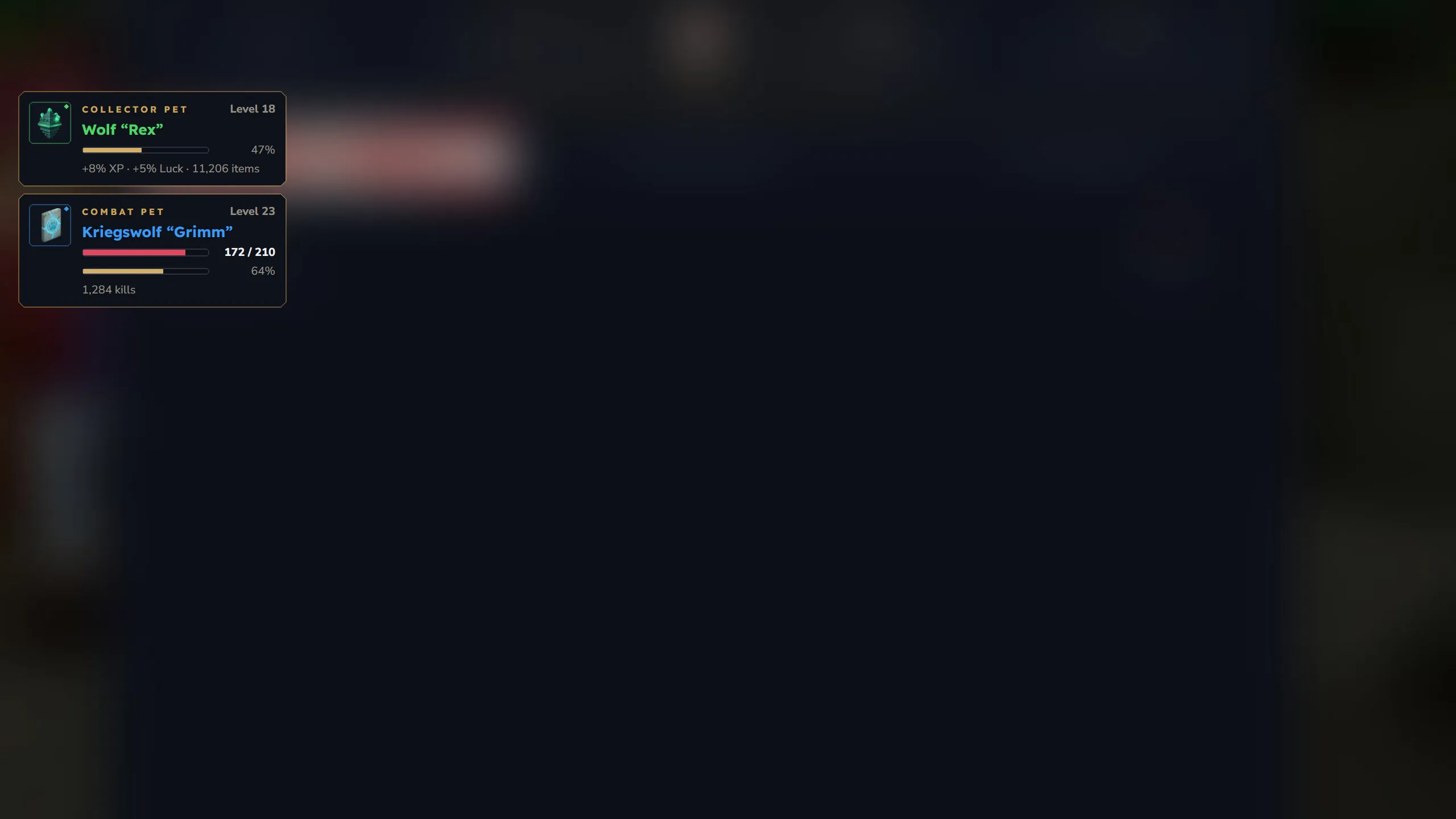
Section titled “Pet HUD”While a pet is out, the pet HUD shows a card for it: item icon with rarity ring, kind, level, name in its rarity colour, XP bar and a footer with your buffs and the number of collected items. Players choose the position and layout in the compendium header; until they do, the server default from config.json (hudPosition, hudLayout) applies. See UI Pages.
All collector pets (26)
Section titled “All collector pets (26)”Names are the displayName of each pet type file. Server owners can rename a pet by changing displayName (see Custom Pets Guide).
| Pet | ID | Rarity | Egg item | Max level |
|---|---|---|---|---|
| Baby Frost Dragon | dragon_frost | Legendary | Pet_Egg_Dragon_Frost | 50 |
| Fire Dragon | dragon | Legendary | Pet_Egg_Legendary | 50 |
| Baby Fen Stalker | fen_stalker | Epic | Pet_Egg_Fen_Stalker | 50 |
| Baby Yeti | yeti | Epic | Pet_Egg_Yeti | 50 |
| Baby Archaeopteryx | archaeopteryx | Rare | Pet_Egg_Archaeopteryx | 50 |
| Baby Cactee | cactee | Rare | Pet_Egg_Cactee | 50 |
| Baby Ferab | feran_cube | Rare | Pet_Egg_Feran_Cube | 50 |
| Baby Penguin | penguin | Rare | Pet_Egg_Penguin | 50 |
| Baby Skrill | skrill_chick | Rare | Pet_Egg_Skrill_Chick | 50 |
| Cat | cat | Rare | Pet_Egg_Cat | 50 |
| Fox | fox | Rare | Pet_Egg_Fox | 50 |
| Hatworm | hatworm | Rare | Pet_Egg_Hatworm | 50 |
| Snow Owl | owl_snow | Rare | Pet_Egg_Owl_Snow | 50 |
| Baby Bluebird | bluebird | Uncommon | Pet_Egg_Bluebird | 50 |
| Baby Crab | crab | Uncommon | Pet_Egg_Crab | 50 |
| Baby Duck | duck | Uncommon | Pet_Egg_Duck | 50 |
| Baby Gecko | gecko | Uncommon | Pet_Egg_Gecko | 50 |
| Baby Meerkat | meerkat | Uncommon | Pet_Egg_Meerkat | 50 |
| Baby Sand Lizard | lizard_sand | Uncommon | Pet_Egg_Lizard_Sand | 50 |
| Bat | bat | Uncommon | Pet_Egg_Bat | 50 |
| Bunny | bunny | Uncommon | Pet_Egg_Bunny | 50 |
| Green Frog | frog_green | Uncommon | Pet_Egg_Frog_Green | 50 |
| Parrot | parrot | Uncommon | Pet_Egg_Parrot | 50 |
| Squirrel | squirrel | Uncommon | Pet_Egg_Squirrel | 50 |
| Trork | trork | Uncommon | Pet_Egg_Trork | 50 |
| Wolf | wolf | Uncommon | Pet_Egg_Wolf | 50 |
The ID is what you type in commands such as /kspet summon fox or /kspetadmin give <player> fox.