
Combat Pets
Combat pets fight next to you. They attack what you attack, defend you when a creature hits you, level up from their kills and live in a Battle Rune. 13 combat pets ship with the plugin.
The combat module is on by default (modules.combat in config.json). With the module off, Battle Runes do nothing, the “Combat pets” tab of the compendium is hidden and /kscombatpet is not registered. See Configuration.
Summoning
Section titled “Summoning”- Right-click a Battle Rune to summon its pet; right-click it again to send the pet home. Right-clicking another rune swaps the pets. You can also summon and dismiss in the Pet Compendium (
/kspet, tab “Combat pets”). - The rune must be in your inventory. One combat pet can be out at a time, next to one collector pet and one mount.
- A blank rune hatches on its first right-click: a new pet with its own ID, the type’s
displayNameas name and stats rolled from the combat stat pool. - The pet is sent home when its rune leaves your inventory, when you die, when you change worlds and when you log out.
- A defeated pet cannot be summoned until it has recovered (see Health, defeat and recovery).
- Combat pets never pick up items.
How combat pets fight
Section titled “How combat pets fight”| Situation | What the pet does |
|---|---|
| You hit a creature | Attacks that creature |
| A creature hits you | Attacks the attacker |
| A creature hits the pet (only with mortality on) | Fights back |
| The target dies or disappears | Comes back to you |
| You are away (only with AFK protection on) | Stops fighting |
- Combat pets only attack NPCs: never players, never your own pets and never other players’ pets or mounts.
- A new target is only taken if it is within the pet’s
leashDistance(18 to 25 blocks for the shipped pets). This keeps the pet from running across the map for a far-away target. - The pet hits once it is within
attackRangeof the target, at mostattackSpeedtimes per second. Attacks are checked every 0.5 seconds (in the default damage mode also each time you hit the target), so values above 2 attacks per second add little. aggroRangeis shown in the pet’s stats, but pets do not look for enemies on their own; they only react to the situations above.- Out of combat the pet follows you. If it is more than
petTeleportDistanceblocks away (default 30) and not fighting, it is teleported back to you. - Each hit plays the pet’s attack animation and shows a floating damage number to everyone who can see the target.
Damage
Section titled “Damage”damage per hit = (baseDamage + level * damagePerLevel) * (1 + Damage stat)Example: Kriegswolf (base 8.0, +0.5 per level) at level 10 without a Damage stat hits for 8 + 10 x 0.5 = 13, twice per second. /kscombatpet stats shows the damage and the DPS (damage x attackSpeed).
- Only the pet’s own Damage stat (
damage_bonus) changes its hits. Crit Chance and the other stats do not. - The compendium’s “Damage” row counts the level part from level 1 (
baseDamage + damagePerLevel * (level - 1)) and lists the Damage stat as its own row, so the real hit is a little higher than that row.
There are two damage modes, set with combatBalance.damageThroughPipeline:
| Value | Behaviour |
|---|---|
false (default) | The pet takes HP off the target directly. Armor, resistances and boss invulnerability phases are ignored. A kill is credited to the pet when its hit empties the target’s HP. |
true | Each hit is a regular physical damage event with the pet as attacker. Armor and resistances reduce it, invulnerability phases block it and other damage plugins see it. |
Kill rewards of other plugins do not go to the owner for kills made by the pet.
Combat stats
Section titled “Combat stats”Each combat pet type has a combatStats block in its file (mods/kyuubisoft_pets/pet-types/combat/<id>.json):
| Field | Default | Meaning |
|---|---|---|
baseDamage | 8.0 | Base damage; the formula above adds damagePerLevel times the level |
damagePerLevel | 0.5 | Damage added per level |
attackSpeed | 1.5 | Attacks per second (the pause between hits is 1 / attackSpeed seconds) |
attackRange | 3.0 | Distance in blocks from which the pet hits |
aggroRange | 15.0 | Shown in the stats; not used for targeting |
leashDistance | 20.0 | Maximum distance between pet and a new target |
attackAnimation | "Bite" | Animation played on each hit; an empty value plays Attack |
attackAnimationsId | "" | Animation set of the model, e.g. Wolf_Black_Default; empty uses <entityTypeId>_Default |
baseHealth | 0 | Pet HP at level 1 with mortality on; 0 = use the config value |
healthPerLevel | -1 | HP per level above 1 with mortality on; -1 = use the config value |
Combat stat pool
Section titled “Combat stat pool”Combat pets roll their stats from combatStatTypes in stat-pool.json: Damage (damage_bonus), Crit Chance (crit_chance), Max Health (max_health), Life Steal (life_steal) and Armor (armor_bonus). Number of stats, unlock levels and roll quality follow the rarity, exactly as for collector pets (see Collector Pets).
- Hatching, admin rolls (
/kspetadmin give,setlevel,reroll,maxout, the admin window) and Battle scrolls use only these five types. - Stats that unlock through a natural level-up are rolled from the full pool of 11 stats by default. With
combatBalance.levelUpCombatStatsOnly: trueinconfig.jsonthey come from these five types too (see Configuration). The default staysfalseso existing servers keep their balancing. - Damage raises the pet’s hits, Max Health adds to the pet’s HP when mortality is on.
- All stats of the summoned combat pet also count as buffs for you, in a second buff slot next to the collector pet’s (both are added together and capped by
statCaps). They apply as soon as the pet is summoned, from the compendium or by right-clicking its rune, and are removed when it is dismissed or swapped, also through the rune.
Health, defeat and recovery
Section titled “Health, defeat and recovery”Since 1.8.0 combat pets can have real HP and be defeated. This is off by default; until you switch it on, combat pets cannot be hurt.
Setting (combatBalance.mortality) | Default | Meaning |
|---|---|---|
enabled | false | Combat pets have HP and can be defeated |
baseHealth | 100.0 | HP at level 1 (a pet type’s combatStats.baseHealth overrides it) |
healthPerLevel | 5.0 | HP per level above 1 (overridden by combatStats.healthPerLevel) |
tauntChance | 0.25 | Chance per pet hit that the target turns on the pet |
deathCooldownMinutes | 15 | Recovery time after a defeat |
regenPerSecond | 2.0 | HP regenerated per second out of combat |
regenDelaySeconds | 10 | Seconds without damage before regeneration starts |
xpLossPercent | 0.0 | XP lost on a defeat, in percent of the current level’s requirement |
playerDamage | false | Other players can hurt combat pets (the owner never can) |
How it works with enabled: true:
- Max HP = base HP + HP per level x (level - 1) + the pet’s Max Health stat. The shipped combat pets use the config values, so a level 50 pet has 100 + 49 x 5 = 345 HP plus its stat. Max HP grows right away when the pet levels up.
- Only hits from creatures count (and from other players if
playerDamageistrue). Fall damage, drowning, suffocation, the owner and other pets never hurt a combat pet. - Taunt: each hit of the pet has a
tauntChanceto make the target attack the pet, so bosses fight the pet instead of ignoring it. - Regeneration: once per second the pet heals
regenPerSecondHP while it is not fighting and has taken no damage forregenDelaySeconds. - Damage carries over: a hurt pet that you send home comes back with the same HP, also after a world change or relog.
- Defeat: a lethal hit is blocked, the pet disappears and needs
deathCooldownMinutesto recover. You get the message “Your combat pet … was defeated! It needs … to recover.” The cooldown is stored in the pet database and keeps running through relogs, world changes and restarts. With a cooldown of 0 the pet can be summoned again right away. - XP penalty: with
xpLossPercentabove 0 the pet loses that share of its current level’s XP requirement from its progress. It never drops a level. - Trying to summon a recovering pet shows ”… is still recovering. Ready in 12m 05s.” After the recovery the pet comes back with full HP.
- Defeated pets are never treated as killed mobs: no death drops, no kill rewards from other plugins, no death message.
- Switching
enabledon with/kspetadmin reloadapplies to pets summoned afterwards; switching it off protects pets that are already out at once.
While a defeated combat pet is recovering and no other combat pet is out, its HUD card stays and counts down:

/kspet.
Every copy of a pet you own has its own HP and recovery time. The compendium lists each copy as its own card:
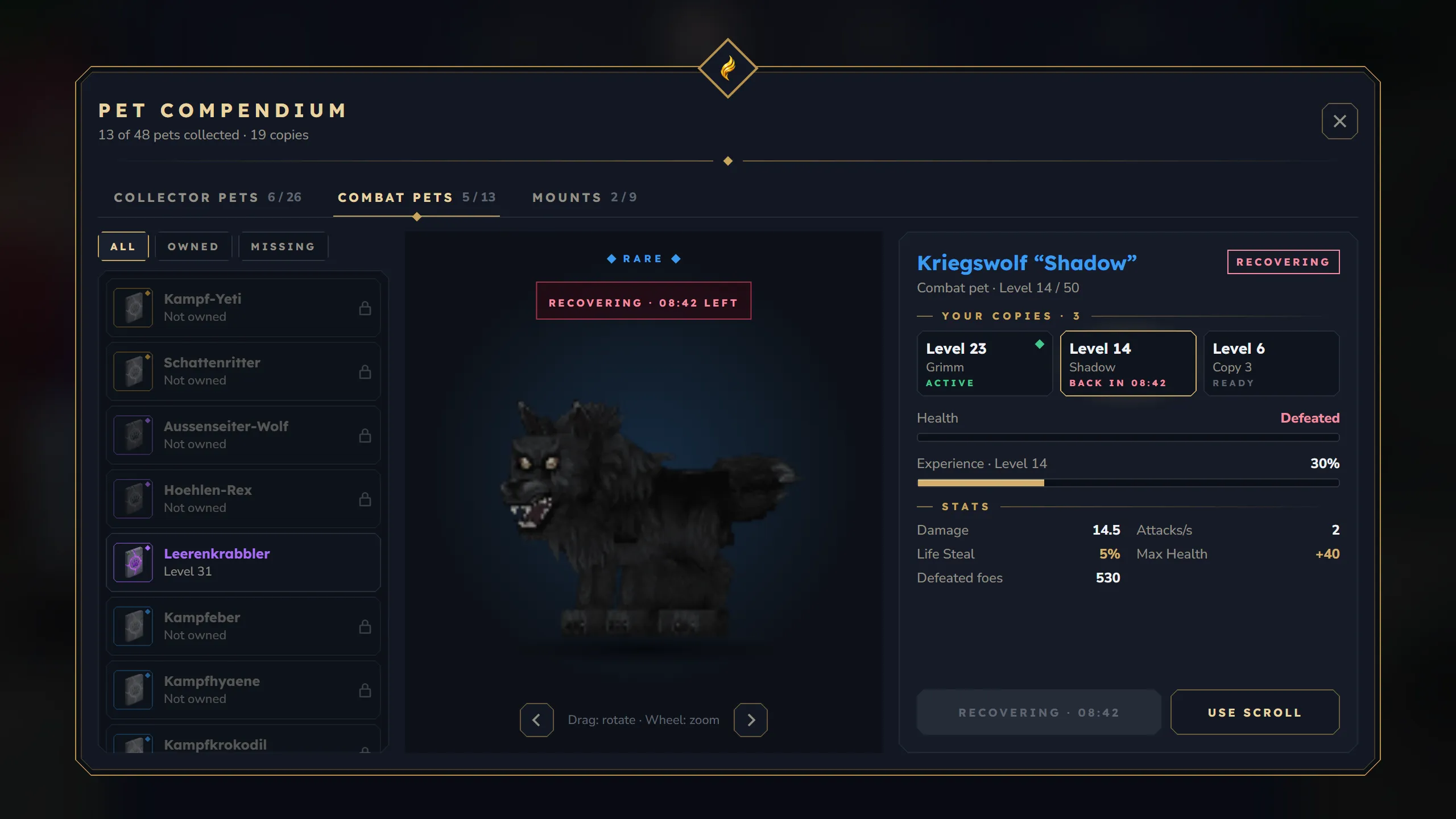
Revival
Section titled “Revival”- Battle Pet Revival Scroll (
Battle_Revive_Scroll): right-click to end the recovery of your most recently defeated combat pet. The scroll is only used up when a pet was revived. The pet is ready again with full HP; summon it as usual. On servers with mortality off the scroll only answers “Combat pets cannot be defeated on this server.” - In the compendium every recovering copy has its own revive action that uses one revival scroll.
/kspetadmin revive <player>ends the recovery of all defeated combat pets of a player; the admin window (“Player pets”) can revive a single pet. See Admin Panel.- The revival scroll has no crafting recipe. Hand it out through shops, loot or
/give.
AFK protection
Section titled “AFK protection”With combatBalance.requireOwnerActivity: true combat pets stop fighting when their owner has neither turned the camera nor attacked for ownerInactivitySeconds (default 120). The owner gets one chat notice: “Your combat pet stopped fighting because you seem to be away.” Being pushed around (knockback, water) does not count as activity, so standing AFK at a boss does not keep the pet fighting. The pet fights again as soon as the owner looks around or attacks. Off by default.
Recommended settings against AFK boss farming
Section titled “Recommended settings against AFK boss farming”"combatBalance": { "damageThroughPipeline": true, "requireOwnerActivity": true, "ownerInactivitySeconds": 120, "mortality": { "enabled": true, "baseHealth": 100.0, "healthPerLevel": 5.0, "tauntChance": 0.25, "deathCooldownMinutes": 15, "regenPerSecond": 2.0, "regenDelaySeconds": 10, "xpLossPercent": 0.0, "playerDamage": false }}XP from fights
Section titled “XP from fights”Combat pets earn XP only from kills:
XP per kill = xpSources.mobKill * (target's max HP / 100)With the default mobKill of 25, a creature with 200 max HP gives 50 XP, plus the pet’s Pet XP stat if it has one.
- A kill counts when the pet’s current target dies and the killing blow is yours or the pet’s. In the default damage mode it also counts when the pet’s own hit empties the target’s HP.
- Every counted kill adds one to the pet’s kill counter (“Defeated foes” in the compendium, kills on the HUD card).
- Combat pets get no XP from blocks, crafting or pickups, and no XP for creatures that were not their target.
- The XP needed per level follows the same formula as for collector pets (
baseXpPerLevel * xpScaleFactor ^ (level - 1)). All shipped combat pets reach level 50.
Battle Runes
Section titled “Battle Runes”- Every combat pet has its own rune item (
Battle_Rune_..., see the table below). Runes do not stack. - Like a pet egg, the rune is the proof of ownership: the pet can only be summoned while the rune is in your inventory, and trading the rune trades the pet. The rune stores only the pet’s ID; level, XP, stats, name, HP and recovery state are in
pets.db. - Runes are never dropped when you die, in every death mode (see Collector Pets). With
maxPetsEverywhere: true, a blank rune does not hatch while all your pet slots are used. A lost rune can be replaced by an admin with/kspetadmin restore; older copies then become void (item generations, see Collector Pets).
Battle scrolls
Section titled “Battle scrolls”| Item ID | Name | What it does |
|---|---|---|
Battle_Reroll_Scroll | Battle Stat Reroll Scroll | One unlocked stat gets a new type (from the combat stat pool) and a new value |
Battle_Refine_Scroll | Battle Stat Refine Scroll | One unlocked stat keeps its type and gets a new value |
Battle_Reroll_All_Scroll | Battle Reroll All Scroll | Every unlocked stat gets a new type and value |
Battle_Refine_All_Scroll | Battle Refine All Scroll | Every unlocked stat keeps its type and gets a new value |
Battle_Revive_Scroll | Battle Pet Revival Scroll | Ends the recovery of the most recently defeated combat pet |
- Right-click a reroll or refine scroll while your combat pet is summoned. They work like the pet scrolls of collector pets (pick a stat, or confirm for the “All” scrolls).
- The reroll dice in the compendium use Battle Stat Reroll Scrolls and Battle Reroll All Scrolls for combat pets and work for every owned copy, summoned or not.
- None of the scrolls has a crafting recipe.
Commands
Section titled “Commands”/kscombatpet stats(aliasescombatpet,cpet): name, level, damage, DPS, attack range, aggro range, kills and, with mortality on, current HP of your summoned combat pet. Without a summoned combat pet it lists your recovering pets with their remaining time. Needsks.pet.user.combat(allowed by default) and is only registered with the combat module on./kspet rename <name>renames your summoned combat pet (up to 24 characters). In the compendium you can rename any pet.
Full syntax: Commands and Permissions.
All combat pets (13)
Section titled “All combat pets (13)”Names are the displayName of each pet type file and ship in German. Server owners can rename them by changing displayName (see Custom Pets Guide). All shipped combat pets have a maximum level of 50.
| Pet | ID | Rarity | Rune item | Damage | Per level | Attacks/s | Range | Leash |
|---|---|---|---|---|---|---|---|---|
| Schattenritter | shadow_knight_combat | Legendary | Battle_Rune_Shadow_Knight | 15.0 | 0.8 | 1.5 | 3.5 | 25 |
| Kampf-Yeti | yeti_combat | Legendary | Battle_Rune_Yeti | 14.0 | 0.7 | 0.67 | 4.0 | 20 |
| Leerenkrabbler | crawler_void_combat | Epic | Battle_Rune_Crawler_Void | 12.0 | 0.7 | 1.4 | 3.0 | 22 |
| Hoehlen-Rex | rex_cave_combat | Epic | Battle_Rune_Rex_Cave | 11.0 | 0.6 | 1.0 | 3.0 | 20 |
| Aussenseiter-Wolf | wolf_outlander_combat | Epic | Battle_Rune_Wolf_Outlander | 9.0 | 0.6 | 2.0 | 3.0 | 22 |
| Kampfeber | boar_combat | Rare | Battle_Rune_Boar | 10.0 | 0.6 | 1.3 | 3.0 | 20 |
| Kampfskorpion | scorpion_combat | Rare | Battle_Rune_Scorpion | 11.0 | 0.6 | 1.2 | 3.0 | 20 |
| Kampfkrokodil | crocodile_combat | Rare | Battle_Rune_Crocodile | 9.0 | 0.5 | 1.3 | 3.5 | 20 |
| Kampfspinne | spider_combat | Rare | Battle_Rune_Spider | 9.0 | 0.5 | 1.5 | 3.0 | 20 |
| Kampfhyaene | hyena_combat | Rare | Battle_Rune_Hyena | 8.0 | 0.5 | 1.6 | 3.0 | 20 |
| Kriegswolf | wolf_combat | Rare | Battle_Rune_Wolf | 8.0 | 0.5 | 2.0 | 3.0 | 20 |
| Dornling | bramblekin_combat | Uncommon | Battle_Rune_Bramblekin | 6.0 | 0.4 | 2.0 | 2.5 | 18 |
| Sandechse | lizard_sand_combat | Uncommon | Battle_Rune_Lizard_Sand | 5.0 | 0.4 | 1.5 | 2.5 | 18 |
Damage = baseDamage, Per level = damagePerLevel, Range = attackRange in blocks, Leash = leashDistance in blocks.