
UI Pages
Version: 1.12.1
This page lists every window of the pet system and the pet HUD. Command syntax is on Commands, the settings mentioned here are explained on Configuration.
Overview
Section titled “Overview”| Window | How to open it | Notes |
|---|---|---|
| Pet Compendium | /kspet without arguments | Default. Needs ui.compendium: true |
| Classic pet menu | /kspet without arguments | Only when ui.compendium is false |
| Pickup filter | /kspet filter, or “Pickup filter” in the compendium | Collector pets only |
| Collection | /kspet collection | |
| Bestiary | /kspet bestiary | |
| Combat pet page | /kspet combat | Only with the combat module on |
| Mount page | /kspet mount or /kspet mounts | Only with the mount module on |
| Reroll / Refine | Right-click a Reroll or Refine Scroll | Needs the pet to be summoned |
| Reroll All / Refine All | Right-click a Reroll All or Refine All Scroll | Needs the pet to be summoned |
| Pet HUD | Appears by itself | While a collector or combat pet is out |
| Admin window | /kspetadmin | Admins only, see Admin Panel |
/kscombatpet, /ksmount and /kslang only answer in chat; they do not open a window (see Language).
Pet Compendium
Section titled “Pet Compendium”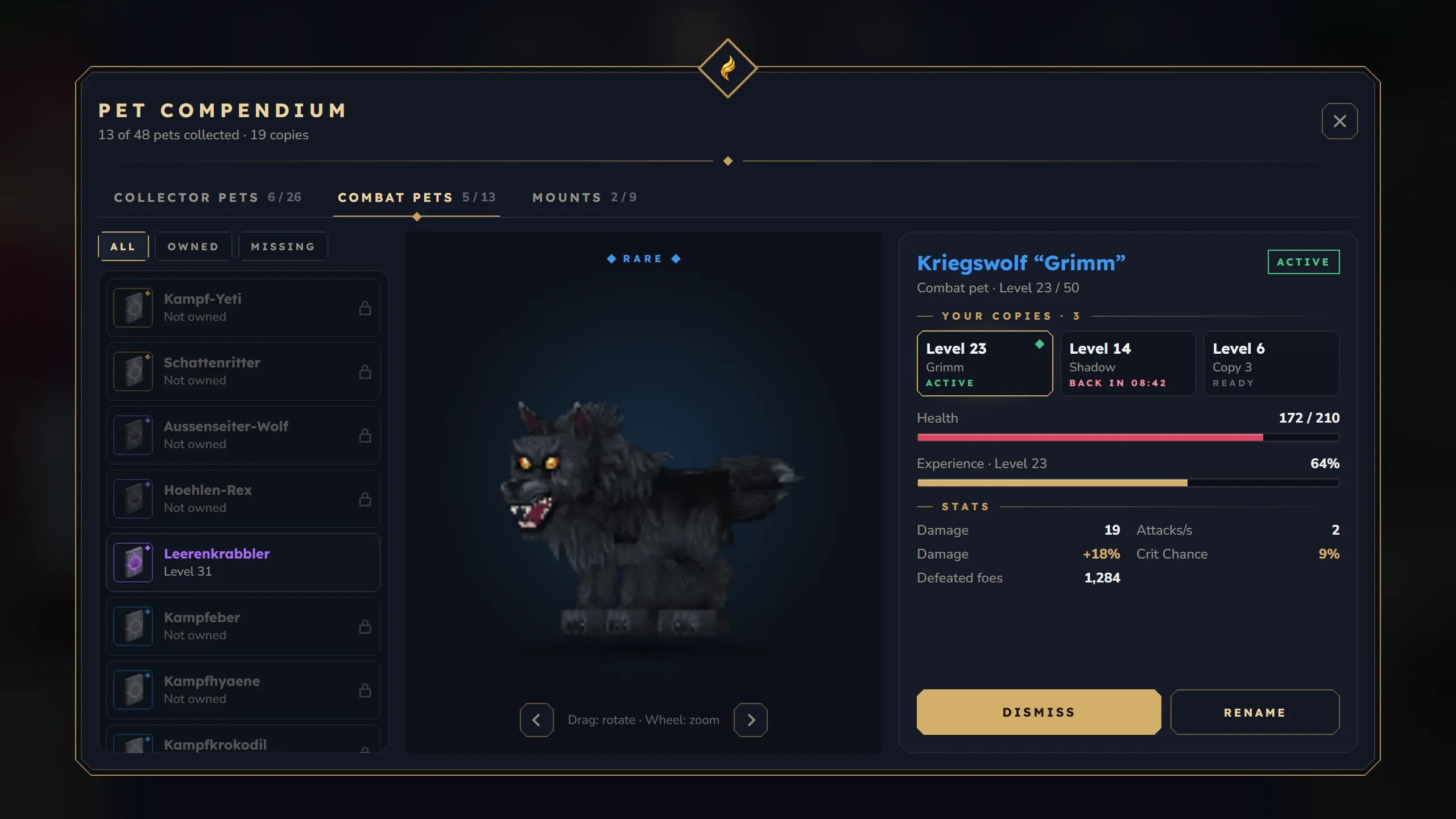
/kspet opens the compendium (since 1.9.0). It is one window with a header, three tabs and three columns: the list on the left, the 3D stage in the middle and the details of the selected pet on the right. To use the old menu instead, set ui.compendium to false in config.json.
Header
Section titled “Header”- Title and counter: “Pet Compendium” and a line like “13 of 48 pets collected · 19 copies” (pet types you own, all pet types, all copies you own).
- HUD button: shows a strip with two dropdowns, “HUD position” and “HUD layout”. A change is applied to your pet HUD at once and saved for you.
- X: closes the window.
Collector pets, Combat pets and Mounts, each with “owned / total”. A tab is hidden when its module is switched off in config.json → modules.
List (left)
Section titled “List (left)”- Filter buttons All, Owned and Missing above the list.
- Every pet type of the tab, sorted by rarity (legendary first), then by name.
- Each row shows the pet’s item (egg, battle rune or mount horn) with a rarity marker, the name and one status line:
- “Level 12” when you own one copy,
- “3 copies · up to level 23” and a “x3” badge when you own several,
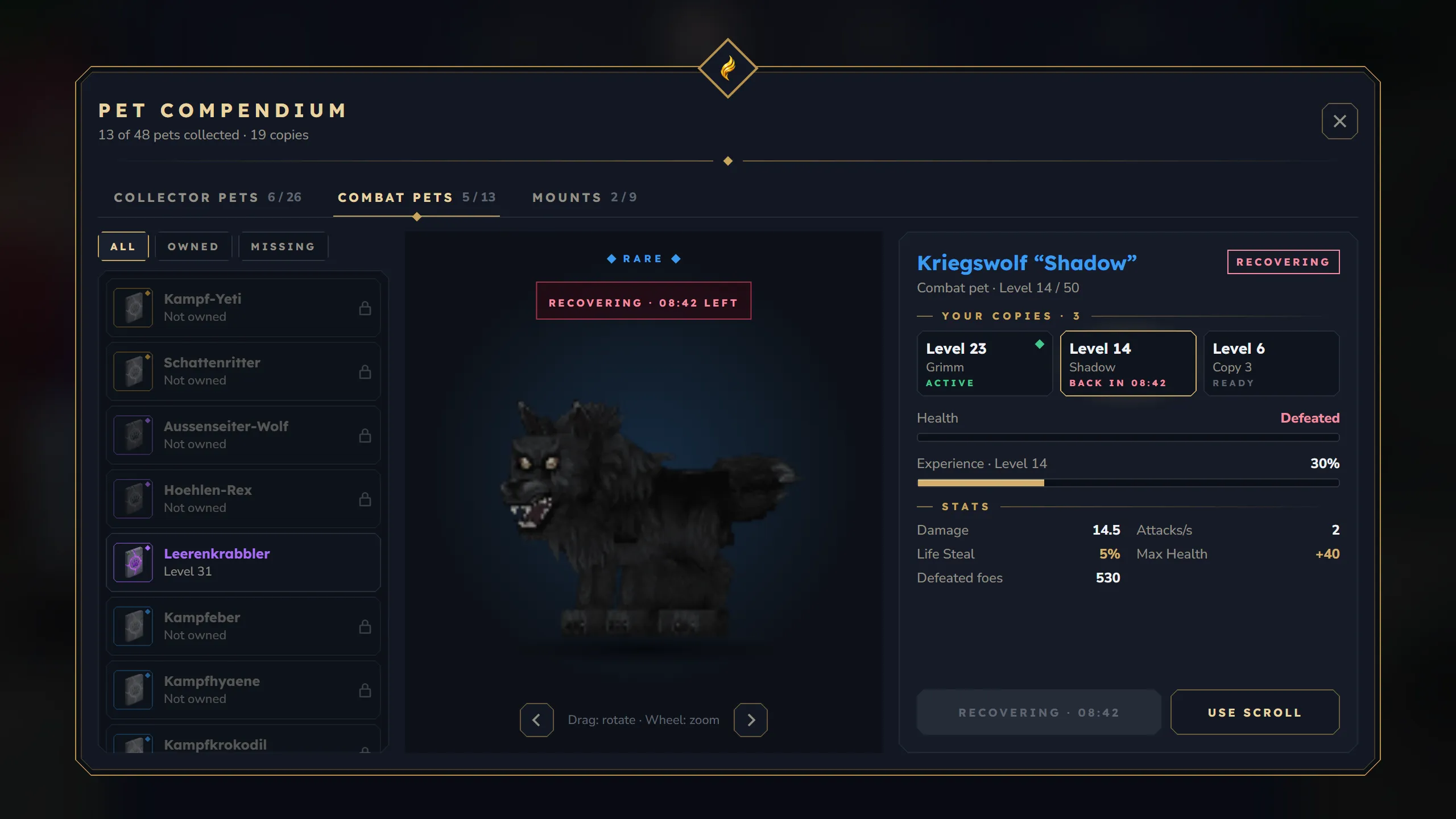
- “Recovering · 08:42” when your only copy is a defeated combat pet,
- “Not owned” (dimmed row) when you have none.
- Pets that are out right now are marked Active.
3D stage (middle)
Section titled “3D stage (middle)”- The selected pet’s model, rendered inside the window. Drag to rotate, mouse wheel to zoom. It turns slowly on its own (
ui.previewSpinSpeed,0= only by dragging);ui.previewTiltsets the camera angle. - Nothing is spawned in the world, other players see nothing. Models stand in their rest pose (no animation). They are scaled to a common size; a pet type can fine-tune this with
previewScale. - Above the model: the rarity. Pets you do not own carry a “NOT OWNED” lock. A defeated copy shows “Recovering · 08:42 left”.
Details (right)
Section titled “Details (right)”From top to bottom:
| Part | What it shows |
|---|---|
| Name | Pet name in its rarity colour, your nickname in quotes |
| Info line | Kind and level, e.g. “Combat pet · Level 23 / 50”, or “Not owned” |
| Chips | Active, Recovering or Locked |
| Your copies | Only when you own the pet more than once: one card per copy with level, nickname (or “Copy 2”) and state (Active, Ready or the recovery time). 4 cards per page with arrows. Click a card to select that copy. The active copy comes first, then the highest level |
| Health | Combat pets only, and only with combatBalance.mortality.enabled: current / max HP, or “Defeated” while recovering |
| Experience | ”Experience · Level 23” with a bar and percent, “MAX” at the maximum level |
| Stats | See below |
| How to get it | Pets you do not own: the pet type’s description (if it has one) and the obtainHint text, or “Ask the server team how to get this pet.” |
| Buttons | See Summon, dismiss, rename |
Stats of an owned copy:
- Collector pets: the rolled stats, then “Collected: 11,206 items”.
- Combat pets: Damage, Attacks/s, the rolled stats, then “Defeated foes”.
- Mounts: Speed (for example “x1.3”), Max level, the rolled stats.
- Next-level preview (since 1.10.0): a stat that grows with the level shows the value it will have after the next level-up next to the current one, with a green arrow. Combat pets show it for damage too. There is no preview at the maximum level or for stats that do not grow.
- Hidden stats (since 1.10.0): rolled stats that are still locked show as “Hidden stat · Lv. 20”, so you can see when the next one unlocks. The value stays secret.
Base stats of a pet you do not own: Max level and Pickup radius (collector), Damage (level 1), ”+ per level”, Attacks/s and Range (combat), Speed and Max level (mount).
Summon, dismiss, rename
Section titled “Summon, dismiss, rename”| State of the selected copy | Buttons |
|---|---|
| Ready | Summon (mounts: Call) and Rename |
| Active | Dismiss and Rename |
| Recovering | a disabled “Recovering · 08:42” button and Use scroll |
| Not owned | a disabled “Not owned” button |
- Summon puts this copy into its slot. You can have one collector pet and one combat pet out at the same time, plus a mount. A pet already out in the same slot is sent home first.
- Summoning needs the pet’s item in your inventory and its module switched on. A defeated combat pet cannot be summoned until it has recovered.
- Call on a mount closes the compendium so you can ride off right away.
- Summon clicks are limited to one every 2 seconds.
- Rename shows a text field with OK and Cancel. Names have 1 to 24 characters and work for every pet type. The nickname appears in the compendium, the HUD and the item tooltip. Above the pet in the world only combat pets show it; collector pets show “Baby” plus their type name, mounts show no name.
- Use scroll uses one Battle Pet Revival Scroll from your inventory and revives this copy at once. It only works when combat pets can be defeated on the server.
- Pickup filter (owned collector copies only, in the header line of the stats) opens the pickup filter for exactly this copy. Its Back button returns to the compendium on the same pet.
Reroll dice
Section titled “Reroll dice”Since 1.10.0 every unlocked stat of an owned copy has a small dice in front of it.
- Dice on a stat: uses one reroll scroll from your inventory and rerolls that stat right away. Collector pets and mounts use the Pet Reroll Scroll, combat pets the Battle Reroll Scroll.
- Dice above the stat column: rerolls all unlocked stats for one Pet Reroll All Scroll or Battle Reroll All Scroll. The first click replaces the “Stats” label with a Confirm reroll button; click it to reroll. Clicking the dice again, or anything else, cancels.
- The dice are gold while you have a matching scroll and grey when you have none (a click then tells you which scroll you need). The tooltip names the scroll and how many you have.
- Works for every owned copy, summoned or not. Locked stats have no dice.
Locked pets: visible or hidden
Section titled “Locked pets: visible or hidden”ui.lockedPets decides how pets you do not own look (see Configuration).
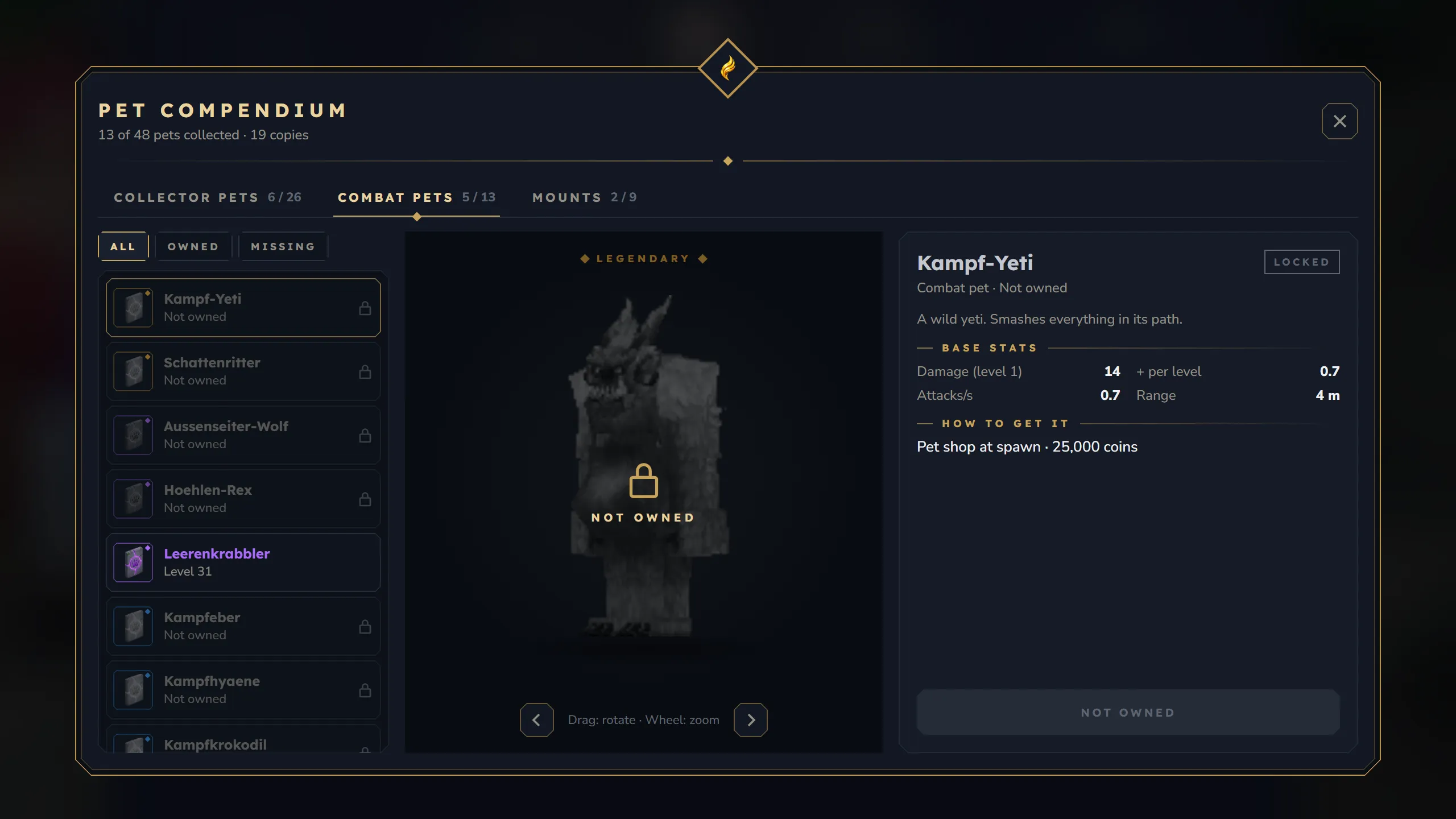
ui.lockedPets: "visible" (default): pets you do not own are dimmed but show name, model, base stats and how to get them.
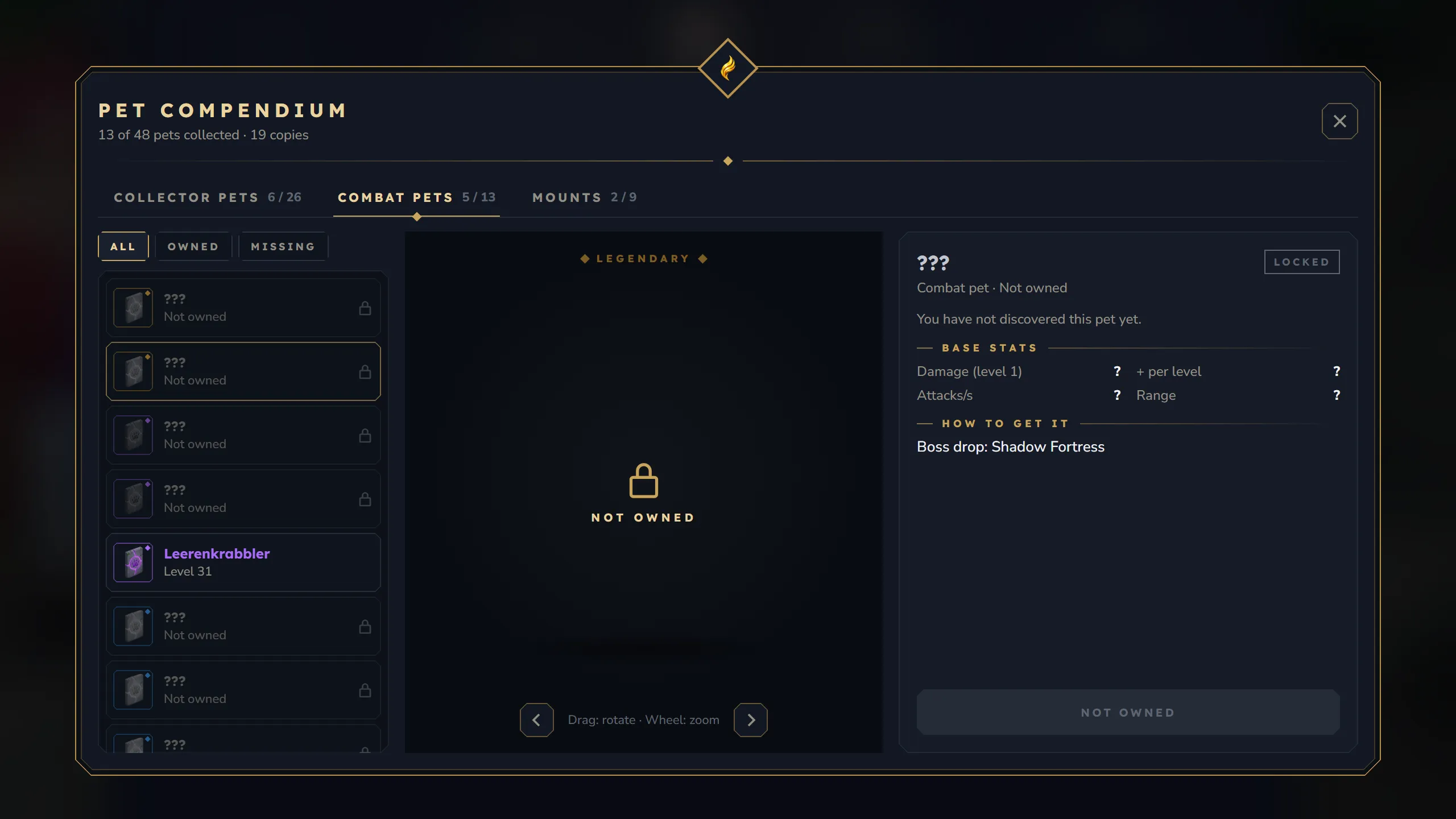
ui.lockedPets: "hidden": pets you do not own are listed as ”???” with an empty stage; only their rarity and the “How to get it” text are visible.
With "hidden" a pet you do not own shows ”???” as its name, no 3D model, ”?” for every base stat value and the text “You have not discovered this pet yet.” The “How to get it” text is still shown, so you can give players a hint.
Classic pet menu
Section titled “Classic pet menu”With ui.compendium: false, /kspet opens the older menu. Most of its labels are fixed English text.
- Active companions (top): three cards for the collector pet, the combat pet and the mount that are out, with name, level (mount: speed), bonus stats and a Dismiss button.
- Pet rows (middle): COLLECTOR, COMBAT and MOUNTS with up to 5 pets each, most recently summoned first. Only pets whose item is in your inventory are listed. Click a pet to summon it. While a pet of a row is out, the summon buttons of that row are hidden; dismiss it first.
- HUD settings (bottom): the same position and layout dropdowns as in the compendium.
Pickup filter
Section titled “Pickup filter”Opened with /kspet filter (no further arguments) or from the compendium. /kspet filter edits your active collector pet, otherwise the first collector pet in your pet data; without any collector pet you get “You don’t have a pickup pet.” From the compendium it edits the selected copy, and the X button becomes Back.
| Section | Content |
|---|---|
| Header | ”Pickup filter” and “Filter for: Wolf · Level 18” |
| Mode | Blacklist (picks up everything except items that match a rule) or Whitelist (picks up only items that match a rule) |
| Presets | No junk, Valuables, Ores only, Pick all. A preset replaces all rules and sets the mode |
| Blocks | Toggles for Dirt, Sand, Stone, Gravel, Cobble (Cobblestone) and Mud |
| Item types | Toggles for Weapons, Armor, Tools, Food, Ores and Resources |
| Custom rule | A text field for an item name, wildcards allowed (Stone*, *Ore*). Add or Enter adds it; a rule that already exists is not added twice |
| Active rules | Rule count, Clear (removes all rules), the rules with an x each, 12 per page with page arrows |
Every change is saved at once. How the rules match items is explained on Collector Pets.
Collection
Section titled “Collection”/kspet collection lists every pet type of the server, 6 per page, with an “owned / total” counter. Pets you have show “Lv. 12 | Rare” in their rarity colour; the others are dimmed with ”???”.
Bestiary
Section titled “Bestiary”/kspet bestiary lists every pet type, 5 per page, with a “discovered / total” counter. A pet type is discovered the first time you use its egg, battle rune or mount horn. Discovered entries show name, rarity, “Discovered: 17.10.2026” and “Highest: Lv. 31”; the others show ”???” and “Not yet discovered”.
Combat pet page
Section titled “Combat pet page”/kspet combat (combat module on) shows your summoned combat pet: name, level, XP (current / needed and percent, or “MAX LEVEL”), damage, DPS, attack / aggro / leash range and kills.
Mount page
Section titled “Mount page”/kspet mount or /kspet mounts (mount module on):
- Active mount: name, type (
[Walk],[Fly]or[Swim]), speed and a Dismount button. - Your mounts: only the mounts you own, 3 per page, most recently summoned first, each with name, type and speed. A click summons exactly the mount shown in that slot: it dismounts you from the current mount, closes the window and puts you on the chosen one. The page arrows page through the same list.
- The mount’s horn must be in your hotbar, storage or backpack, like for
/ksmount summonand the compendium. Without it you get “You need the pet item in your inventory to summon.” and stay on your current mount.
Reroll and refine scrolls
Section titled “Reroll and refine scrolls”These windows open when you right-click a scroll. The pet must be summoned: Pet scrolls work on your summoned collector pet, Battle scrolls on your summoned combat pet. Otherwise you get “Summon a pet first …”. Mounts are rerolled with the dice in the compendium.
| Scroll | Window | What happens |
|---|---|---|
Pet_Reroll_Scroll, Battle_Reroll_Scroll | Reroll | Each unlocked stat has a reroll button. A click uses one scroll and rolls a new stat (type and value). Locked stats show “Hidden” and their unlock level |
Pet_Refine_Scroll, Battle_Refine_Scroll | Refine | Like Reroll, but the stat type stays and only the value is rolled again. Each stat shows its possible range for the pet’s rarity |
Pet_Reroll_All_Scroll, Battle_Reroll_All_Scroll | Reroll All | Current values and ”???” for the new ones. Confirm uses one scroll, rerolls all unlocked stats and closes the window |
Pet_Refine_All_Scroll, Battle_Refine_All_Scroll | Refine All | Same as Reroll All, but only the values change |
The “All” windows do not show the new values in advance. Locked stats are never changed.
The Battle Pet Revival Scroll has no window: a right-click revives your most recently defeated combat pet.
Language
Section titled “Language”/kslang has no window. Without arguments it answers in chat with your current language (and whether you chose it or it comes from your game), the available language codes and how to change it: /kslang <code> (for example /kslang de-DE) or /kslang auto. Details: Localization.
Pet HUD
Section titled “Pet HUD”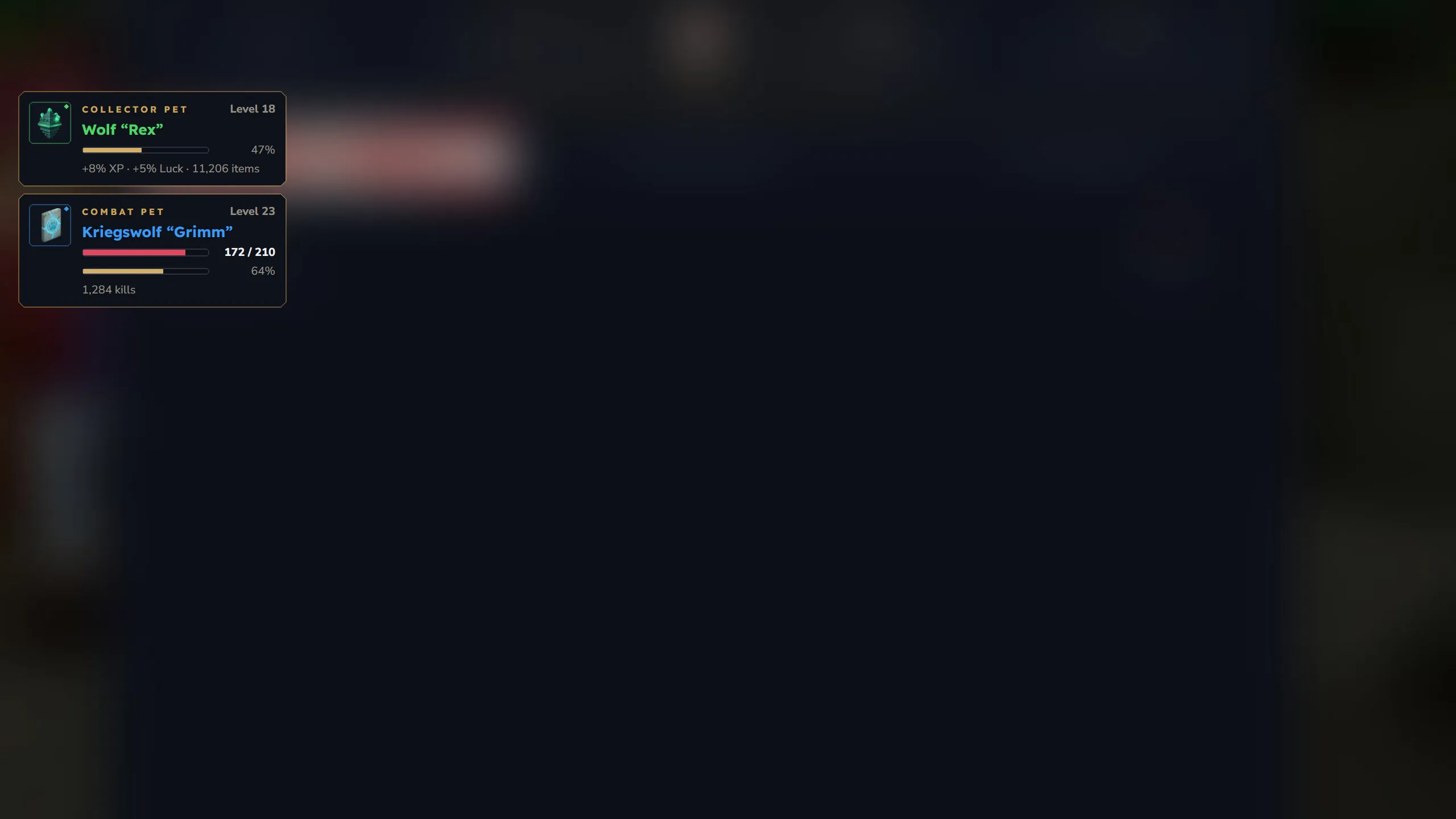
The HUD appears by itself while you have a collector pet or a combat pet out, and disappears when neither is out (except for the recovery card described below). Mounts have no card.
Each card shows:
- the pet’s item icon with a rarity ring,
- the kind (“Collector pet” or “Combat pet”) and “Level 18”,
- the name in its rarity colour, with the nickname in quotes,
- an HP bar (combat pets, only when they can be defeated on the server),
- an XP bar with percent (“MAX” at the maximum level),
- a footer: active buffs and collected items (collector pet) or kills (combat pet).
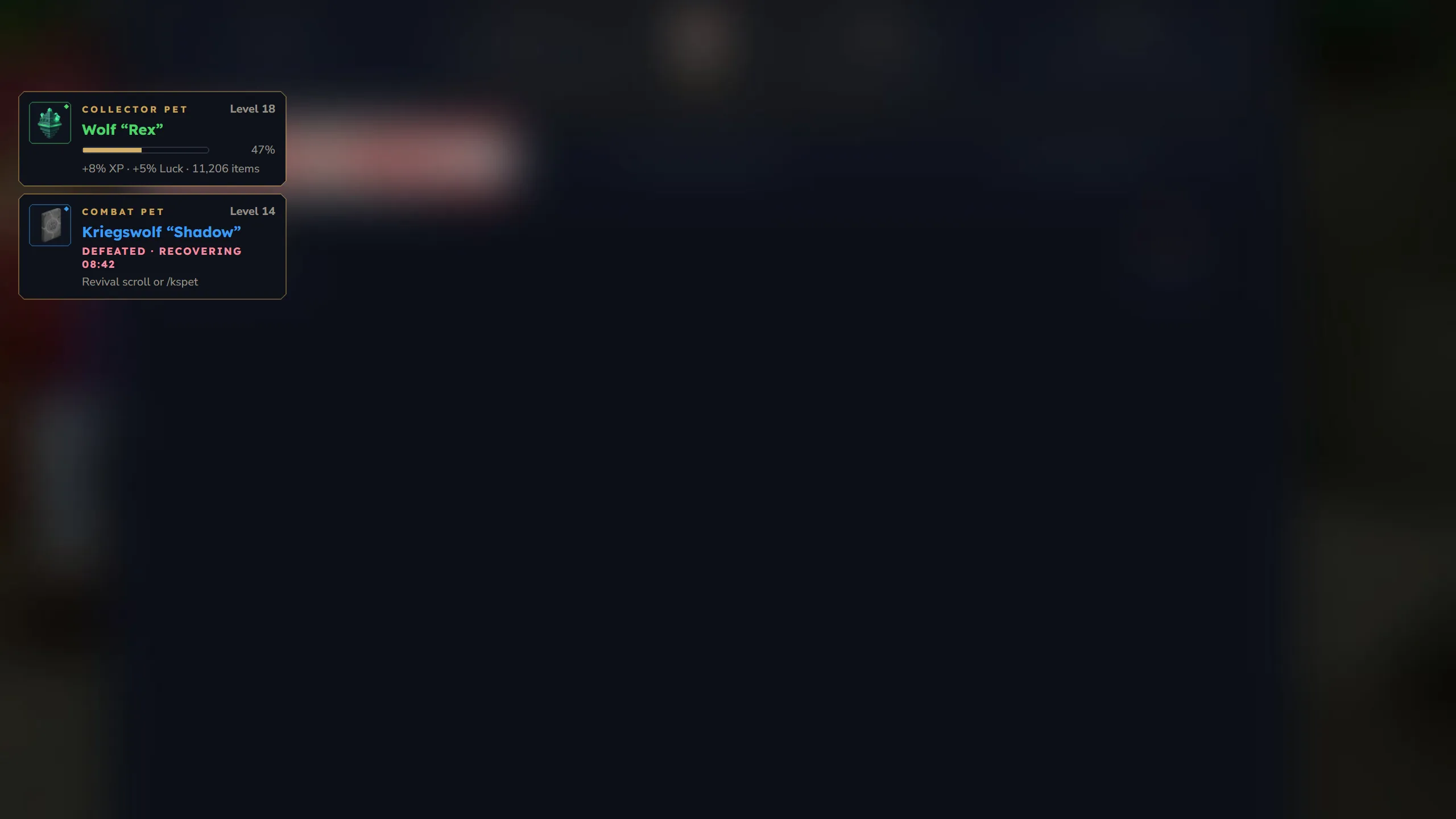
Recovery card: when combat pets can be defeated (combatBalance.mortality.enabled) and no combat pet is out, the defeated combat pet with the longest remaining recovery keeps its card: dimmed icon, “Defeated · recovering 08:42” and the hint “Revival scroll or /kspet”.
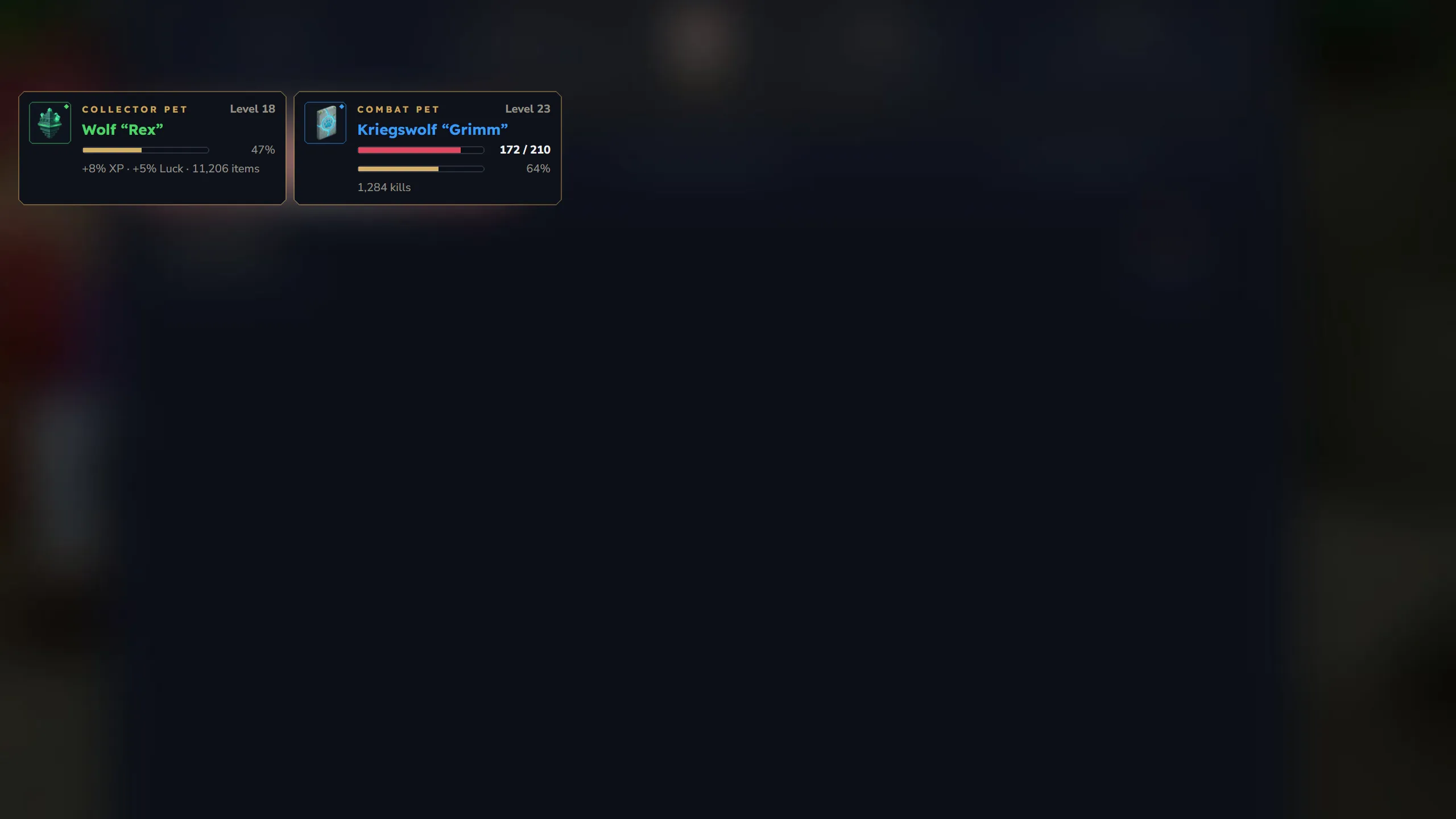
Position and layout: open the compendium, click HUD in the header and pick a position (Top Left, Top Right, Middle Left, Middle Right, Bottom Left, Bottom Right) and a layout (Vertical or Horizontal). With the classic menu the same dropdowns are at its bottom. The choice is saved per player. Players who never picked one get the server default (hudPosition / hudLayout in config.json, top left and vertical unless the admin changed it).
The HUD is registered under the key ks.pets.tracker and works next to other mods’ HUDs.
Admin window
Section titled “Admin window”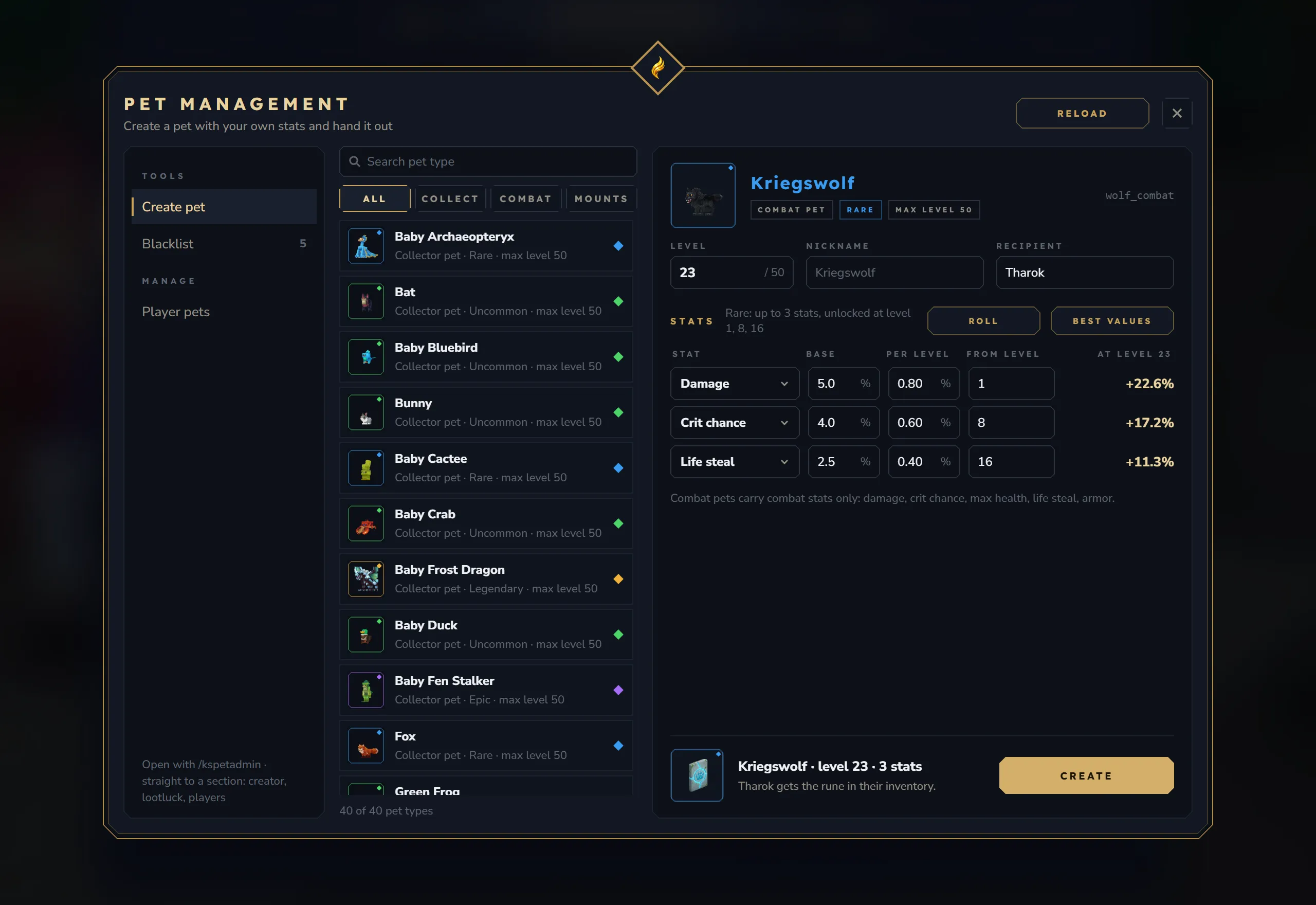
/kspetadmin without arguments opens the admin window for players with ks.pet.admin (the console gets the command list). /kspetadmin creator (or create), /kspetadmin lootluck and /kspetadmin players open it on the matching section: Create pet, Blacklist (loot luck blacklist) and Player pets. Everything about it is on Admin Panel.
Notes for server owners
Section titled “Notes for server owners”- The compendium, the pickup filter, the HUD and the admin window use the KyuubiSoft “Goldfiligran” look. Their textures come from the shared KS UI kit inside the jar, which registers itself at startup; nothing extra to install.
- Window texts follow the player’s language, see Localization. The classic menu, the collection and bestiary layouts, the combat pet and mount pages, the scroll windows and the HUD position names are partly fixed English text.
- A window that changes pet data (rename, filter, reroll) saves the change to the database and updates the pet item’s tooltip right away.